
Join the Conversation
- Find Answers
- :
- Using Splunk
- :
- Dashboards & Visualizations
- :
- How can I apply color over the cells having specia...
- Subscribe to RSS Feed
- Mark Topic as New
- Mark Topic as Read
- Float this Topic for Current User
- Bookmark Topic
- Subscribe to Topic
- Mute Topic
- Printer Friendly Page
- Mark as New
- Bookmark Message
- Subscribe to Message
- Mute Message
- Subscribe to RSS Feed
- Permalink
- Report Inappropriate Content

Hello,
I've a tabular data like below and I want to color the cells based on the following threshold.
0%-79% ==> Red
80%-99% ==> Yellow
100% ==> Green
I am applying below but without any success. I know that this is due to % symbol in the values.
<format type="color" field="Passed Rules">
<colorPalette type="list">[#FF9999,#FFE699,#C6E0B4]</colorPalette>
<scale type="threshold">80%,100%</scale>
</format>
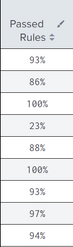
So how can I apply colors over the cell?
Thanks in advance.
- Mark as New
- Bookmark Message
- Subscribe to Message
- Mute Message
- Subscribe to RSS Feed
- Permalink
- Report Inappropriate Content


You can't use range expressions if your data is not numeric and the % sign breaks them, so you have to use an expression. Use this
<format type="color" field="Passed Rules">
  <colorPalette type="expression">case(tonumber(rtrim(value, "%"))>=100, "#C6E0B4",tonumber(rtrim(value, "%"))>80, "#FFE699",true(), "#FF9999")
  </colorPalette>
</format>
which effectively removes the % to calculate each range in the expression.
- Mark as New
- Bookmark Message
- Subscribe to Message
- Mute Message
- Subscribe to RSS Feed
- Permalink
- Report Inappropriate Content
You can't use range expressions if your data is not numeric and the % sign breaks them, so you have to use an expression. Use this
<format type="color" field="Passed Rules">
  <colorPalette type="expression">case(tonumber(rtrim(value, "%"))>=100, "#C6E0B4",tonumber(rtrim(value, "%"))>80, "#FFE699",true(), "#FF9999")
  </colorPalette>
</format>
which effectively removes the % to calculate each range in the expression.
- Mark as New
- Bookmark Message
- Subscribe to Message
- Mute Message
- Subscribe to RSS Feed
- Permalink
- Report Inappropriate Content
Perfect !!!
Thank you so much @bowesmana

Upcoming Webinar: Unmasking Insider Threats with Slunk Enterprise Security’s UEBA
.conf25 technical session recap of Observability for Gen AI: Monitoring LLM ...
A Season of Skills: New Splunk Courses to Light Up Your Learning Journey
