
Join the Conversation
- Find Answers
- :
- Using Splunk
- :
- Dashboards & Visualizations
- :
- Choropleth Map - move AK and HI to be viewed on da...
- Subscribe to RSS Feed
- Mark Topic as New
- Mark Topic as Read
- Float this Topic for Current User
- Bookmark Topic
- Subscribe to Topic
- Mute Topic
- Printer Friendly Page
- Mark as New
- Bookmark Message
- Subscribe to Message
- Mute Message
- Subscribe to RSS Feed
- Permalink
- Report Inappropriate Content
Choropleth Map - move AK and HI to be viewed on dashboard with continental US

I am looking for a way to move AK and HI on the dashboard to be viewed with the continental US. I did find the following documentation:
However when I convert the JSON to XML it states that 'LogicalBounds' is invalid. Is there a way to use this? I do not want to zoom in and out on my splunk dashboard to view data.
- Mark as New
- Bookmark Message
- Subscribe to Message
- Mute Message
- Subscribe to RSS Feed
- Permalink
- Report Inappropriate Content


@andrew_j_kuhn - You need to use following XML option:
mapping.map.fitBounds - (south-lat, west-long, north-lat, east-long)
Examlple:
  <option name="mapping.map.fitBounds">
    (37.5,-123,38,-122)
  </option>
Find more details about simple XML options for map here - https://docs.splunk.com/Documentation/SplunkCloud/8.2.2202/Viz/PanelreferenceforSimplifiedXML#map
I hope this helps!!!
- Mark as New
- Bookmark Message
- Subscribe to Message
- Mute Message
- Subscribe to RSS Feed
- Permalink
- Report Inappropriate Content
That setting seems to be a zoom setting? I am trying to accomplish the map layout to look like this:
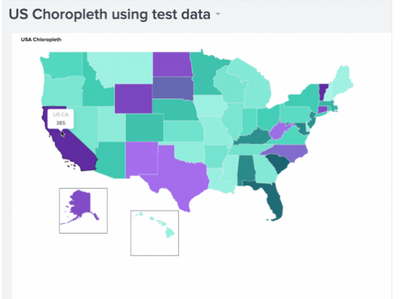
Not the colors, but notice how Alaska and Hawaii are moved so they can be easily seen with out panning out or moving the map.
- Mark as New
- Bookmark Message
- Subscribe to Message
- Mute Message
- Subscribe to RSS Feed
- Permalink
- Report Inappropriate Content
You need to create/add a geospatial lookup file for that. (that's what describes the map with polygons)
The file format is KMZ.
Splunk comes default with two lookups:
- geo_us_states
- geo_countries
Reference - https://docs.splunk.com/Documentation/Splunk/8.2.6/Knowledge/Configuregeospatiallookups
(In your case you may be tried to clone & update the current US lookup manually or try to see if you can find that lookup on the web somewhere.
https://docs.splunk.com/Documentation/DashApp/0.9.0/DashApp/mapsChor

A Season of Skills: New Splunk Courses to Light Up Your Learning Journey
Announcing the Migration of the Splunk Add-on for Microsoft Azure Inputs to ...
Splunk Observability for AI
