
Join the Conversation
- Find Answers
- :
- Using Splunk
- :
- Dashboards & Visualizations
- :
- Chart color change on basis of an alert for brief ...
- Subscribe to RSS Feed
- Mark Topic as New
- Mark Topic as Read
- Float this Topic for Current User
- Bookmark Topic
- Subscribe to Topic
- Mute Topic
- Printer Friendly Page
- Mark as New
- Bookmark Message
- Subscribe to Message
- Mute Message
- Subscribe to RSS Feed
- Permalink
- Report Inappropriate Content
Chart color change on basis of an alert for brief period of time

Hi all,
At the moment I am trying to color a chart depending on the recency of an alert.
This works great for coloring in certain timeperiods during which an alert was triggered, however, I am trying to color the entire chart for a brief moment of 5 minutes. This way the chart stands out and grabs attention, is there any way to easily color the entire chart, or the background of the chart, for a brief moment?
ATM I have a query that copies the count field into a second field and provides different colors in the XML options in the source, like so:
#query:
| makeresults count=20
| eval alert=(random()%2)
| streamstats count
| eval _time=_time-(count*60)
| eval recent_time=relative_time(now(),"-5M@M")
| eval latest_alert_time=if(alert>0,_time,None)
| eval chart_color = case(latest_alert_time>recent_time,count)
| fields _time count alert chart_color
#XML:
<option name="charting.fieldColors">{"count":#228B22, "chart_color":#bf1f1f}</option>
This above solution only results in colored sections during the alert time, but not a completely colored chart.
current result and desired results:
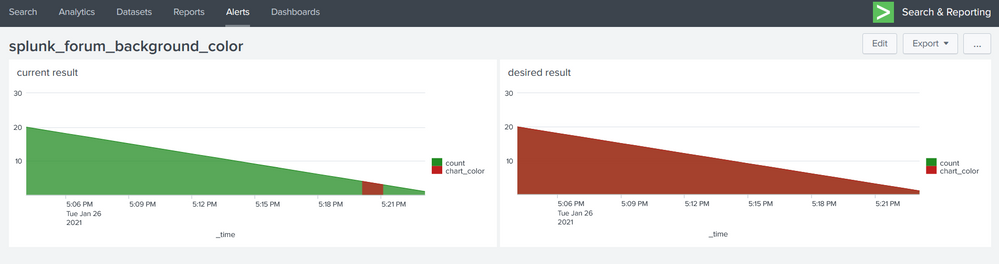
(this example image is made by simply saying chart_color=count, so it is not dynamically responding to recent alerts)
A change in background color would also be fine, any suggestions are welcome
Roelof
--------------------------------------------------
#full XML of example dashboard:
<dashboard>
<label>splunk_forum_background_color</label>
<row>
<panel>
<title>current result</title>
<chart>
<search>
<query>| makeresults count=20
| eval alert=(random()%2)
| streamstats count
| eval _time=_time-(count*60)
| eval recent_time=relative_time(now(),"-5M@M")
| eval latest_alert_time=if(alert>0,_time,None)
| eval chart_color = case(latest_alert_time>recent_time,count)
| fields _time count chart_color</query>
<earliest>-24h@h</earliest>
<latest>now</latest>
<sampleRatio>1</sampleRatio>
</search>
<option name="charting.chart">area</option>
<option name="charting.fieldColors">{"count":#228B22, "chart_color":#bf1f1f}</option>
<option name="charting.drilldown">none</option>
<option name="refresh.display">progressbar</option>
</chart>
</panel>
<panel>
<title>desired result</title>
<chart>
<search>
<query>| makeresults count=20
| eval alert=(random()%2)
| streamstats count
| eval _time=_time-(count*60)
| eval recent_time=relative_time(now(),"-5M@M")
| eval latest_alert_time=if(alert>0,_time,None)
| eval chart_color = count
| fields _time count chart_color</query>
<earliest>-24h@h</earliest>
<latest>now</latest>
<sampleRatio>1</sampleRatio>
</search>
<option name="charting.chart">area</option>
<option name="charting.fieldColors">{"count":#228B22, "chart_color":#bf1f1f}</option>
<option name="charting.drilldown">none</option>
<option name="refresh.display">progressbar</option>
</chart>
</panel>
</row>
</dashboard>

Stay Connected: Your Guide to January Tech Talks, Office Hours, and Webinars!
[Puzzles] Solve, Learn, Repeat: Reprocessing XML into Fixed-Length Events
Data Management Digest – December 2025
