
Join the Conversation
- Find Answers
- :
- Using Splunk
- :
- Dashboards & Visualizations
- :
- Adding Alert Trigger Condition (token) to Email
- Subscribe to RSS Feed
- Mark Topic as New
- Mark Topic as Read
- Float this Topic for Current User
- Bookmark Topic
- Subscribe to Topic
- Mute Topic
- Printer Friendly Page
- Mark as New
- Bookmark Message
- Subscribe to Message
- Mute Message
- Subscribe to RSS Feed
- Permalink
- Report Inappropriate Content
Adding Alert Trigger Condition (token) to Email

Hello all, is there a token usable in the Email alert body that indicates the Trigger Condition?
I'm using a "Custom" trigger condition and would like to include it in the email to normalize expectations of the alert threshold.
From the documentation page (http://docs.splunk.com/Documentation/Splunk/6.3.2/Alert/Emailnotification), I see both $trigger_date and $trigger_time$ but no $trigger_condition$ or similar. Is there an undocumented token for this?
I could try to re-write the search string to include the condition but that's not exactly desirable for a few different reasons. Anyway, this seems like an obvious token that should be in place already.
- Mark as New
- Bookmark Message
- Subscribe to Message
- Mute Message
- Subscribe to RSS Feed
- Permalink
- Report Inappropriate Content

While setting up the alert from the UI, you've option to include trigger condition with the email.
See the first image on the this link
http://docs.splunk.com/Documentation/Splunk/latest/Alert/Emailnotification#Configure_email_notificat...
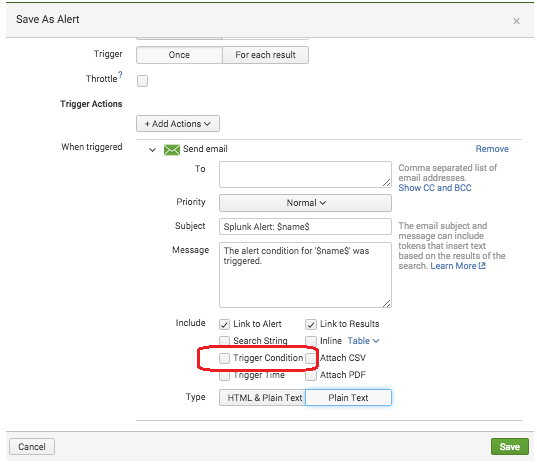
- Mark as New
- Bookmark Message
- Subscribe to Message
- Mute Message
- Subscribe to RSS Feed
- Permalink
- Report Inappropriate Content
Yes I see that but its placement cannot be controlled. I want to include it in the main body text like in the middle of a sentence. The problem is sending to lower tier groups and those who may not be familiar with Splunk as they wouldn't understand "count > 350" for example. I can give them the Search String too but that's beyond their comprehension level.
To be honest, if Splunk provides it in the UI then I'd be surprised that it wasn't also an undocumented token. Splunk tends to "eat their own dog food" when designing UI feature.
- Mark as New
- Bookmark Message
- Subscribe to Message
- Mute Message
- Subscribe to RSS Feed
- Permalink
- Report Inappropriate Content

I have the same issue when trying to write a custom alert action. I can't seem to find the token for trigger condition if it even exists. It is supplied to a standard alert actin script as a positional parameter so it must be available somewhere.
Did you have any luck in finding a token name for trigger condition?



Join the Splunk Community Slack to learn, troubleshoot, and make connections with fellow Splunk practitioners in real time!
Join Splunk User Groups to connect and learn in-person by region or remotely by topic or industry.
Painting a Clearer Picture: Unifying Your Investigations with Cisco AI Canvas
Hello POJO, meet nocode
Announcing Modern Navigation: A New Era of Splunk User Experience
