
Turn on suggestions
Auto-suggest helps you quickly narrow down your search results by suggesting possible matches as you type.
Dashboards & Visualizations
×
Join the Conversation
Without signing in, you're just watching from the sidelines. Sign in or Register to connect, share, and be part of the Splunk Community.
Turn on suggestions
Auto-suggest helps you quickly narrow down your search results by suggesting possible matches as you type.
- Find Answers
- :
- Using Splunk
- :
- Dashboards & Visualizations
- :
- Add previous week to line chart for comparison
Options
- Subscribe to RSS Feed
- Mark Topic as New
- Mark Topic as Read
- Float this Topic for Current User
- Bookmark Topic
- Subscribe to Topic
- Mute Topic
- Printer Friendly Page
- Mark as New
- Bookmark Message
- Subscribe to Message
- Mute Message
- Subscribe to RSS Feed
- Permalink
- Report Inappropriate Content
Add previous week to line chart for comparison

davidsplunk123
New Member
02-28-2018
01:04 AM
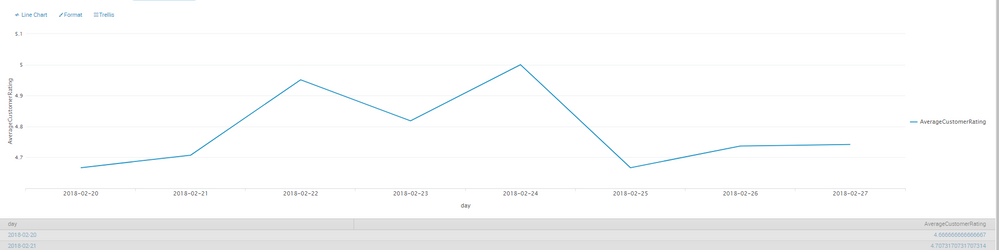
I have this below search and would like to add another line to include the week previous showing how it compares with the last 7 days.
index=summary report=otl_engineering_jiracsatresults Key="**" Assignee="**" Classification="**"
| dedup Key
| eval dateEpoch = strptime(Date, "%Y-%m-%d %H:%M")
| eval today = now()
| eval daysAgo = round(((today - dateEpoch)/60/60/24), 0)
| rex field=Date "(?<day>^\d{4}-\d{2}-\d{2}) \d{2}:\d{2}$"
| table Key, Summary, Reporter, Assignee, Classification, "CSAT Rate", "CSAT Rating Comment", Date, daysAgo, day
|  search daysAgo <= 7
| stats avg("CSAT Rate") as AverageCustomerRating by day

- Mark as New
- Bookmark Message
- Subscribe to Message
- Mute Message
- Subscribe to RSS Feed
- Permalink
- Report Inappropriate Content

cmerriman
Super Champion
02-28-2018
04:53 AM
what version of Splunk are you using? newer versions of Splunk (6.5+, I believe) have a command called timewrap
https://docs.splunk.com/Documentation/Splunk/6.6.0/SearchReference/Timewrap
if you do something ilke:
index=summary report=otl_engineering_jiracsatresults Key="**" Assignee="**" Classification="**"
 | dedup Key
 | eval dateEpoch = strptime(Date, "%Y-%m-%d %H:%M")
 | eval today = now()
 | eval daysAgo = round(((today - dateEpoch)/60/60/24), 0)
 | rex field=Date "(?<day>^\d{4}-\d{2}-\d{2}) \d{2}:\d{2}$"
 | table Key, Summary, Reporter, Assignee, Classification, "CSAT Rate", "CSAT Rating Comment", Date, daysAgo, day dateEpoch
 | eval _time=dateEpoch
 |  search daysAgo <= 14
 | timechart span=1d avg("CSAT Rate") as AverageCustomerRating
 | timewrap 1week
there is also a timewrap app, if you're on an older version of splunk https://splunkbase.splunk.com/app/1645/

Get Updates on the Splunk Community!
Enter the Agentic Era with Splunk AI Assistant for SPL 1.4
🚀 Your data just got a serious AI upgrade — are you ready?
Say hello to the Agentic Era with the ...
Stronger Security with Federated Search for S3, GCP SQL & Australian Threat ...
Splunk Lantern is a Splunk customer success center that provides advice from Splunk experts on valuable data ...
Accelerating Observability as Code with the Splunk AI Assistant
We’ve seen in previous posts what Observability as Code (OaC) is and how it’s now essential for managing ...
