
Turn on suggestions
Auto-suggest helps you quickly narrow down your search results by suggesting possible matches as you type.
All Apps and Add-ons
×
Join the Conversation
Without signing in, you're just watching from the sidelines. Sign in or Register to connect, share, and be part of the Splunk Community.
Turn on suggestions
Auto-suggest helps you quickly narrow down your search results by suggesting possible matches as you type.
- Find Answers
- :
- Apps & Add-ons
- :
- All Apps and Add-ons
- :
- Splunk Dashboard - timerange token doesn't work in...
Options
- Subscribe to RSS Feed
- Mark Topic as New
- Mark Topic as Read
- Float this Topic for Current User
- Bookmark Topic
- Subscribe to Topic
- Mute Topic
- Printer Friendly Page
- Mark as New
- Bookmark Message
- Subscribe to Message
- Mute Message
- Subscribe to RSS Feed
- Permalink
- Report Inappropriate Content
Splunk Dashboard - timerange token doesn't work in dbxquery command

cheriemilk
Path Finder
12-12-2019
05:35 PM
Hi Team,
I have configured below token,
<row>
    <panel>
      <title>DB performance comparison for loading route map</title>
      <table>
        <title>DB performance comparison for loading route map</title>
        <search>
          <query> | dbxquery query="SELECT xx FROM xx  WHERE TIMESTAMP > add_days(now(),-$timerange_token$)"
         </query>
          <earliest>$timerange_token.earliest$</earliest>
          <latest>$timerange_token.latest$</latest>
          <sampleRatio>1</sampleRatio>
        </search>
        <option name="count">10</option>
        <option name="dataOverlayMode">heatmap</option>
        <option name="drilldown">none</option>
        <option name="percentagesRow">false</option>
        <option name="refresh.display">progressbar</option>
        <option name="rowNumbers">false</option>
        <option name="totalsRow">false</option>
        <option name="wrap">true</option>
      </table>
    </panel>
  </row>
But somehow , it doesn't work the panel is always display waiting for input when I select a time period from the shared time picker.
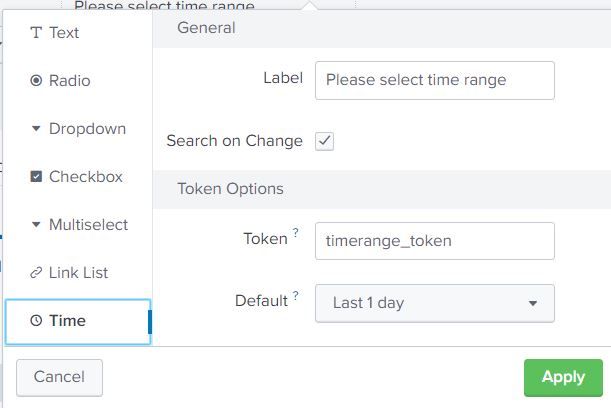
If I hard code the date , it works
dbxquery query="SELECT xx FROM xx WHERE TIMESTAMP > add_days(now(),-2)"
I set time range for this panel to "TimeRange: Shared Time Picker (timerange_token) "


Get Updates on the Splunk Community!
[Puzzles] Solve, Learn, Repeat: Reprocessing XML into Fixed-Length Events
This challenge was first posted on Slack #puzzles channelFor a previous puzzle, I needed a set of fixed-length ...
Data Management Digest – December 2025
Welcome to the December edition of Data Management Digest!
As we continue our journey of data innovation, the ...
Index This | What is broken 80% of the time by February?
December 2025 Edition
Hayyy Splunk Education Enthusiasts and the Eternally Curious!
We’re back with this ...
