
Turn on suggestions
Auto-suggest helps you quickly narrow down your search results by suggesting possible matches as you type.
All Apps and Add-ons
×
Join the Conversation
Without signing in, you're just watching from the sidelines. Sign in or Register to connect, share, and be part of the Splunk Community.
Turn on suggestions
Auto-suggest helps you quickly narrow down your search results by suggesting possible matches as you type.
- Find Answers
- :
- Apps & Add-ons
- :
- All Apps and Add-ons
- :
- Splunk DB Connect 2: How to troubleshoot why the O...
Options
- Subscribe to RSS Feed
- Mark Topic as New
- Mark Topic as Read
- Float this Topic for Current User
- Bookmark Topic
- Subscribe to Topic
- Mute Topic
- Printer Friendly Page
- Mark as New
- Bookmark Message
- Subscribe to Message
- Mute Message
- Subscribe to RSS Feed
- Permalink
- Report Inappropriate Content
Splunk DB Connect 2: How to troubleshoot why the Operations tab is not loading, but the other tabs are working?

srinathd
Contributor
02-22-2016
05:21 AM
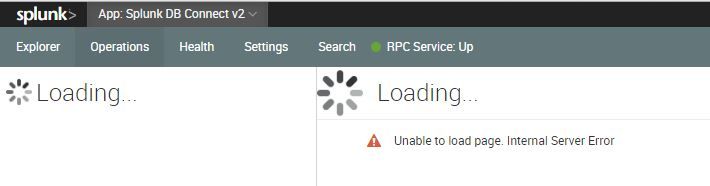
Operations tab is not loading while creating a db input in Splunk DB Connect 2. What might be the issue? Other tabs are working fine.

- Mark as New
- Bookmark Message
- Subscribe to Message
- Mute Message
- Subscribe to RSS Feed
- Permalink
- Report Inappropriate Content

ryandg
Communicator
02-23-2016
05:16 AM
There are two possibilities that I've noticed for this issue:
1) You do not have permissions to edit operations
2) You are behind a company proxy that is causing issues with the app. Typically having a FQDN instead of an IP fixes this so if you already have a FQDN this shouldn't be an issue.
Additionally, sometimes if you can whitelist the domain on your proxy it will resolve the issue.
Have you tried both of these?
- Mark as New
- Bookmark Message
- Subscribe to Message
- Mute Message
- Subscribe to RSS Feed
- Permalink
- Report Inappropriate Content

dshpritz

SplunkTrust
02-22-2016
11:52 AM
Are you on WIndows?
- Mark as New
- Bookmark Message
- Subscribe to Message
- Mute Message
- Subscribe to RSS Feed
- Permalink
- Report Inappropriate Content
srinathd
Contributor
02-22-2016
12:02 PM
No. on Linux machine

Get Updates on the Splunk Community!
Accelerating Observability as Code with the Splunk AI Assistant
We’ve seen in previous posts what Observability as Code (OaC) is and how it’s now essential for managing ...
Integrating Splunk Search API and Quarto to Create Reproducible Investigation ...
Splunk is More Than Just the Web Console
For Digital Forensics and Incident Response (DFIR) practitioners, ...
Congratulations to the 2025-2026 SplunkTrust!
Hello, Splunk Community! We are beyond thrilled to announce our newest group of SplunkTrust members!
The ...
