
Join the Conversation
- Find Answers
- :
- Apps & Add-ons
- :
- All Apps and Add-ons
- :
- All Apps and Add-ons
- :
- SNMP Modular Input: Unable to receive SNMPv3 traps
- Subscribe to RSS Feed
- Mark Topic as New
- Mark Topic as Read
- Float this Topic for Current User
- Bookmark Topic
- Subscribe to Topic
- Mute Topic
- Printer Friendly Page
- Mark as New
- Bookmark Message
- Subscribe to Message
- Mute Message
- Subscribe to RSS Feed
- Permalink
- Report Inappropriate Content
SNMP Modular Input: Unable to receive SNMPv3 traps

Environment:
Windows 2008 R2.
Splunk Enterprise 6.3.2
SNMP Modular Input 1.2.7
pycrypto-2.6.1
Issue:
Packet capture shows the trap is getting received by the splunk server, but Windows is sending back: ICMP - Destination unreachable (Port unreachable). The traps are not getting saved into Splunk
Details:
After fighting to get pycrypto-2.6.1 compiled on Windows 10 (http://stackoverflow.com/a/28617830 was the exact steps I used that worked), eventually got it compiled and installed.
Created a SNMPv3 Trap in the inputs with the necessary info.
Validated Python (python D:\Splunk\etc\apps\snmp_ta\bin\snmp.py) is listening on UDP port 162.
No errors in splunkd.log related to snmp_ta
Confirm user/pw info for snmpv3 traps is correct as able to decode via Wireshark.
- Mark as New
- Bookmark Message
- Subscribe to Message
- Mute Message
- Subscribe to RSS Feed
- Permalink
- Report Inappropriate Content
Did you ever get this figured out? Thanks!
- Mark as New
- Bookmark Message
- Subscribe to Message
- Mute Message
- Subscribe to RSS Feed
- Permalink
- Report Inappropriate Content
Nope 😞 too many blocking issues. Gave up and eventually got the same info via syslog instead.
- Mark as New
- Bookmark Message
- Subscribe to Message
- Mute Message
- Subscribe to RSS Feed
- Permalink
- Report Inappropriate Content


- Mark as New
- Bookmark Message
- Subscribe to Message
- Mute Message
- Subscribe to RSS Feed
- Permalink
- Report Inappropriate Content
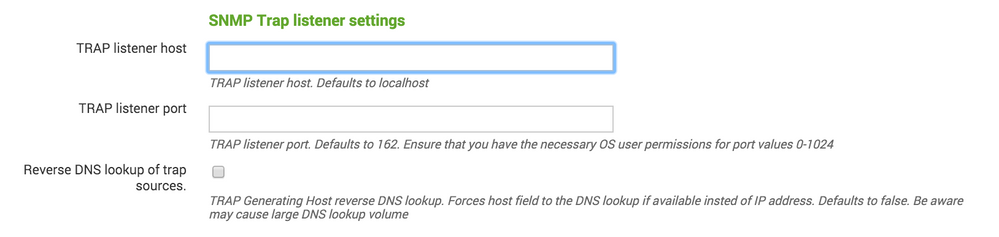
Tried 127.0.0.1 and no change.
Tried the hostname and now I dont see a ICMP - Destination unreachable (Port unreachable) getting sent back, but nothing is still apparently getting logged. Tried by the index and/or sourcetype=snmp_ta
- Mark as New
- Bookmark Message
- Subscribe to Message
- Mute Message
- Subscribe to RSS Feed
- Permalink
- Report Inappropriate Content
is there some policy/limitation in the OS that the user running the splunk service does not have permission to listen on the UDP port? I would think you would see an error logged if that was the case though.
I noticed on the screenshot posted above it says "TRAAP listener port. Defaults to 162.". Mine says "The SNMP port. Defaults to 161". Even though my devices are configured with trap targets on port 162, the snmp process on the switch only accepts incomming snmp packets on port 161 so I had to use that.

Join the Splunk Community Slack to learn, troubleshoot, and make connections with fellow Splunk practitioners in real time!
Join Splunk User Groups to connect and learn in-person by region or remotely by topic or industry.
Announcing Modern Navigation: A New Era of Splunk User Experience
Modernize your Splunk Apps – Introducing Python 3.13 in Splunk
Step into “Hunt the Insider: An Splunk ES Premier Mystery” to catch a cybercriminal ...
