
Join the Conversation
- Find Answers
- :
- Apps & Add-ons
- :
- All Apps and Add-ons
- :
- All Apps and Add-ons
- :
- Re: REST API Modular - Why are the dynamic tokens ...
- Subscribe to RSS Feed
- Mark Topic as New
- Mark Topic as Read
- Float this Topic for Current User
- Bookmark Topic
- Subscribe to Topic
- Mute Topic
- Printer Friendly Page
- Mark as New
- Bookmark Message
- Subscribe to Message
- Mute Message
- Subscribe to RSS Feed
- Permalink
- Report Inappropriate Content
REST API Modular - Why are the dynamic tokens used for URL not updating?

Hi all,
I'm currently using the Modular REST API to pull data from a REST API which allows me to specify the earliest time for events through an argument in the URL.
I'm using the dynamic token functionality to put a unix timestamp into the URL, all works well. My python code in tokens.py just gets the current linux time and takes 80 seconds from it.
My interval is then set to 60 seconds and in theory I shouldn't lose any data from the API.
However the REST API Add-on seems to always issue the same request to the API. If I restart splunk then it seems to update and the API call uses the correct time, however then it just keeps using the same time, although the Python code should be updating.
Here's the Python code.
def eightySecondsAgo():
unixEpochTimeNow = time.time()
timeEightySecondsAgo = int(unixEpochTimeNow) - 80
return str(timeEightySecondsAgo)
Any my inputs.conf
[rest://Intercom_admin_events]
activation_key = <redacted>
endpoint=https://api.intercom.io/admins/activity_logs?created_at_after=$eightySecondsAgo$
http_header_propertys = authorization=Bearer <redacted>,accept=application/json,content-type=application/json
http_method = GET
auth_type= none
response_type = json
streaming_request=0
verify=0
sourcetype=intercom.admin.events
polling_interval=60
It's like the dynamic token response is being cached or something? Really strange.
Any ideas?
- Mark as New
- Bookmark Message
- Subscribe to Message
- Mute Message
- Subscribe to RSS Feed
- Permalink
- Report Inappropriate Content

The problem is that the endpoint_list variable is set the first time the script runs, but is never updated after that.
I just edited rest_ta/bin/rest.py, before the " for endpoint in endpoint_list " loop as below :
(begins at line 465 in version 1.4 of the REST Modular Input App)
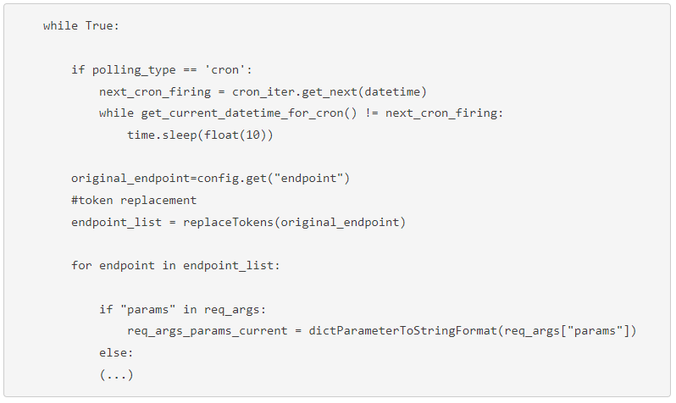
After that, tokens are always updated with tokens.py file before the REST API is polled.

Join the Splunk Community Slack to learn, troubleshoot, and make connections with fellow Splunk practitioners in real time!
Join Splunk User Groups to connect and learn in-person by region or remotely by topic or industry.
Index This | What travels the world but is also stuck in place?
Discover New Use Cases: Unlock Greater Value from Your Existing Splunk Data
Continue Your Journey: Join Session 2 of the Data Management and Federation Bootcamp ...
