
Join the Conversation
- Find Answers
- :
- Apps & Add-ons
- :
- All Apps and Add-ons
- :
- I have choropleth map in a panel of dashboard, on ...
- Subscribe to RSS Feed
- Mark Topic as New
- Mark Topic as Read
- Float this Topic for Current User
- Bookmark Topic
- Subscribe to Topic
- Mute Topic
- Printer Friendly Page
- Mark as New
- Bookmark Message
- Subscribe to Message
- Mute Message
- Subscribe to RSS Feed
- Permalink
- Report Inappropriate Content

This is the home page for all other dashboard, hence 4 panels are being shown in a row. Each panel drill downs to their specific dashboards.
Here on loading of the page the choropleth map is by default showing the map of Africa.
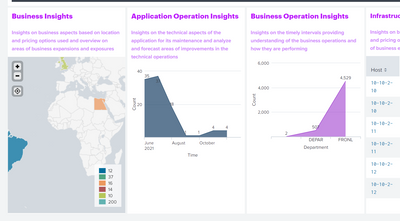
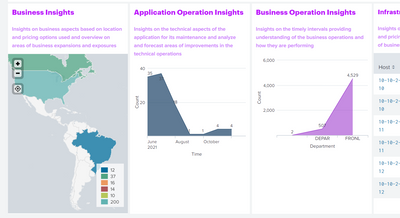
But the business wants to show the North & South American continents by default on loading of the page.
Is it possible to set the view of the map, like this
- Mark as New
- Bookmark Message
- Subscribe to Message
- Mute Message
- Subscribe to RSS Feed
- Permalink
- Report Inappropriate Content
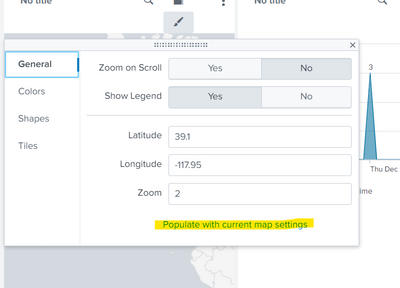
I have got the solution in the general settings of the visualization.
Using the highlighted option automatically took the focused region.
- Mark as New
- Bookmark Message
- Subscribe to Message
- Mute Message
- Subscribe to RSS Feed
- Permalink
- Report Inappropriate Content


@cadrija - Try the `mapping.map.fitBounds` property/option of the map in the XML of your dashboard.
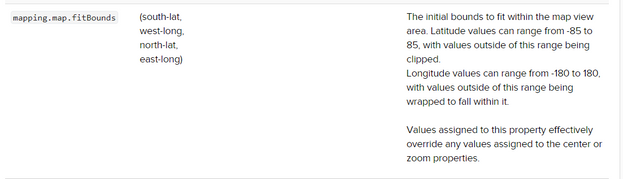
https://docs.splunk.com/Documentation/Splunk/8.2.3/Viz/PanelreferenceforSimplifiedXML#map
- Mark as New
- Bookmark Message
- Subscribe to Message
- Mute Message
- Subscribe to RSS Feed
- Permalink
- Report Inappropriate Content
I have got the solution in the general settings of the visualization.
Using the highlighted option automatically took the focused region.

A Season of Skills: New Splunk Courses to Light Up Your Learning Journey
Announcing the Migration of the Splunk Add-on for Microsoft Azure Inputs to ...
Splunk Observability for AI
