
Join the Conversation
- Find Answers
- :
- Apps & Add-ons
- :
- All Apps and Add-ons
- :
- All Apps and Add-ons
- :
- How to Retreive Missing/Additional Fields from Che...
- Subscribe to RSS Feed
- Mark Topic as New
- Mark Topic as Read
- Float this Topic for Current User
- Bookmark Topic
- Subscribe to Topic
- Mute Topic
- Printer Friendly Page
- Mark as New
- Bookmark Message
- Subscribe to Message
- Mute Message
- Subscribe to RSS Feed
- Permalink
- Report Inappropriate Content
How to Retreive Missing/Additional Fields from Check Point using OPSEC LEA?

Hey,
Trying to work out if 1) Check Point's LEA API does in fact allow the pull of additional fields and 2) how to configure Splunk to get these fields in?
The field I am mainly after is part of the IPS Software Blade (aka SmartDefence) product in the "General Event Information" box in the GUI and the field name is "Follow Up". I can see the other fields above this one been pulled into the start of the logs but not this field. I also see it in a 2011 version of "LEA Fields Update" from Check Point:
http://dl3.checkpoint.com/paid/0f/LEA_Fields_2011.pdf?HashKey=1490231745_7005032b58147d68669dc3ebc18...
--- Page 12
Sample logs which correspond to the attached pic from the GUI:
time=####|loc=#####|fileid=####|action=reject|orig=<blah>|i/f_dir=outbound|i/f_name=eth5|has_accounting=0|uuid=<00000000,00000000,00000000,00000000>|product=SmartDefense|Protection Name=Suspicious Mail Attachment Containing JavaScript Code|Severity=4|Confidence Level=5|protection_id=asm_dynamic_prop_JS_SMTP_ATTACH|SmartDefense Profile=Edge_Recommended_Protection|Performance Impact=3|Industry Reference=None|Protection Type=protection|Update Version=#####|rule=20|rule_uid={00000000,00000000,00000000,00000000}|rule_name=SMTP Delivery - EXT -> DMZ|Attack Info=Suspicious Mail Attachment Containing JavaScript Code|attack=SMTP Protection Violation|src=<blah>|s_port=44555|dst=<blah>|service=smtp|proto=tcp|capture_uuid=<00000000,00000000,00000000,00000000>|__policy_id_tag=product=VPN-1 & FireWall-1[db_tag={00000000,00000000,00000000,00000000};mgmt=<blah>;date=#####;policy_name=Edge]|origin_sic_name=CN=<blah>,O=<blah>
Also should note that the fields in the pic that appear above the highlighted "Follow Up" field mixed with the "Log Info" section at the beginning of the log. So log lengths shouldn't have anything to do with it.
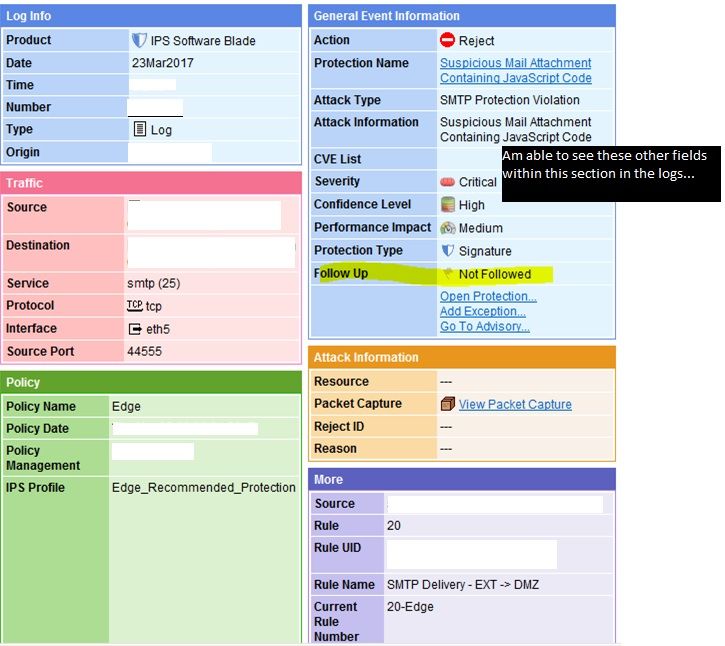
So is this information possible to retrieve or am I wasting time?
Thanks
- Mark as New
- Bookmark Message
- Subscribe to Message
- Mute Message
- Subscribe to RSS Feed
- Permalink
- Report Inappropriate Content
You can parse it to a field named e.g. "confidence_level" with this rex:
rex field=_raw "Confidence\sLevel=(?\d)"



Join the Splunk Community Slack to learn, troubleshoot, and make connections with fellow Splunk practitioners in real time!
Join Splunk User Groups to connect and learn in-person by region or remotely by topic or industry.
Event Series: Level up your SOC: Advancing with Splunk Enterprise Security
Announcing Modern Navigation: A New Era of Splunk User Experience
SOC4Kafka - New Kafka Connector Powered by OpenTelemetry
