
Join the Conversation
- Find Answers
- :
- Apps & Add-ons
- :
- All Apps and Add-ons
- :
- Re: Horizon Chart - How can I change the axis base...
- Subscribe to RSS Feed
- Mark Topic as New
- Mark Topic as Read
- Float this Topic for Current User
- Bookmark Topic
- Subscribe to Topic
- Mute Topic
- Printer Friendly Page
- Mark as New
- Bookmark Message
- Subscribe to Message
- Mute Message
- Subscribe to RSS Feed
- Permalink
- Report Inappropriate Content

Recently I observed that the axis in Horizon Chart is not following the timezone setting by the user. Please refer to the images below,
The user with timezone setting as GMT+0800
The user with timezone setting as GMT
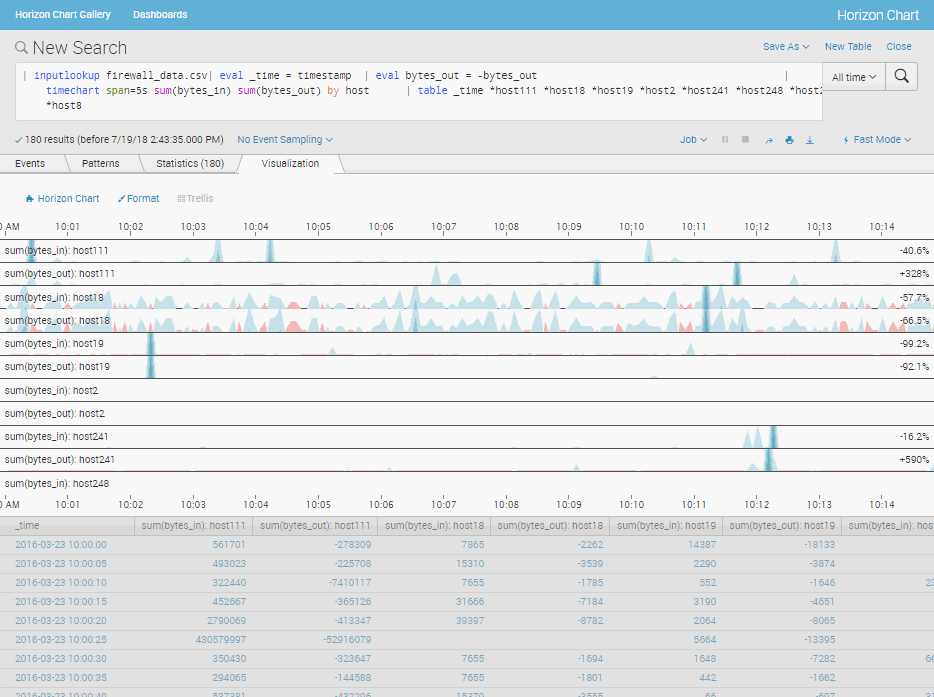
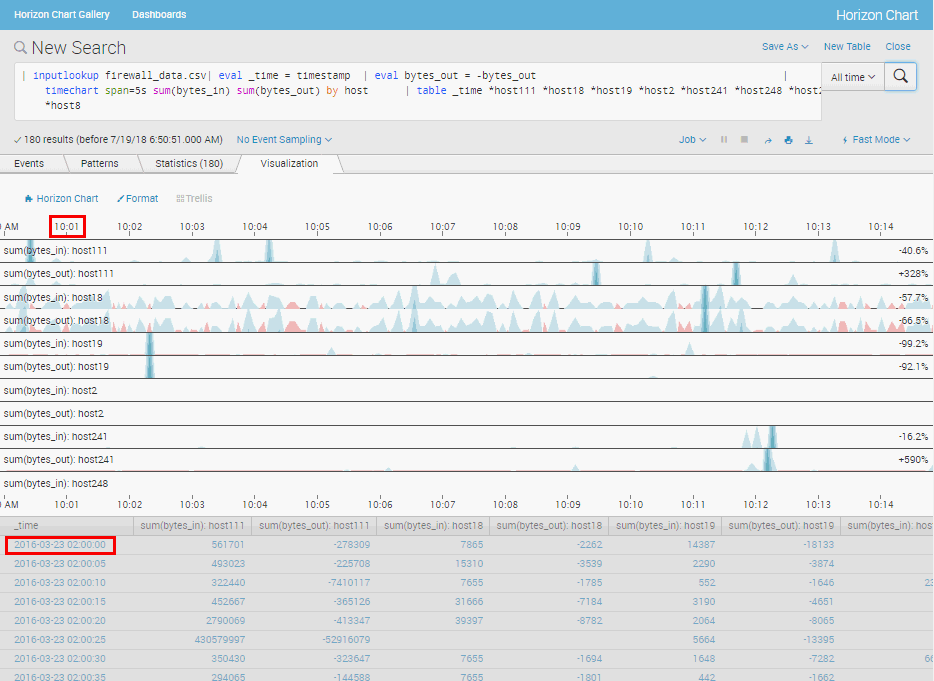
Do I have any method that I can apply the timezone configured by the user in Splunk on the axis?


- Mark as New
- Bookmark Message
- Subscribe to Message
- Mute Message
- Subscribe to RSS Feed
- Permalink
- Report Inappropriate Content

| makeresults count=2
| streamstats count
| eval _time = if (count==2,relative_time(_time,"-24h@m"), relative_time(_time,"@m"))
| makecontinuous span=30m
| eval col1=random() % 20, col2=random() % 20, col3=random() % 20
| fieldformat _time = strftime(_time,"%c %:::z")
| table _time col*
| eval COMMENT AS "this is sample data"
It runs in local time
In the worst case, add the following command:
| eval _time = relative_time (_time, "The timezone offset from UTC")
- Mark as New
- Bookmark Message
- Subscribe to Message
- Mute Message
- Subscribe to RSS Feed
- Permalink
- Report Inappropriate Content
| makeresults count=2
| streamstats count
| eval _time = if (count==2,relative_time(_time,"-24h@m"), relative_time(_time,"@m"))
| makecontinuous span=30m
| eval col1=random() % 20, col2=random() % 20, col3=random() % 20
| fieldformat _time = strftime(_time,"%c %:::z")
| table _time col*
| eval COMMENT AS "this is sample data"
It runs in local time
In the worst case, add the following command:
| eval _time = relative_time (_time, "The timezone offset from UTC")
- Mark as New
- Bookmark Message
- Subscribe to Message
- Mute Message
- Subscribe to RSS Feed
- Permalink
- Report Inappropriate Content

I know its over a year later - but did you resolve this ? I would like to know why Horizon Chart doesnt use the localised _time generated by | timestamp but instead uses the UTC timestamp from the event

Accelerating Observability as Code with the Splunk AI Assistant
Integrating Splunk Search API and Quarto to Create Reproducible Investigation ...
Congratulations to the 2025-2026 SplunkTrust!
