
Join the Conversation
- Find Answers
- :
- Apps & Add-ons
- :
- All Apps and Add-ons
- :
- All Apps and Add-ons
- :
- Re: Having trouble establishing connection with Sp...
- Subscribe to RSS Feed
- Mark Topic as New
- Mark Topic as Read
- Float this Topic for Current User
- Bookmark Topic
- Subscribe to Topic
- Mute Topic
- Printer Friendly Page
- Mark as New
- Bookmark Message
- Subscribe to Message
- Mute Message
- Subscribe to RSS Feed
- Permalink
- Report Inappropriate Content
Having trouble establishing connection with Splunk server for McAfee ePO integration.

I'm the ePO administrator at my company and we are trying to integrate McAfee with Splunk.
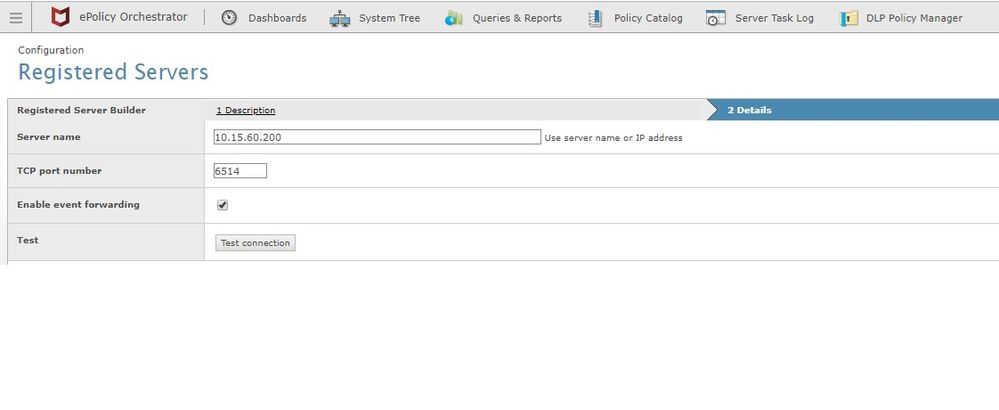
McAfee told me that on the ePO side I just need to set the Splunk server as a Registered Server (as I've set on this image below), but I'm not able to establish a connection with Splunk and forward Syslogs.
What can I do to establish a connection with Splunk and send syslogs?
Do we need to install the McAfee add-on and/or install DB Connect?

- Mark as New
- Bookmark Message
- Subscribe to Message
- Mute Message
- Subscribe to RSS Feed
- Permalink
- Report Inappropriate Content

hi all, i still failed to decrypt the epo logs. this is my config.
[tcp://6514]
connection_host = ip
host = DCHQ-SIMSL-01
source = 10.220.34.23:6514
sourcetype = mcafee:epo:syslog
index = mcafee


[SSL]
serverCert=/splunk/cert/splunk-epo-remote.pem

requireClientCert=false

cipherSuite = ECDHE-ECDSA-AES256-GCM-SHA384:ECDHE-RSA-AES256-GCM-SHA384:ECDHE-ECDSA-AES128-GCM-SHA256:ECDHE-RSA-AES128-GCM-SHA256:ECDHE-ECDSA-AES256-SHA384:ECDHE-RSA-AES256-SHA384:ECDHE-ECDSA-AES128-SHA256:ECDHE-RSA-AES128-SHA256
any ideas? huhh
- Mark as New
- Bookmark Message
- Subscribe to Message
- Mute Message
- Subscribe to RSS Feed
- Permalink
- Report Inappropriate Content
Hello,
We've tried to do this method but without success.
We're trying to use DB Connect to directly connect to ePO DB.
On DB connect screen, we have put server address, port number, but I have one doubt about put our instance/db.
Can I put on DB field PR02DS\EPODB (instance\Database) ?
Or do I need to put this on server address like "serverepo.dom.com\pr02ds" ?
Thanks in advance.
- Mark as New
- Bookmark Message
- Subscribe to Message
- Mute Message
- Subscribe to RSS Feed
- Permalink
- Report Inappropriate Content

try this configuration :
[tcp-ssl:6514]
sourcetype = mcafee:epo

[SSL]
password =
requireClientCert = false
rootCA = /opt/splunk/certs/root-ca.pem
serverCert = /opt/splunk/certs/cert.pem
check this link for a configuration example: https://virtuallyhyper.com/2013/06/install-splunk-and-send-logs-to-splunk-with-rsyslog-over-tcp-with...
- Mark as New
- Bookmark Message
- Subscribe to Message
- Mute Message
- Subscribe to RSS Feed
- Permalink
- Report Inappropriate Content
@PavelP
Thanks for the tip.
I'll try this with our team and let you know if that worked.
Thank you
- Mark as New
- Bookmark Message
- Subscribe to Message
- Mute Message
- Subscribe to RSS Feed
- Permalink
- Report Inappropriate Content

Adding my 2c to this thread since I've found it be so very useful:
1. The ePO to splunk TLS connection requires only a splunk-side cert. I've used a self-signed cert by doing the following:
1.a. sudo openssl req -x509 -days 3650 -nodes -newkey rsa:2048 -keyout splunk-epo-remote.key -out splunk-epo-remote.crt
1.b. cat splunk-epo-remote.crt splunk-epo-remote.key > splunk-epo-remote.pem
2. the [SSL] stanza in input.conf is:
serverCert=/opt/splunk/certs/ splunk-epo-remote.pem
requireClientCert=false
I've also updated the ciperSuite based on this link https://community.splunk.com/t5/Getting-Data-In/how-to-configure-Mcafee-Epo-to-send-data-to-Splunk/m... to add the AES256-GCM-SHA384 cipher
- Mark as New
- Bookmark Message
- Subscribe to Message
- Mute Message
- Subscribe to RSS Feed
- Permalink
- Report Inappropriate Content
Hello @raphaalmeida ,
there are two types of data you can get from ePO - mcafee:epo using DB Connect and mcafee:ids using syslog:
https://docs.splunk.com/Documentation/AddOns/released/McAfeeEPO/DataTypes
ePO outputs TLS encrypted syslog, you need to set up TLS on the syslog side, here are a few examples:
https://kc.mcafee.com/corporate/index?page=content&id=KB91194
https://kc.mcafee.com/corporate/index?page=content&id=KB87927
What kind of receiver (rsyslog or syslog-ng, Windows or Linux) do you have?
- Mark as New
- Bookmark Message
- Subscribe to Message
- Mute Message
- Subscribe to RSS Feed
- Permalink
- Report Inappropriate Content
Hello @PavelP
Thanks for your response.
I'm trying to forward syslogs directly to Splunk server.
Is this possible? Or do I need to setup a middle server to receive those syslogs and after send it to Splunk?
Thanks for your help.
- Mark as New
- Bookmark Message
- Subscribe to Message
- Mute Message
- Subscribe to RSS Feed
- Permalink
- Report Inappropriate Content

@raphaalmeida I am planning to forward logs from McAfee ePO to Splunk Syslog-ng server. but while testing the connection i see like Syslog connection failed.
Please let us know how you configured the log forwarding.


Join the Splunk Community Slack to learn, troubleshoot, and make connections with fellow Splunk practitioners in real time!
Join Splunk User Groups to connect and learn in-person by region or remotely by topic or industry.
Announcing Modern Navigation: A New Era of Splunk User Experience
Modernize your Splunk Apps – Introducing Python 3.13 in Splunk
Step into “Hunt the Insider: An Splunk ES Premier Mystery” to catch a cybercriminal ...
