
Join the Conversation
- Find Answers
- :
- Apps & Add-ons
- :
- All Apps and Add-ons
- :
- Field extractions are incomplete for juniper
- Subscribe to RSS Feed
- Mark Topic as New
- Mark Topic as Read
- Float this Topic for Current User
- Bookmark Topic
- Subscribe to Topic
- Mute Topic
- Printer Friendly Page
- Mark as New
- Bookmark Message
- Subscribe to Message
- Mute Message
- Subscribe to RSS Feed
- Permalink
- Report Inappropriate Content
Field extractions are incomplete for juniper

Hello,
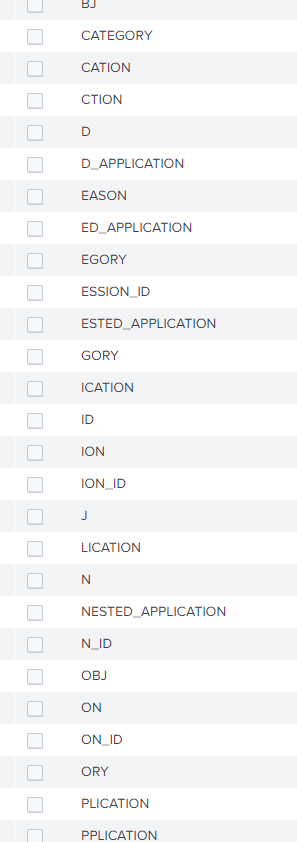
We are extracting juniper logs using the Juniper addon and are getting random fields as pictured.
Could someone explain why this might be happening

- Mark as New
- Bookmark Message
- Subscribe to Message
- Mute Message
- Subscribe to RSS Feed
- Permalink
- Report Inappropriate Content

Hi @nathanluke86,
Are you on a distributed env ? If so where have you installed the ad-on ?
Search time components of the TA should go on the search head to get the cleanest extractions possible.
In your case it seems that the auto-extractions are grabbing lots of weird fields and polluting your field list. In order to disable it modify your local props.conf to include KV_MODE = none that way auto-extraction will be disabled.
More info here:
https://docs.splunk.com/Documentation/Splunk/8.0.0/Knowledge/Automatickey-valuefieldextractionsatsea...
Cheers,
David
- Mark as New
- Bookmark Message
- Subscribe to Message
- Mute Message
- Subscribe to RSS Feed
- Permalink
- Report Inappropriate Content
Hi @DavidHourani
We are in a distributed env. I have checked props.conf and KV_MODE is set to none. The TA is installed on all forwarders and Search heads.
Thanks
- Mark as New
- Bookmark Message
- Subscribe to Message
- Mute Message
- Subscribe to RSS Feed
- Permalink
- Report Inappropriate Content
Are those fields showing over all time ? Click on one of the weird fields and check what the event looks like, wether its broken or not.
Also check if there are other places where the sourcetype might be grabbing its config from use btool to verify that.
- Mark as New
- Bookmark Message
- Subscribe to Message
- Mute Message
- Subscribe to RSS Feed
- Permalink
- Report Inappropriate Content
The log is not complete when viewing these weird extractions
Thanks

Upcoming Webinar: Unmasking Insider Threats with Slunk Enterprise Security’s UEBA
.conf25 technical session recap of Observability for Gen AI: Monitoring LLM ...
A Season of Skills: New Splunk Courses to Light Up Your Learning Journey
