
Join the Conversation
- Find Answers
- :
- Using Splunk
- :
- Other Using Splunk
- :
- Alerting
- :
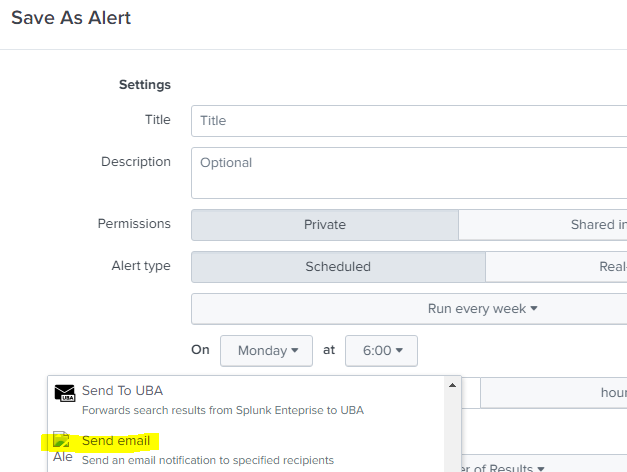
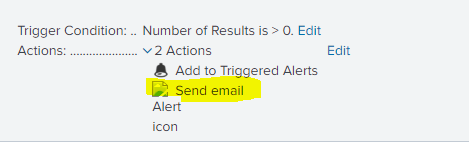
- Why can't I see the icon picture for alert action ...
- Subscribe to RSS Feed
- Mark Topic as New
- Mark Topic as Read
- Float this Topic for Current User
- Bookmark Topic
- Subscribe to Topic
- Mute Topic
- Printer Friendly Page
- Mark as New
- Bookmark Message
- Subscribe to Message
- Mute Message
- Subscribe to RSS Feed
- Permalink
- Report Inappropriate Content

Hi,
I can't see the icon picture for alert action option, already the "alert_action.conf" configured as below:
[email]
icon_path = mod_alert_icon_email.png.
Please your support
- Mark as New
- Bookmark Message
- Subscribe to Message
- Mute Message
- Subscribe to RSS Feed
- Permalink
- Report Inappropriate Content


This appears to be missing from some versions of splunk - for example, it is missing / wrongly referenced in 8.2.2.1 but present / correctly referenced in 8.2.6
If it is important to you, please try upgrading your version of splunk
- Mark as New
- Bookmark Message
- Subscribe to Message
- Mute Message
- Subscribe to RSS Feed
- Permalink
- Report Inappropriate Content
This appears to be missing from some versions of splunk - for example, it is missing / wrongly referenced in 8.2.2.1 but present / correctly referenced in 8.2.6
If it is important to you, please try upgrading your version of splunk
- Mark as New
- Bookmark Message
- Subscribe to Message
- Mute Message
- Subscribe to RSS Feed
- Permalink
- Report Inappropriate Content
I have the same issue. The actual PNG file I have located on my search head (Splunk Enterprise 9 on windows 2019) at
c:\Program Files\Splunk\etc\system\static\mod_alert_icon_email.png
c:\Program Files\Splunk\share\splunk\search_mrsparkle\exposed\img\mod_alert_icon_email.png
And referenced in the following config files
etc\system\default\alert_actions.conf
Contents of this file are
[email]

icon_path = mod_alert_icon_email.png
label = Send email
description = Send an email notification to specified recipients
- Mark as New
- Bookmark Message
- Subscribe to Message
- Mute Message
- Subscribe to RSS Feed
- Permalink
- Report Inappropriate Content
@ITWhisperer Thank you for your support.

Your Guide to Splunk Digital Experience Monitoring
Data Management Digest – November 2025
Upcoming Webinar: Unmasking Insider Threats with Slunk Enterprise Security’s UEBA
