
Join the Conversation
- Find Answers
- :
- Using Splunk
- :
- Other Using Splunk
- :
- Alerting
- :
- How to display the first 3 lines of an event that ...
- Subscribe to RSS Feed
- Mark Topic as New
- Mark Topic as Read
- Float this Topic for Current User
- Bookmark Topic
- Subscribe to Topic
- Mute Topic
- Printer Friendly Page
- Mark as New
- Bookmark Message
- Subscribe to Message
- Mute Message
- Subscribe to RSS Feed
- Permalink
- Report Inappropriate Content

Hi,
I have an alert set up that is triggered by an event that contains almost 100 lines. However, the users are only interested in the first three lines, the rest is noise to them.
Is there a way to only display the first three lines of the event without changing the sourcetype or altering anything in the backend? Like give a regex into the alert that cuts the event off after 3 lines? The lines always end with the same string: "Could not open connection"
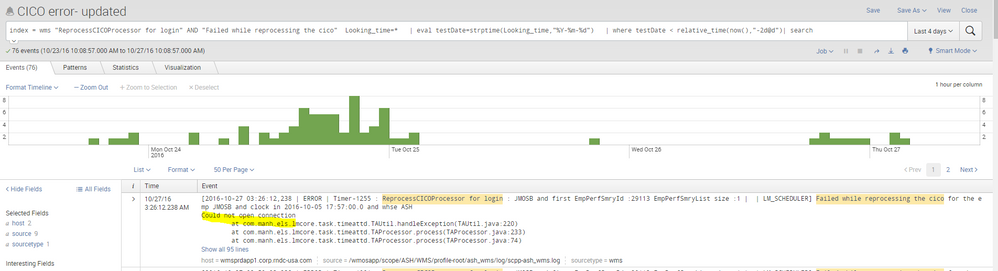
I would appreciate some input.
Thank you,
Oliver

- Mark as New
- Bookmark Message
- Subscribe to Message
- Mute Message
- Subscribe to RSS Feed
- Permalink
- Report Inappropriate Content

Should be able to do something like this. I know the regex isn't nice and you will probably need to change it for your needs.
... | rex field=_raw "(?<FirstFewLines>(.*\n){3})" | table FirstFewLines
- Mark as New
- Bookmark Message
- Subscribe to Message
- Mute Message
- Subscribe to RSS Feed
- Permalink
- Report Inappropriate Content

Give this a try
your current search | rex field=_raw "^(?<trimmed>(.+[\r\n]){3})" | eval _raw=trimmed
- Mark as New
- Bookmark Message
- Subscribe to Message
- Mute Message
- Subscribe to RSS Feed
- Permalink
- Report Inappropriate Content
Should be able to do something like this. I know the regex isn't nice and you will probably need to change it for your needs.
... | rex field=_raw "(?<FirstFewLines>(.*\n){3})" | table FirstFewLines
- Mark as New
- Bookmark Message
- Subscribe to Message
- Mute Message
- Subscribe to RSS Feed
- Permalink
- Report Inappropriate Content
Thank you guys, that was what I needed!

[Puzzles] Solve, Learn, Repeat: Dynamic formatting from XML events
Enter the Agentic Era with Splunk AI Assistant for SPL 1.4
Stronger Security with Federated Search for S3, GCP SQL & Australian Threat ...
