
Join the Conversation
- Find Answers
- :
- Using Splunk
- :
- Splunk Search
- :
- Custom command description field location
- Subscribe to RSS Feed
- Mark Topic as New
- Mark Topic as Read
- Float this Topic for Current User
- Bookmark Topic
- Subscribe to Topic
- Mute Topic
- Printer Friendly Page
- Mark as New
- Bookmark Message
- Subscribe to Message
- Mute Message
- Subscribe to RSS Feed
- Permalink
- Report Inappropriate Content
Custom command description field location

Hello,
I'm using Splunk Enterprise 9.1.2 on my local Linux machine (in a docker container).
When documenting a new custom command in the searchbnf.conf file in my Splunk app, one of the fields is called "description". However, I can't seem to find where this field is actually used?
The command help that pops up when I start typing the command in the search assistant in Splunk Web only shows the "shortdesc" field. This is also true for command from apps installed from SplunkBase.
I'm attaching a screenshot that shows what I see what I start typing a command. In this case I'm using the "summary" command from the Splunk ML app.
The entry in searchbnf.conf is:
[summary-command]
syntax = summary <model_name>
shortdesc = Returns a summary of a machine learning model that was learned using the "fit" command.
description = The summary is algorithm specific. For <LinearRegression>, \
the summary is a list of coefficients. For \
<LogisticRegression>, the summary is a list of \
coefficients for each class.
comment1 = Inspect a previously-learned LinearRegression model, "errors_over_time":
example1 = | summary errors_over_time
usage = public
related = fit apply listmodels deletemodel
As can be seen, only "shortdesc" shows in the little help window that pops up. Is this normal? Is there something to change in some configuration to make the full description show? Is there a different place I can find the full description for the command?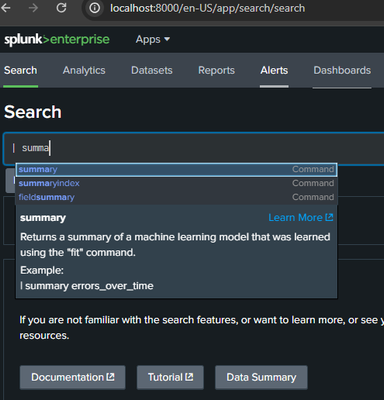
FYI, the "Learn more" link goes to http://localhost:8000/en-US/help?location=search_app.assist.summary which gets automatically redirected to https://docs.splunk.com/Documentation/MLApp/5.4.1/User/Customsearchcommands?ref=hk#summary. However, for my custom command it gets redirected to https://docs.splunk.com/Documentation/Splunk/9.1.2/SearchReference/3rdpartycustomcommands?ref=hk so not relevant...
Thanks!
- Mark as New
- Bookmark Message
- Subscribe to Message
- Mute Message
- Subscribe to RSS Feed
- Permalink
- Report Inappropriate Content

According to the docs for searchbnf.conf, setting the shortdesc field to a value will make it so that the description field only appears when the search assistant is set to "Full" mode.
https://docs.splunk.com/Documentation/Splunk/9.2.1/Admin/Searchbnfconf
If you would like description to always appear in that window, and it is not too long, then you could comment out the shortdesc field. Or you could set your user preference so that the Search assistant is in "Full" mode. (User "Preferences"->"SPL Editor"->"Search assistant". It defaults to "Compact")


Join the Splunk Community Slack to learn, troubleshoot, and make connections with fellow Splunk practitioners in real time!
Join Splunk User Groups to connect and learn in-person by region or remotely by topic or industry.
Defend at Machine Speed: Your Guide to Security Sessions at .conf26
Where Innovation Takes Flight: The Splunk4Aviation Flight Sim Lands at .conf26
Turn Cisco Telemetry Into Action with Cisco Data Fabric, powered by the Splunk ...
