
Join the Conversation
- Find Answers
- :
- Using Splunk
- :
- Splunk Search
- :
- Alien Vault Check OTX
- Subscribe to RSS Feed
- Mark Topic as New
- Mark Topic as Read
- Float this Topic for Current User
- Bookmark Topic
- Subscribe to Topic
- Mute Topic
- Printer Friendly Page
- Mark as New
- Bookmark Message
- Subscribe to Message
- Mute Message
- Subscribe to RSS Feed
- Permalink
- Report Inappropriate Content

Hello
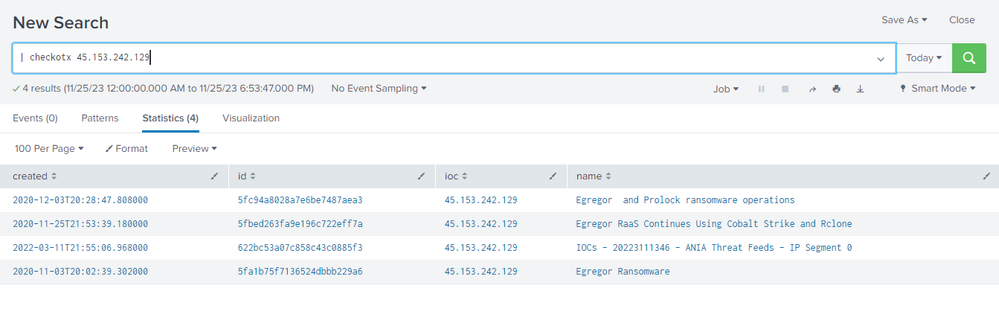
I have installed the add-on "Alien Vault Check OTX".
I would like to know if out of this command where I can query an IP, HASH or domain for indicators of compromise, could someone give me an idea if it is possible to associate it for example to the src_ip or dest_ip field of my firewall logs?
https://apps.splunk.com/app/5422/#/details
- Mark as New
- Bookmark Message
- Subscribe to Message
- Mute Message
- Subscribe to RSS Feed
- Permalink
- Report Inappropriate Content


Hi @splunkcol,
If you're using Splunk Enterprise Security, see <https://community.splunk.com/t5/Splunk-Enterprise-Security/Splunk-ES-issue/m-p/579751/highlight/true...>, but review the latest documentation. With that knowledge in hand, you may prefer to use the OTX TAXII feed.
If you're not using Splunk Enterprise Security and simply want to cross-reference your events with the output of the checkotx generating command, use the map command with an existing search. E.g.:
index=firewall
| dedup src_ip
| map search="checkotx $src_ip$" maxsearches=10 ``` increase maxsearches as needed ```
The map command will run one search for each src_ip value (up to 10 values in this example).
If you're feeling adventurous, you could clone and modify checkotx.py to function as an external lookup command. See <https://dev.splunk.com/enterprise/docs/devtools/externallookups/>. You could then use the Splunk lookup command to correlate src_ip to IOCs:
index=firewall
| lookup checkotx ip as src_ip
If written correctly, the external lookup command could add multi-valued created, id, ioc, and name fields to each event with matching IOCs. (Apologies if you're not feeling adventurous. I like to tinker.)
You may also want to look at Add-on for Open Threat Exchange <https://splunkbase.splunk.com/app/4336>. The add-on will index IOCs, from which you can write a scheduled search to generate a local lookup file or KV store collection. The end result would provide functionality similar to the proposed external lookup command described above.
(Edit: I have a vague memory of maybe having written an OTX lookup command one afternoon for a client. If you're interested, we could probably whip one up from scratch pretty quickly in this thread.)
- Mark as New
- Bookmark Message
- Subscribe to Message
- Mute Message
- Subscribe to RSS Feed
- Permalink
- Report Inappropriate Content
Hi @splunkcol,
If you're using Splunk Enterprise Security, see <https://community.splunk.com/t5/Splunk-Enterprise-Security/Splunk-ES-issue/m-p/579751/highlight/true...>, but review the latest documentation. With that knowledge in hand, you may prefer to use the OTX TAXII feed.
If you're not using Splunk Enterprise Security and simply want to cross-reference your events with the output of the checkotx generating command, use the map command with an existing search. E.g.:
index=firewall
| dedup src_ip
| map search="checkotx $src_ip$" maxsearches=10 ``` increase maxsearches as needed ```
The map command will run one search for each src_ip value (up to 10 values in this example).
If you're feeling adventurous, you could clone and modify checkotx.py to function as an external lookup command. See <https://dev.splunk.com/enterprise/docs/devtools/externallookups/>. You could then use the Splunk lookup command to correlate src_ip to IOCs:
index=firewall
| lookup checkotx ip as src_ip
If written correctly, the external lookup command could add multi-valued created, id, ioc, and name fields to each event with matching IOCs. (Apologies if you're not feeling adventurous. I like to tinker.)
You may also want to look at Add-on for Open Threat Exchange <https://splunkbase.splunk.com/app/4336>. The add-on will index IOCs, from which you can write a scheduled search to generate a local lookup file or KV store collection. The end result would provide functionality similar to the proposed external lookup command described above.
(Edit: I have a vague memory of maybe having written an OTX lookup command one afternoon for a client. If you're interested, we could probably whip one up from scratch pretty quickly in this thread.)
- Mark as New
- Bookmark Message
- Subscribe to Message
- Mute Message
- Subscribe to RSS Feed
- Permalink
- Report Inappropriate Content
@tscroggins Thank you very much for your valuable help

Join the Splunk Community Slack to learn, troubleshoot, and make connections with fellow Splunk practitioners in real time!
Join Splunk User Groups to connect and learn in-person by region or remotely by topic or industry.
Meet the .conf26 AI Agent Buildathon Winners
Trusted Autonomy in the SOC: A Maturity Journey
Supercharging Windows Security Detection Performance: Introducing Hybrid Field ...
