
Join the Conversation
- Find Answers
- :
- Splunk Administration
- :
- Getting Data In
- :
- Why am I getting logs from unexcepted hosts?
- Subscribe to RSS Feed
- Mark Topic as New
- Mark Topic as Read
- Float this Topic for Current User
- Bookmark Topic
- Subscribe to Topic
- Mute Topic
- Printer Friendly Page
- Mark as New
- Bookmark Message
- Subscribe to Message
- Mute Message
- Subscribe to RSS Feed
- Permalink
- Report Inappropriate Content
Why am I getting logs from unexcepted hosts?

Hello All,
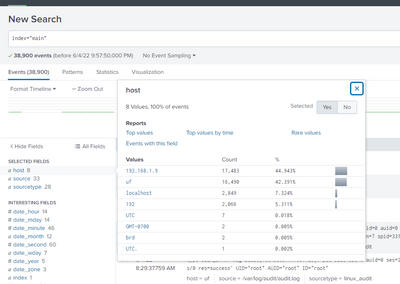
I have integrated UF with splunk v8.2 but getting unnecessary host from where I'm getting logs. Not sure how they started sending logs. Is there a way I can stop and check it, why it started and how I can stop them? Below screenshot for reference
- Mark as New
- Bookmark Message
- Subscribe to Message
- Mute Message
- Subscribe to RSS Feed
- Permalink
- Report Inappropriate Content
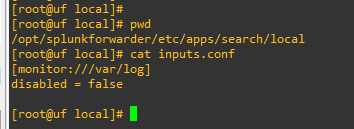
Thanks @gcusello for a quick response. I have just installed UF on CentOS 8 and enabled only /var/log in inputs.conf.
the hostname "uf" is what I'm expecting but not sure from why I'm getting data from other hosts. And I don't have any host in my setup with such names. Is there way, I can check why it's fetching data from these, when I have only 1 entry in my inputs.conf
BR,
__Sebastian
- Mark as New
- Bookmark Message
- Subscribe to Message
- Mute Message
- Subscribe to RSS Feed
- Permalink
- Report Inappropriate Content


If you enabled /var/log in general as a single sourcetype, you will get many different types of logs ingested but treated the same way. That's not the way to go. Don't mix different types of input data within a single inputs.conf stanza.
You should have a separate well-defined stanza for all "syslog-like" files like /var/log/messages, separate for other types (I don't know what's happening on your system and what kinds of data you're pulling). Otherwise all those different files from /var/log are getting treated the same way even though they contain data in different formats. That's why your "host" is getting parsed wrongly from many events.
- Mark as New
- Bookmark Message
- Subscribe to Message
- Mute Message
- Subscribe to RSS Feed
- Permalink
- Report Inappropriate Content

Hi @__Sebastian,
for logs coming from Forwarders, hostname is usually setted in:
- by default:
- $SPLUNK_HOME/system/local/server.conf
- $SPLUNK_HOME/system/local/inputs.conf
- on UF overriding:
- all inputs.conf
- in Indexers or (uf present) on Heavy Forwarders
- on props.conf.
for logs coming from syslogs (usually the ones with an IP address as hostname) are setted in inputs.conf.
So you should read the logs with unexpected hostnames and understand what kind of logs they are: syslogs or from Forwarders.
Then you can analyze the conf files to underatand where the hostname is conigured.
Ciao.
Giuseppe
- Mark as New
- Bookmark Message
- Subscribe to Message
- Mute Message
- Subscribe to RSS Feed
- Permalink
- Report Inappropriate Content
@gcusello As I'm having a test setup, I have deleted all logs. And now I'm only getting logs from defined hosts.
I'll keep it under observation, and will see if it occurs again.
Thanks for your help & detailed explanation.
- Mark as New
- Bookmark Message
- Subscribe to Message
- Mute Message
- Subscribe to RSS Feed
- Permalink
- Report Inappropriate Content
Hi @__Sebastian,
when you'll finish the observation, remember to accept an answer for the other people of Community.
Ciao and happy splunking.
Giuseppe
P.S.: Karma Points are appreciated ,-)
- Mark as New
- Bookmark Message
- Subscribe to Message
- Mute Message
- Subscribe to RSS Feed
- Permalink
- Report Inappropriate Content
Hi @__Sebastian,
the first ting you should do is to understand which kind of unwanted logs you are receiving. from Forwarders or from syslogs.
Viewing you screenshot the seems to be syslogs.
Anyway, if the come from syslogs, you have to go in those systems and stop syslogs sending.
If instead they come from Forwarders, you have to stop (and eventually remove) the Forwarder on these systems.
In addition I can say that the hostnames are very strange, maybe is there an host overriding configuration o your Indexers?
You can check this, viewing props.conf and transforms.conf on your Indexers (https://docs.splunk.com/Documentation/Splunk/latest/Data/Overridedefaulthostassignments).
Ciao.
Giuseppe


Join the Splunk Community Slack to learn, troubleshoot, and make connections with fellow Splunk practitioners in real time!
Join Splunk User Groups to connect and learn in-person by region or remotely by topic or industry.
Supercharging Windows Security Detection Performance: Introducing Hybrid Field ...
Ditch the Manual Grind: Building AI Agents with Splunk
Cisco Data Fabric from Architecture to Investigation, Better SOC Visibility, and More ...
