
Join the Conversation
- Find Answers
- :
- Splunk Administration
- :
- Getting Data In
- :
- How to provide a valid start time for the Tenable ...
- Subscribe to RSS Feed
- Mark Topic as New
- Mark Topic as Read
- Float this Topic for Current User
- Bookmark Topic
- Subscribe to Topic
- Mute Topic
- Printer Friendly Page
- Mark as New
- Bookmark Message
- Subscribe to Message
- Mute Message
- Subscribe to RSS Feed
- Permalink
- Report Inappropriate Content
How to provide a valid start time for the Tenable add-on input?


Hi. I'm trying to add a new input with the Tenable add-on: https://splunkbase.splunk.com/app/4060/
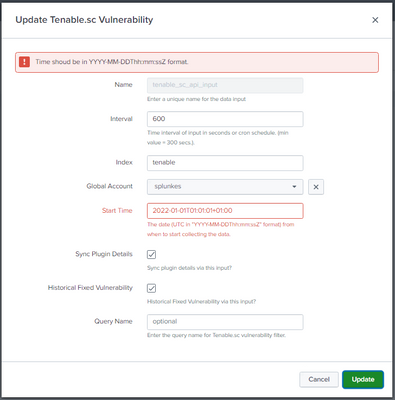
When adding a new input I can input a "start time" from when the add-on will start collection data from Tenable, as opposed to "all time" I suppose, but no matter how I format my timestamp, the add-on won't accept it. See screenshot. I've tried all sort of variations, but all fail. I've also looked at the documentation (https://docs.tenable.com/integrations/Splunk/Content/Splunk2/CreateInput.htm) which suggest another time format than the add-on itself (probably not updated), but that isn't working either.
Has anyone gotten this to work, and if so, what is the correct way of formating the timestamp?
- Mark as New
- Bookmark Message
- Subscribe to Message
- Mute Message
- Subscribe to RSS Feed
- Permalink
- Report Inappropriate Content

Mine is set formatted as: 2021-01-01T01:01:00Z
- Mark as New
- Bookmark Message
- Subscribe to Message
- Mute Message
- Subscribe to RSS Feed
- Permalink
- Report Inappropriate Content
- Mark as New
- Bookmark Message
- Subscribe to Message
- Mute Message
- Subscribe to RSS Feed
- Permalink
- Report Inappropriate Content

The literal character 'Z' is representative of the GMT/UTC time zone. It should be written as %Z in a time format string to ensure Splunk applies the right time zone.
If this reply helps you, Karma would be appreciated.
- Mark as New
- Bookmark Message
- Subscribe to Message
- Mute Message
- Subscribe to RSS Feed
- Permalink
- Report Inappropriate Content

Hi, I am not sure if this directly answers your question, but perhaps it could be of some help being that it is Tenable/Nessus related.
I recently developed a free open-source application called TenaPull, which processes Nessus data for ingestion by Splunk. There is more information here:
https://community.splunk.com/t5/Getting-Data-In/I-developed-an-application-to-process-Nessus-data-fo...
GitHub repo:
https://github.com/billyJoePiano/TenaPull
- Mark as New
- Bookmark Message
- Subscribe to Message
- Mute Message
- Subscribe to RSS Feed
- Permalink
- Report Inappropriate Content
The form says it wants a time in YYYY-mm-ddTHH:MM:SSZ format in the UTC timezone. Have you tried 2022-01-01T00:01:01Z?
If this reply helps you, Karma would be appreciated.
- Mark as New
- Bookmark Message
- Subscribe to Message
- Mute Message
- Subscribe to RSS Feed
- Permalink
- Report Inappropriate Content
Thanks, but the format you're suggesting was the first one I tried.



Join the Splunk Community Slack to learn, troubleshoot, and make connections with fellow Splunk practitioners in real time!
Join Splunk User Groups to connect and learn in-person by region or remotely by topic or industry.
Defend at Machine Speed: Your Guide to Security Sessions at .conf26
Where Innovation Takes Flight: The Splunk4Aviation Flight Sim Lands at .conf26
Turn Cisco Telemetry Into Action with Cisco Data Fabric, powered by the Splunk ...
