
Join the Conversation
- Find Answers
- :
- Using Splunk
- :
- Dashboards & Visualizations
- :
- Re: Area Chart to show duration between two dates
- Subscribe to RSS Feed
- Mark Topic as New
- Mark Topic as Read
- Float this Topic for Current User
- Bookmark Topic
- Subscribe to Topic
- Mute Topic
- Printer Friendly Page
- Mark as New
- Bookmark Message
- Subscribe to Message
- Mute Message
- Subscribe to RSS Feed
- Permalink
- Report Inappropriate Content
Area Chart to show duration between two dates

Hi Splunkers,
I'm a newbie in Splunk. I'm trying to create a chart to show the duration between two dates (Occurtime and ClearTime but I'm unable to get my desired result.
Here's my Data:
Data1
1593323763.234,AlarmName="Mains Input Out of Range",State="Unacknowledged & Cleared",EventType="Power System",Occurtime="2020-06-28 11:09:42",ClearTime="2020-06-28 17:55:05"
Data2
1593323716.209,,AlarmName="NodeB Unavailable",State="Unacknowledged & Cleared",EventType="Running System",Occurtime="2020-06-28 11:59:32",ClearTime="2020-06-28 17:55:13"
Here is my query:
|eval dur_sec=strptime(ClearTime,"%Y-%m-%d %H:%M:%S.%N")-strptime(Occurtime,"%Y-%m-%d %H:%M:%S.%N")
|eval dur_sec=round((strptime(ClearTime,"%Y-%m-%d %H:%M:%S.%N")-strptime(Occurtime,"%Y-%m-%d %H:%M:%S.%N")))
|eval duration=tostring(dur_sec,"duration")
|convert num(duration)
|eval duration=round(duration/60,2)
| eval filter=case(
searchmatch("AC Failure*"),"Power Outage",
searchmatch("Cell Blocked*"),"Cell Blocked",
searchmatch("NodeB Unavailable"),"3G Outage",
searchmatch("eNodeB S1 Control Plane Transmission Interruption"),"4G Outage",1=1,"No Filter match")
| chart max(duration) over Occurtime by filter
Can anyone help me?
- Mark as New
- Bookmark Message
- Subscribe to Message
- Mute Message
- Subscribe to RSS Feed
- Permalink
- Report Inappropriate Content

@Noob_splunker Please explore Chart Event Annotation or Region Chart Viz Custom Visualization for your use case. Refer to one of my older answer with run anywhere example for both: https://community.splunk.com/t5/Dashboards-Visualizations/add-custom-name-in-chart-viz-for-empty-spa...
| makeresults | eval message= "Happy Splunking!!!"
- Mark as New
- Bookmark Message
- Subscribe to Message
- Mute Message
- Subscribe to RSS Feed
- Permalink
- Report Inappropriate Content


What is your desired result? An area chart requires more than two data points.
This search works with more data points.
| makeresults
| eval data="1593323763.234,AlarmName=\"Mains Input Out of Range\",State=\"Unacknowledged & Cleared\",EventType=\"Power System\",Occurtime=\"2020-06-28 11:09:42\",ClearTime=\"2020-06-28 17:55:05\"#
1593323716.209,,AlarmName=\"NodeB Unavailable\",State=\"Unacknowledged & Cleared\",EventType=\"Running System\",Occurtime=\"2020-06-28 11:59:32\",ClearTime=\"2020-06-28 17:55:13\"#
1593323710.209,,AlarmName=\"NodeB Unavailable\",State=\"Unacknowledged & Cleared\",EventType=\"Running System\",Occurtime=\"2020-06-28 11:59:26\",ClearTime=\"2020-06-28 17:54:10\"#
1593323706.209,,AlarmName=\"NodeB Unavailable\",State=\"Unacknowledged & Cleared\",EventType=\"Running System\",Occurtime=\"2020-06-28 11:59:16\",ClearTime=\"2020-06-28 16:50:03\""
| eval data=split(data,"#")
| mvexpand data
| eval _raw=data
| extract kvdelim=",", pairdelim="="
| rex "(?<time>\d+)"
| eval _time=time
`comment("Everything above just creates test data")`
| eval duration=round((strptime(ClearTime,"%Y-%m-%d %H:%M:%S.%N")-strptime(Occurtime,"%Y-%m-%d %H:%M:%S.%N")))
| eval filter=case(
    searchmatch("AC Failure*"),"Power Outage",
    searchmatch("Cell Blocked*"),"Cell Blocked",
    searchmatch("NodeB Unavailable"),"3G Outage",
    searchmatch("eNodeB S1 Control Plane Transmission Interruption"),"4G Outage",1=1,"No Filter match")
| chart max(duration) over Occurtime by filterIf this reply helps you, Karma would be appreciated.
- Mark as New
- Bookmark Message
- Subscribe to Message
- Mute Message
- Subscribe to RSS Feed
- Permalink
- Report Inappropriate Content
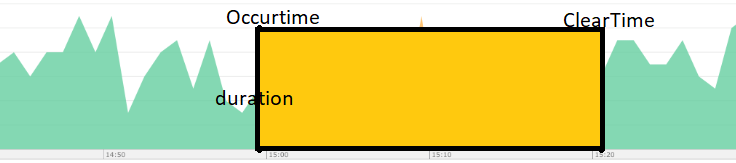
Hi @richgalloway thanks for your reply.
My desired result is more of like this.
Y-axis is the duration.
- Mark as New
- Bookmark Message
- Subscribe to Message
- Mute Message
- Subscribe to RSS Feed
- Permalink
- Report Inappropriate Content
If this reply helps you, Karma would be appreciated.

Upcoming Webinar: Unmasking Insider Threats with Slunk Enterprise Security’s UEBA
.conf25 technical session recap of Observability for Gen AI: Monitoring LLM ...
A Season of Skills: New Splunk Courses to Light Up Your Learning Journey
