
Join the Conversation
- Find Answers
- :
- Using Splunk
- :
- Splunk Search
- :
- Re: Transforming results from json api to a table
- Subscribe to RSS Feed
- Mark Topic as New
- Mark Topic as Read
- Float this Topic for Current User
- Bookmark Topic
- Subscribe to Topic
- Mute Topic
- Printer Friendly Page
- Mark as New
- Bookmark Message
- Subscribe to Message
- Mute Message
- Subscribe to RSS Feed
- Permalink
- Report Inappropriate Content
Transforming results from json api to a table

Hi there!
I am kinda new to Splunk so I apologize if my wording is off, but I am trying to collect metrics from a weirder phone system, and the way it presents data is like this:
{
"response": {
"method": "switchvox.callQueues.getCurrentStatus",
"result": {
"call_queue": {
"extension": "***",
"strategy": "ring_all",
"queue_members": {
"queue_member": [
{
"paused_time": "15911",
"completed_calls": "8",
"paused_since": "",
"talking_to_name": "",
"login_type": "login",
"order": "1",
"login_time": "32963",
"extension": "***",
"max_talk_time": "661",
"time_of_last_call": "2021-01-06 13:52:31",
"paused": "0",
"account_id": "***",
"missed_calls": "14",
"logged_in_status": "logged_off",
"fullname": "***",
"talking_to_number": "",
"avg_talk_time": "443"
},
Where it restates the variable name with each record. So far I have the rest api module pulling the data, and doing some light translation on it (it still looks like an array but it is at least identifying each extension). Is there a way to get Splunk to use the first portion of each response as a field name while tying it to the same record?
EX:
{
"paused_time": "15911",
"completed_calls": "8",
"paused_since": "",
"talking_to_name": "",
"login_type": "login",
"order": "1",
"login_time": "32963",
"extension": "***",
"max_talk_time": "661",
"time_of_last_call": "2021-01-06 13:52:31",
"paused": "0",
"account_id": "**1",
"missed_calls": "14",
"logged_in_status": "logged_off",
"fullname": "***",
"talking_to_number": "",
"avg_talk_time": "443"
},
getting converted to
| Account_ID | login_time | missed_calls | paused_since | avg_talk_time | max_talk_time |
| **1 | 32963 | 14 | 443 | 661 | **2 | 32945 | 0 | 250 | 450
|
- Mark as New
- Bookmark Message
- Subscribe to Message
- Mute Message
- Subscribe to RSS Feed
- Permalink
- Report Inappropriate Content


Hi @willryals ,
Yes, on some json events especially arrays cannot be parsed default successfully. That is why you should use this kind of search commands.
- Mark as New
- Bookmark Message
- Subscribe to Message
- Mute Message
- Subscribe to RSS Feed
- Permalink
- Report Inappropriate Content
So I went ahead and created new sources and have them writing to a new index, but it still appears to be disregarding the SPL.
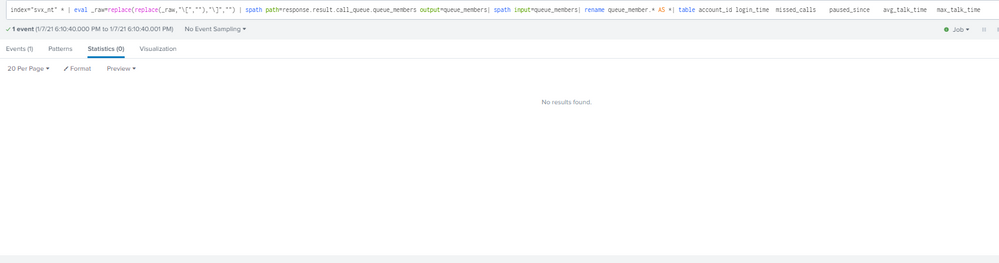
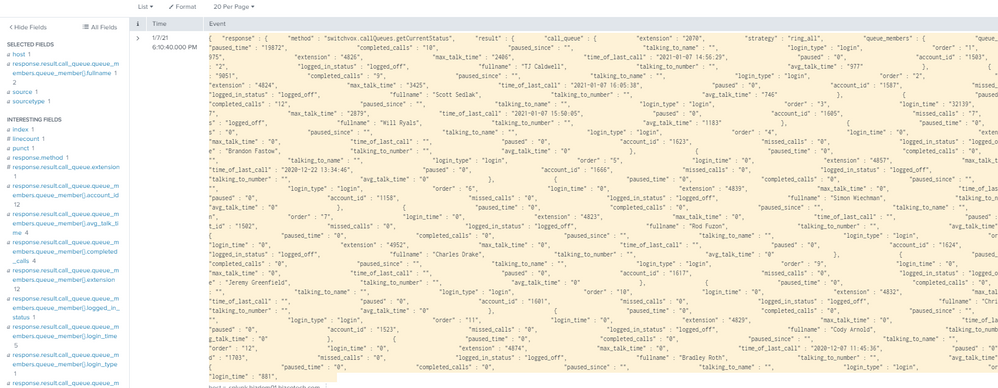
So far the only thing I have is the response type set to JSON on the source...
Are there any other ideas you can think of?
- Mark as New
- Bookmark Message
- Subscribe to Message
- Mute Message
- Subscribe to RSS Feed
- Permalink
- Report Inappropriate Content
Hi @willryals,
You can try below;
| eval _raw=replace(replace(_raw,"\[",""),"\]","")
| spath path=response.result.call_queue.queue_members output=queue_members
| spath input=queue_members
| rename queue_member.* AS *
| table account_id login_time	missed_calls	paused_since	avg_talk_time	max_talk_time
If this reply helps you an upvote is appreciated.
- Mark as New
- Bookmark Message
- Subscribe to Message
- Mute Message
- Subscribe to RSS Feed
- Permalink
- Report Inappropriate Content
@scelikok Thank you for the fast reply! While Splunk takes those arguments, it doesn't appear to actually be parsing the data. I would add these arguments to the search right?

Join the Splunk Community Slack to learn, troubleshoot, and make connections with fellow Splunk practitioners in real time!
Join Splunk User Groups to connect and learn in-person by region or remotely by topic or industry.
Announcing Modern Navigation: A New Era of Splunk User Experience
Modernize your Splunk Apps – Introducing Python 3.13 in Splunk
Step into “Hunt the Insider: An Splunk ES Premier Mystery” to catch a cybercriminal ...
