
Join the Conversation
- Find Answers
- :
- Using Splunk
- :
- Splunk Search
- :
- Transaction global status
- Subscribe to RSS Feed
- Mark Topic as New
- Mark Topic as Read
- Float this Topic for Current User
- Bookmark Topic
- Subscribe to Topic
- Mute Topic
- Printer Friendly Page
- Mark as New
- Bookmark Message
- Subscribe to Message
- Mute Message
- Subscribe to RSS Feed
- Permalink
- Report Inappropriate Content

Hi,
I have some events like :
---------------------------------
TXID;RECEIVER;STATUS
AA11;RCV00001;OK
AA11;RCV00001;KO
AA11;RCV00002;OK
AA22;RCV00001;OK
AA22;RCV00002;OK
AA22;RCV00002;KO
AA33;RCV00001;KO
AA33;RCV00001;KO
AA33;RCV00001;OK
AA33;RCV00002;KO
AA33;RCV00002;OK
AA44;RCV00001;KO
AA44;RCV00002;KO
AA55;RCV00001;OK
AA66;RCV00001;KO
AA77;RCV00001;OK
AA77;RCV00001;OK
AA77;RCV00001;KO
AA88;RCV00001;KO
AA88;RCV00001;OK
AA99;RCV00001;OK
AA99;RCV00001;KO
AA1Z;RCV00001;KO
AA1Z;RCV00001;KO
AA1Z;RCV00002;OK
AABH;RCV00001;OK
AABH;RCV00002;OK
AAKK;RCV00001;OK
AAKK;RCV00002;OK
AAKK;RCV00001;OK
AAYY;RCV00001;OK
AAYY;RCV00002;OK
AAYY;RCV00002;OK
AAPO;RCV00001;OK
AAPO;RCV00001;KO
AAPO;RCV00002;OK
AAPO;RCV00002;KO
AAML;RCV00001;KO
AAML;RCV00001;OK
AAML;RCV00002;KO
AAML;RCV00002;OK
AAOO;RCV00001;OK
AAOO;RCV00001;KO
AAOO;RCV00002;KO
AAOO;RCV00002;OK
AATR;RCV00001;KO
AATR;RCV00001;KO
AATR;RCV00002;KO
AATR;RCV00002;OK
AAFA;RCV00001;OK
AAFA;RCV00001;OK
AAFA;RCV00002;KO
AAFA;RCV00002;OK
AAWW;RCV00002;OK
AAWW;RCV00001;KO
AAWW;RCV00002;OK
AAHZ;RCV00001;KO
AAHZ;RCV00002;OK
AAHZ;RCV00001;OK
----------------------------
I need to calculate a global status for each transaction.
Here you are the rules :
- each transaction must have RCV00001 and RCV00002 : if it has only one RECEIVER then the global status is => ONGOING
- the global status of a transaction is OK only if : it has at least one RCV00001 with OK status + at least one RCV00002 with OK status
- else the global status is KO
As a result we should get :
TXID;GLOBAL_STATUS
AA11;OK
AA22;OK
AA33;OK
AA44;KO
AA55;ONGOING
AA66;ONGOING
AA77;ONGOING
AA88;ONGOING
AA99;ONGOING
AA1Z;KO
AABH;OK
AAKK;OK
AAYY;OK
AAPO;OK
AAML;OK
AAOO;OK
AATR;KO
AAFA;OK
AAWW;KO
AAHZ;OK
Thank you for your help,
Best regards
- Mark as New
- Bookmark Message
- Subscribe to Message
- Mute Message
- Subscribe to RSS Feed
- Permalink
- Report Inappropriate Content
Well i have have done this, it is working but i think there is a better more optimised solution :
| transaction TXID mvlist=true
| eval RECEIVER_STATUS=mvzip(RECEIVER,STATUS)
| eval DEDUP_RECEIVER_STATUS=mvdedup(RECEIVER_STATUS)
| eval RECEIVER_OK=mvfilter(match(DEDUP_RECEIVER_STATUS, "RCV00001,OK$") OR match(DEDUP_RECEIVER_STATUS, "RCV00002,OK$"))
| eval JOINED_RECEIVER_OK=mvjoin(RECEIVER_OK, ";")
| eval OK_GLOBAL_STATUS=if(JOINED_RECEIVER_OK=="RCV00001,OK;RCV00002,OK" OR JOINED_RECEIVER_OK=="RCV00002,OK;RCV00001,OK","OK", "NA")
| eval RECEIVER_DEDUP=mvdedup(RECEIVER)
| eval RECEIVER_DEDUP_COUNT=mvcount(RECEIVER_DEDUP)
| eval ONGOING_GLOBAL_STATUS=if(RECEIVER_DEDUP_COUNT!=2,"ONGOING","NA")
| eval GLOBAL_STATUS=if(OK_GLOBAL_STATUS=="NA" AND ONGOING_GLOBAL_STATUS=="NA","KO",if(OK_GLOBAL_STATUS=="NA",ONGOING_GLOBAL_STATUS,if(RECEIVER_DEDUP_COUNT!=2,"ONGOING",OK_GLOBAL_STATUS)))
| eval TXID=mvdedup(TXID)
| table TXID GLOBAL_STATUS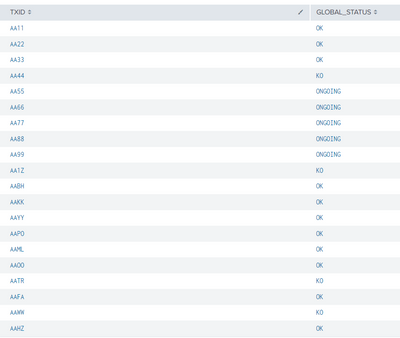
- Mark as New
- Bookmark Message
- Subscribe to Message
- Mute Message
- Subscribe to RSS Feed
- Permalink
- Report Inappropriate Content
Well i have have done this, it is working but i think there is a better more optimised solution :
| transaction TXID mvlist=true
| eval RECEIVER_STATUS=mvzip(RECEIVER,STATUS)
| eval DEDUP_RECEIVER_STATUS=mvdedup(RECEIVER_STATUS)
| eval RECEIVER_OK=mvfilter(match(DEDUP_RECEIVER_STATUS, "RCV00001,OK$") OR match(DEDUP_RECEIVER_STATUS, "RCV00002,OK$"))
| eval JOINED_RECEIVER_OK=mvjoin(RECEIVER_OK, ";")
| eval OK_GLOBAL_STATUS=if(JOINED_RECEIVER_OK=="RCV00001,OK;RCV00002,OK" OR JOINED_RECEIVER_OK=="RCV00002,OK;RCV00001,OK","OK", "NA")
| eval RECEIVER_DEDUP=mvdedup(RECEIVER)
| eval RECEIVER_DEDUP_COUNT=mvcount(RECEIVER_DEDUP)
| eval ONGOING_GLOBAL_STATUS=if(RECEIVER_DEDUP_COUNT!=2,"ONGOING","NA")
| eval GLOBAL_STATUS=if(OK_GLOBAL_STATUS=="NA" AND ONGOING_GLOBAL_STATUS=="NA","KO",if(OK_GLOBAL_STATUS=="NA",ONGOING_GLOBAL_STATUS,if(RECEIVER_DEDUP_COUNT!=2,"ONGOING",OK_GLOBAL_STATUS)))
| eval TXID=mvdedup(TXID)
| table TXID GLOBAL_STATUS
- Mark as New
- Bookmark Message
- Subscribe to Message
- Mute Message
- Subscribe to RSS Feed
- Permalink
- Report Inappropriate Content

Join the Splunk Community Slack to learn, troubleshoot, and make connections with fellow Splunk practitioners in real time!
Join Splunk User Groups to connect and learn in-person by region or remotely by topic or industry.
Build resilience for the agentic era: Join us at Splunk Go San Jose
Manage Edge Processor pipelines end to end with APIs
Splunk Brings Proof of Control to Digital Asset Transfers
