
Join the Conversation
- Find Answers
- :
- Using Splunk
- :
- Splunk Search
- :
- Track License Usage Cumulatively, Comparing Last 7...
- Subscribe to RSS Feed
- Mark Topic as New
- Mark Topic as Read
- Float this Topic for Current User
- Bookmark Topic
- Subscribe to Topic
- Mute Topic
- Printer Friendly Page
- Mark as New
- Bookmark Message
- Subscribe to Message
- Mute Message
- Subscribe to RSS Feed
- Permalink
- Report Inappropriate Content
Track License Usage Cumulatively, Comparing Last 7 Days

I would like to chart license usage throughout the day cumulatively, meaning, the results are added and charts every 5 minutes. So the chart would basically be a graph on a steady incline going up from left to right.
This is the search I am attempting, but the timewrap function is adding the previous days results to the next day.
index=_internal host=host source="*license_usage.log" type!=RolloverSummary earliest=-3d@d latest=+1d@d | timechart span=5m sum(b) as total | streamstats global=f sum(total) as accu_total | timewrap d
If I remove the timechart function, the current day results look fine. But when I add timechart, it doesn't work how I want it to.
Also, I need the accu_total, but a second line is generated called "total". How do I remove that line?
Thoughts? Thanks!
- Mark as New
- Bookmark Message
- Subscribe to Message
- Mute Message
- Subscribe to RSS Feed
- Permalink
- Report Inappropriate Content

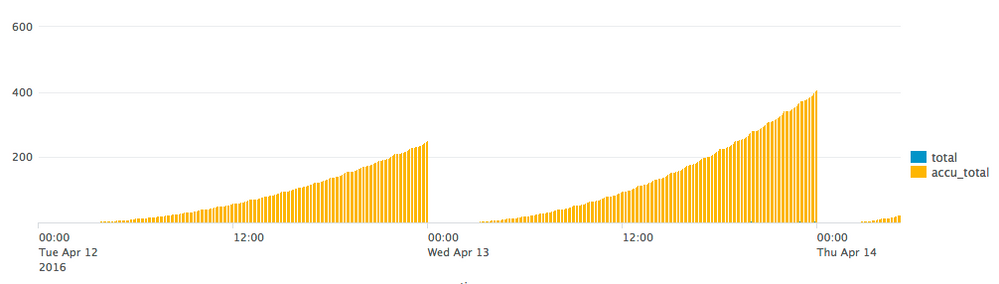
Hi, take a look at the picture below and let me know if that's what you are looking for.
If not please provide a graph explaining what it is exactly what you need as I'm not 100% sure yet.
Keep in mind I don't have production data available and therefore I had to generate license usage with the variables minute, hour, day that you can ignore if you want.
index=_internal source=*license_usage.log type="RolloverSummary" earliest=-2d@d
| bin _time span=5m
| stats latest(b) AS b by pool, _time
| timechart span=5m sum(b) AS total fixedrange=false
| eval minute = strftime(_time, "%M")
| eval hour = strftime(_time, "%H")
| eval day = strftime(_time, "%d")
| eval total = coalesce(total, pow(day,6)*hour*minute)
| fields - day, hour, minute
| eval date = strftime(_time, "%Y-%m-%d")
| streamstats global=f sum(total) as accu_total by date
| eval total = round(total/1024/1024/1024, 3)
| eval accu_total = round(accu_total/1024/1024/1024, 3)
| fields - date
Output (see picture)
- Mark as New
- Bookmark Message
- Subscribe to Message
- Mute Message
- Subscribe to RSS Feed
- Permalink
- Report Inappropriate Content
I am actually looking for something like what timewrap provides. A line chart that overlaps each day on top of each other, so you can easily compare each day.
I decided to check the license and dump it to a summary index and chart on that.
Thanks for your help!
- Mark as New
- Bookmark Message
- Subscribe to Message
- Mute Message
- Subscribe to RSS Feed
- Permalink
- Report Inappropriate Content

Aferone - Can you explain what you ended up coming up with?
- Mark as New
- Bookmark Message
- Subscribe to Message
- Mute Message
- Subscribe to RSS Feed
- Permalink
- Report Inappropriate Content
index=summary source="License - License Progress Today (Populate Summary Index)" earliest=-3d@d latest=+1d@d
| timechart span=5m values(GB)
| rename values(GB) as GB
| timewrap d
| rename GB_latest_day as Today GB_1day_before as "1 Day Ago" GB_2days_before as "2 Days Ago" GB_3days_before as "3 Days Ago"
I check our license usage overall every 5 minutes and add it to a summary index. Then I use the above search to display the results.
- Mark as New
- Bookmark Message
- Subscribe to Message
- Mute Message
- Subscribe to RSS Feed
- Permalink
- Report Inappropriate Content
What about this?
index=_internal source=*license_usage.log type="Usage" earliest=-7d@d latest=@d
| bin _time span=5m
| stats sum(b) as total by _time
| streamstats global=f sum(total) as accu_total
- Mark as New
- Bookmark Message
- Subscribe to Message
- Mute Message
- Subscribe to RSS Feed
- Permalink
- Report Inappropriate Content
I may have forgotten to add that every day should be a new line so we can compare them.
- Mark as New
- Bookmark Message
- Subscribe to Message
- Mute Message
- Subscribe to RSS Feed
- Permalink
- Report Inappropriate Content
I can't test this right now, but what about this other one:
index=_internal source=*license_usage.log type="Usage" earliest=-7d@d latest=@d
| bin _time span=5m
| eval date = strftime(_time, "%Y-%m-%d")
| stats sum(b) as total by _time, date
| streamstats global=f sum(total) as accu_total by date
- Mark as New
- Bookmark Message
- Subscribe to Message
- Mute Message
- Subscribe to RSS Feed
- Permalink
- Report Inappropriate Content
The line isn't stacked. It starts over for each day, but it is one continuous line.
And the "total" line is still there.
I really appreciate your help. Thank you.



Join the Splunk Community Slack to learn, troubleshoot, and make connections with fellow Splunk practitioners in real time!
Join Splunk User Groups to connect and learn in-person by region or remotely by topic or industry.
SOC4Kafka - New Kafka Connector Powered by OpenTelemetry
Rounding off the Splunk Dashboard Contest
A Four Part Event Series: AI + Observability: AI Agents, LLMs, Apps, & Infrastructure
