
Join the Conversation
- Find Answers
- :
- Using Splunk
- :
- Splunk Search
- :
- Timechart automatic high resize
- Subscribe to RSS Feed
- Mark Topic as New
- Mark Topic as Read
- Float this Topic for Current User
- Bookmark Topic
- Subscribe to Topic
- Mute Topic
- Printer Friendly Page
- Mark as New
- Bookmark Message
- Subscribe to Message
- Mute Message
- Subscribe to RSS Feed
- Permalink
- Report Inappropriate Content
Timechart automatic high resize

Hi,
I've got a timechart with different columns (depending on the search). If I don't get many columns, the high of the timechart is enough. If I get many columns results, the timechart high is not enough and all will be pressed together.
So I tried to change the high automatically by the column results, but I don't know how to get the correct column results on the "XXXXXXX". $job.resultCount$ is not correct, because it gives me the row results.
Someone an Idea?
            <search>
              <query>Linie=$Token_Linie$  Antyp=$Token_Antyp$
              | eval combined_field= Linie + " " + Antyp
              | eventstats count as "totalCount" by An
              | timechart  count(totalCount) BY combined_field
              </query>
              <earliest>$Token_IO_NIO_Zeit.earliest$</earliest>
              <latest>$Token_IO_NIO_Zeit.latest$</latest>
              <done>
                   <eval token="tokPanelHeight2">100*$XXXXXXX$</eval>
             </done>
            </search>
            <option name="height">$tokPanelHeight2$</option>

Thx a lot!!!!!
- Mark as New
- Bookmark Message
- Subscribe to Message
- Mute Message
- Subscribe to RSS Feed
- Permalink
- Report Inappropriate Content

I would not do it this way. I would instead use the format tool to change the Y-axis from linear to log.
- Mark as New
- Bookmark Message
- Subscribe to Message
- Mute Message
- Subscribe to RSS Feed
- Permalink
- Report Inappropriate Content
No, that solves not my problem.
My problem ist, if my result shows only one column the display is ok. But if I get more as result the chart get´s pressed together. To rise only the high parameter is also not good, because than the timechart is for one column result to big and for ten column result to small. I need an autoresize of the timechart high....
Good display of one result.
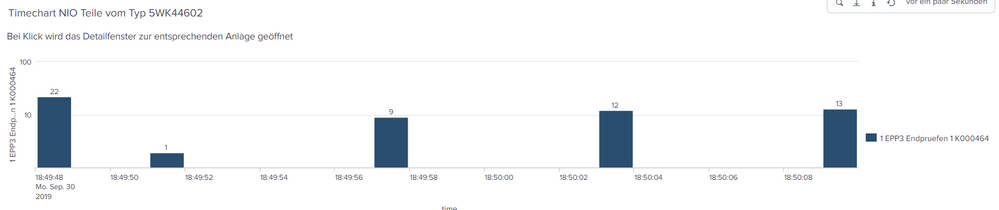
Bad display example of 4 results.



Join the Splunk Community Slack to learn, troubleshoot, and make connections with fellow Splunk practitioners in real time!
Join Splunk User Groups to connect and learn in-person by region or remotely by topic or industry.
Meet the .conf26 AI Agent Buildathon Winners
Trusted Autonomy in the SOC: A Maturity Journey
Supercharging Windows Security Detection Performance: Introducing Hybrid Field ...
