
Join the Conversation
- Find Answers
- :
- Using Splunk
- :
- Splunk Search
- :
- Splunk data doesn't split correctly
- Subscribe to RSS Feed
- Mark Topic as New
- Mark Topic as Read
- Float this Topic for Current User
- Bookmark Topic
- Subscribe to Topic
- Mute Topic
- Printer Friendly Page
- Mark as New
- Bookmark Message
- Subscribe to Message
- Mute Message
- Subscribe to RSS Feed
- Permalink
- Report Inappropriate Content
Splunk data doesn't split correctly

Hi Splunk team,
When I used Splunk to search the log data and found it didn't split correctly, It displayed as below:
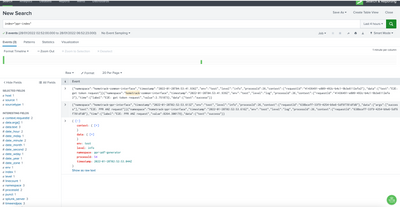
The two data have been combined together, Can anyone has some suggestions do this situation? appreciate it.
- Mark as New
- Bookmark Message
- Subscribe to Message
- Mute Message
- Subscribe to RSS Feed
- Permalink
- Report Inappropriate Content


Hi @zhoayang,
could you share some sample of your original logs (not the oned displayed in Splunk search)?
please one of the event correctly parsed and one of the event not correctly parsed.
Anyway, in Community you can find many examples of JSON parsing e.g. https://community.splunk.com/t5/Getting-Data-In/How-to-parse-JSON-log-data/m-p/121521.
Ciao.
Giuseppe
- Mark as New
- Bookmark Message
- Subscribe to Message
- Mute Message
- Subscribe to RSS Feed
- Permalink
- Report Inappropriate Content
It looks like a problem with LINE_BREAKER in props.conf. (See Configure event line breaking.) By default Splunk indexer assumes "([\r\n]+)", i.e., a new line, to be the separator of events. But some logs seem to have jammed into a single line. There is no universal regex to break non-hierarchical structures like JSON. So, it is best to ask developers to break events neatly. If developers can guarantee that the first field is always "namespace" as in illustrated examples, you can try ([\r\n]+|}{"namespace":).
There is a dedicated forum Getting Data In in which this type of issues are discussed.

Join the Splunk Community Slack to learn, troubleshoot, and make connections with fellow Splunk practitioners in real time!
Join Splunk User Groups to connect and learn in-person by region or remotely by topic or industry.
Tuning Edge Processor in Hybrid Mode: What Limits Each Data Path
Best Practices: Splunk auto adjust pipeline queue
Request for Professional Development: Attending .conf26
