
Join the Conversation
- Find Answers
- :
- Using Splunk
- :
- Splunk Search
- :
- Re: Search cluster operator drill down issue
- Subscribe to RSS Feed
- Mark Topic as New
- Mark Topic as Read
- Float this Topic for Current User
- Bookmark Topic
- Subscribe to Topic
- Mute Topic
- Printer Friendly Page
- Mark as New
- Bookmark Message
- Subscribe to Message
- Mute Message
- Subscribe to RSS Feed
- Permalink
- Report Inappropriate Content
Search cluster operator drill down issue

I searched the error events and use the "cluster" operator as below:
error | cluster | table cluster_count _raw
I got a list of clusters with the size of each cluster as below:
1   98  192.168.11.37 - - ..." 2899 4035
2   4   Apr 13 15:03:10 1.1.1.1 ... (2006-04-13 15:02:40)<000>
3   12  Jan 14 09:47:14 ...(2005-01-14 09:48:21)
...
Now I click the cluster size (98) to look for the 98 events in that cluster, however, there is only one event displayed. Is there anything I did wrong?
LL
- Mark as New
- Bookmark Message
- Subscribe to Message
- Mute Message
- Subscribe to RSS Feed
- Permalink
- Report Inappropriate Content


Hi, I know is years later, but I have your answer ! You need to add the labelonly=t to your cluster command.
error | cluster labelonly=t showcount=t | table cluster_count, cluster_label, _raw | sort - cluster_count
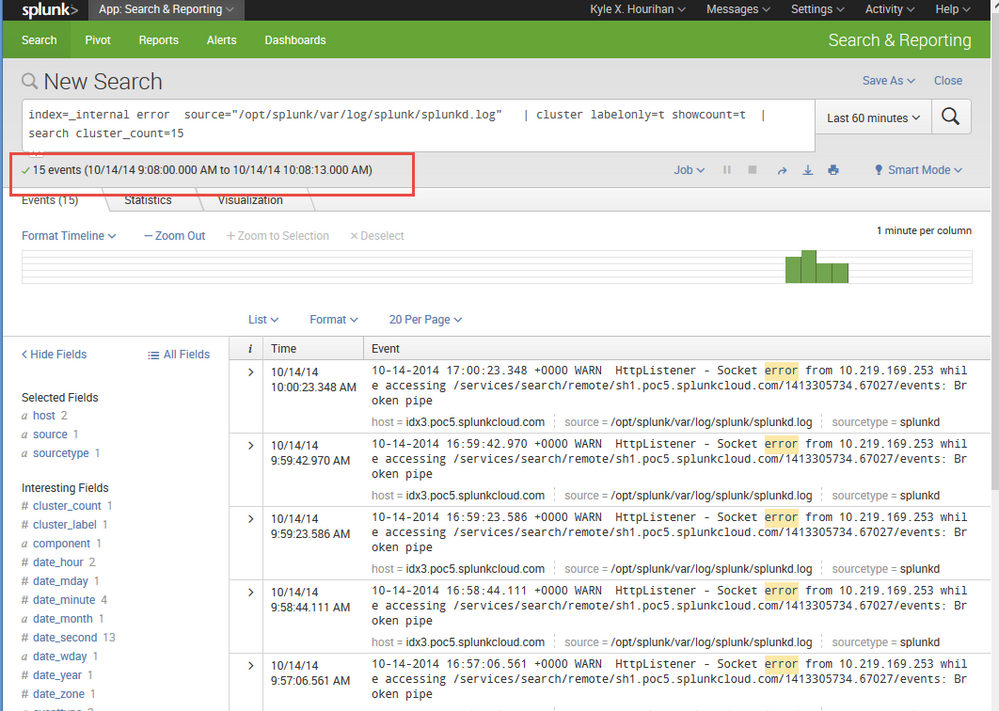
You can drill into the cluster label to get all your results.
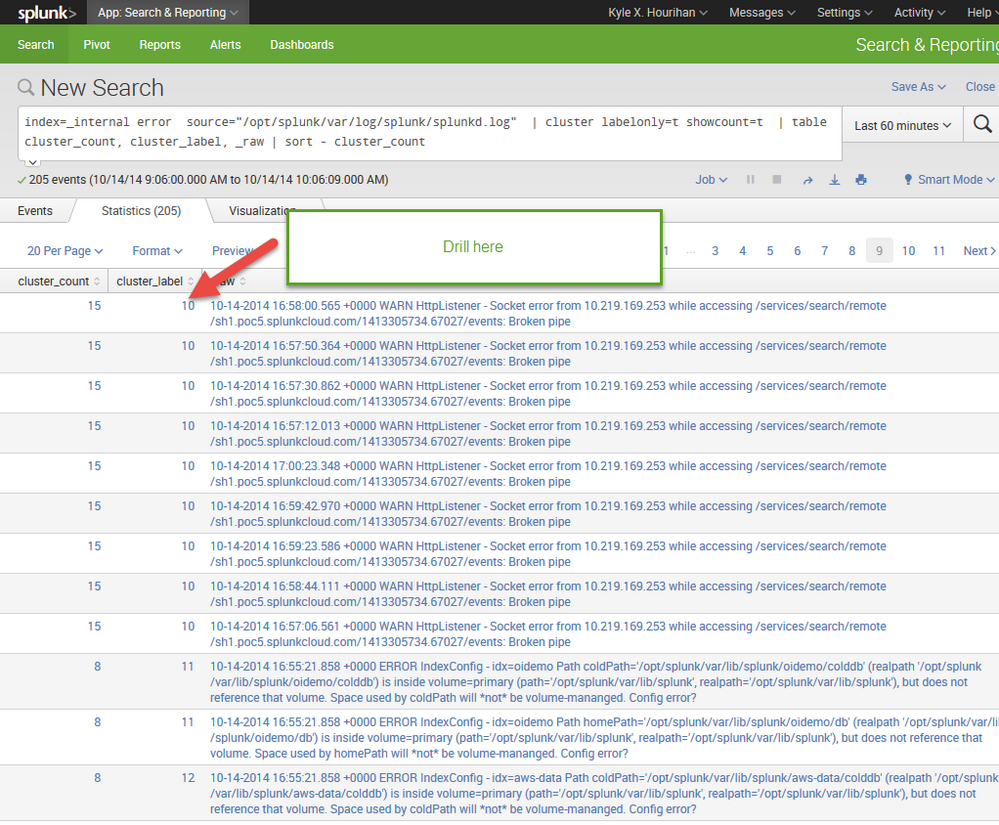
then you get the 15 results:


- Mark as New
- Bookmark Message
- Subscribe to Message
- Mute Message
- Subscribe to RSS Feed
- Permalink
- Report Inappropriate Content
error | cluster | table cluster_count _raw
The above is my input for search and cluster. By "drilldown" I mean I click the link on the cluster size to further display cluster details -- I always see one event no matter which cluster I click. I just wonder what this event mean? --- a sample event from the cluster?
LL
- Mark as New
- Bookmark Message
- Subscribe to Message
- Mute Message
- Subscribe to RSS Feed
- Permalink
- Report Inappropriate Content
In my version of Splunk when I click on information like that the "drilldown" opens a new Splunk window with the drilldown search at the top. stuff like
search term | stats count by ip | sort -count
when I click on "192.168.84.2" a new widow opens with the search:
search terms ip="192.168.84.2"
- Mark as New
- Bookmark Message
- Subscribe to Message
- Mute Message
- Subscribe to RSS Feed
- Permalink
- Report Inappropriate Content
can you post the drill down search?

Join the Splunk Community Slack to learn, troubleshoot, and make connections with fellow Splunk practitioners in real time!
Join Splunk User Groups to connect and learn in-person by region or remotely by topic or industry.
Persistent Queue at TcpOut — One of Splunk's Most Practical Features
Catalog Is Now Generally Available on Splunk Cloud Platform
Your Path to AgenticOps: AI Experiences for Every Splunk Practitioner
