
Join the Conversation
- Find Answers
- :
- Using Splunk
- :
- Splunk Search
- :
- Re: ISO 8601 TimeStamp Extraction / Formatting and...
- Subscribe to RSS Feed
- Mark Topic as New
- Mark Topic as Read
- Float this Topic for Current User
- Bookmark Topic
- Subscribe to Topic
- Mute Topic
- Printer Friendly Page
- Mark as New
- Bookmark Message
- Subscribe to Message
- Mute Message
- Subscribe to RSS Feed
- Permalink
- Report Inappropriate Content

Hi all,
I have a timestamp in a format I havn't dealt with before and I am struggling to get it converted to my timezone using the offset. In raw event form it is like this:
"TimeGenerated": "2022-10-25T04:21:50.2975103Z"
I have also attached a screenshot of how splunk is indexing it.
My second question is how would I configure the sourcetype to have splunk use TimeGenerated field as _time automatically? I've attached a second screenshot with the sourcetype as well.
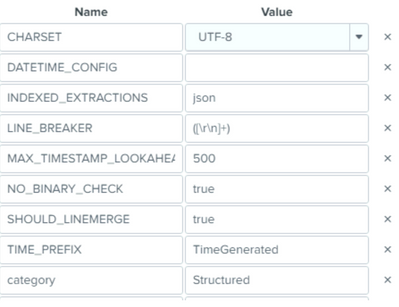
Any help or links would be greatly appreciated!
- Mark as New
- Bookmark Message
- Subscribe to Message
- Mute Message
- Subscribe to RSS Feed
- Permalink
- Report Inappropriate Content

Try the following settings:
TIME_FORMAT = %Y-%m-%dT%H:%M:%S.%7N%Z
TIME_PREFIX = "TimeGenerated":\s"
- Mark as New
- Bookmark Message
- Subscribe to Message
- Mute Message
- Subscribe to RSS Feed
- Permalink
- Report Inappropriate Content
Try the following settings:
TIME_FORMAT = %Y-%m-%dT%H:%M:%S.%7N%Z
TIME_PREFIX = "TimeGenerated":\s"
- Mark as New
- Bookmark Message
- Subscribe to Message
- Mute Message
- Subscribe to RSS Feed
- Permalink
- Report Inappropriate Content
hey johnhuang,
I have attempted your suggestion and ingested some more data:
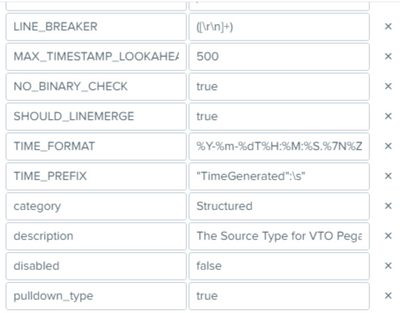
Unfortunately it doesn't look like it has updated _time correctly:

Would these settings have any impact as well?

Appreciate your help, thanks mate
- Mark as New
- Bookmark Message
- Subscribe to Message
- Mute Message
- Subscribe to RSS Feed
- Permalink
- Report Inappropriate Content
If the data is being processed by a heavy forwarder, make sure this is applied there.
- Mark as New
- Bookmark Message
- Subscribe to Message
- Mute Message
- Subscribe to RSS Feed
- Permalink
- Report Inappropriate Content
This worked perfectly thanks mate!



Join the Splunk Community Slack to learn, troubleshoot, and make connections with fellow Splunk practitioners in real time!
Join Splunk User Groups to connect and learn in-person by region or remotely by topic or industry.
A Four-Part Event Series: Full Stack Observability For the AI Era
SOC4Kafka - New Kafka Connector Powered by OpenTelemetry
Event Series: Level up your SOC: Advancing with Splunk Enterprise Security
