
Join the Conversation
- Find Answers
- :
- Using Splunk
- :
- Splunk Search
- :
- How would I calculate time difference between diff...
- Subscribe to RSS Feed
- Mark Topic as New
- Mark Topic as Read
- Float this Topic for Current User
- Bookmark Topic
- Subscribe to Topic
- Mute Topic
- Printer Friendly Page
- Mark as New
- Bookmark Message
- Subscribe to Message
- Mute Message
- Subscribe to RSS Feed
- Permalink
- Report Inappropriate Content

Hi All, i am using 2 searches combined via an append to get me data in the following format. Each row is a distinct event in Raw data.
| _time | Status | owner | rule_ID |
| 2022-08-03 23:00:00 | <null> | unassigned | 001 |
| 2022-08-03 23:35:00 | Acknowledged | John | 001 |
| 2022-08-03 23:40:00 | Resolved | John | 001 |
I need to calculate time_difference between each event i.e. each row above. How can i get another column called "difference" added that shows the delta between these 3 different events.
Desired Output:
| _time | Status | owner | rule_ID | Difference |
| 2022-08-03 23:00:00 | <null> | unassigned | 001 | 0 |
| 2022-08-03 23:35:00 | Acknowledged | John | 001 | 0:35:00 |
| 2022-08-03 23:40:00 | Resolved | John | 001 | 0:05:00 |
Note: Rule_ID is the only common field in all 3 events. I referred to other posts here where folks have recommended transaction command. Unfortunately i don't have any specific field to use in startswith or endswith , so transaction won't work.
Thank you in advance
- Mark as New
- Bookmark Message
- Subscribe to Message
- Mute Message
- Subscribe to RSS Feed
- Permalink
- Report Inappropriate Content


Field names are case-sensitive - try
| streamstats window=2 global=f range(_time) as difference by rule_id- Mark as New
- Bookmark Message
- Subscribe to Message
- Mute Message
- Subscribe to RSS Feed
- Permalink
- Report Inappropriate Content
Try something like this
| streamstats window=2 global=f range(_time) as difference by rule_ID
| fieldformat difference=tostring(difference,"duration")- Mark as New
- Bookmark Message
- Subscribe to Message
- Mute Message
- Subscribe to RSS Feed
- Permalink
- Report Inappropriate Content
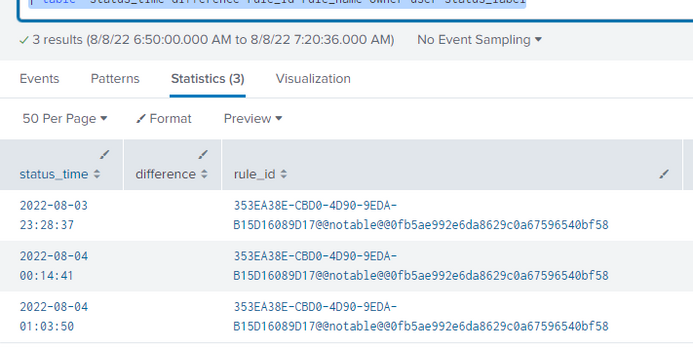
No luck. The difference column is blank. Here is the query
| `incident_review`
| where _time > relative_time(now(),"-7d@d")
| search rule_id=353EA38E-CBD0-4D90-9EDA-B15D16089D17@@notable@@0fb5ae992e6da8629c0a67596540bf58
| eval status_time=strftime(_time,"%Y-%m-%d %H:%M:%S")
| streamstats window=2 global=f range(_time) as difference by rule_ID
| fieldformat difference=tostring(difference,"duration")
| table  status_time difference rule_id rule_name owner user status_label
Result
- Mark as New
- Bookmark Message
- Subscribe to Message
- Mute Message
- Subscribe to RSS Feed
- Permalink
- Report Inappropriate Content

If you strftime your timestamp to a string, you can't calculate anything anymore on it because it's a string now. You'd have to strptime it back to a epoch-based timestamp which is a bit pointless. Use fieldformat instead of eval to display your status_time in a human-readable way but keep it internally as a unix timestamp.
- Mark as New
- Bookmark Message
- Subscribe to Message
- Mute Message
- Subscribe to RSS Feed
- Permalink
- Report Inappropriate Content
Field names are case-sensitive - try
| streamstats window=2 global=f range(_time) as difference by rule_id- Mark as New
- Bookmark Message
- Subscribe to Message
- Mute Message
- Subscribe to RSS Feed
- Permalink
- Report Inappropriate Content
That worked. Awesome !!. But curious, how did it work even though i am doing the following in the line above your streamstats command ?
eval status_time=strftime(_time,"%Y-%m-%d %H:%M:%S")
If you notice PickeRick's comment above, status_time should be in epoch format for us to calculate the difference.
- Mark as New
- Bookmark Message
- Subscribe to Message
- Mute Message
- Subscribe to RSS Feed
- Permalink
- Report Inappropriate Content
PickleRick's comment is wrong
eval status_time=strftime(_time,"%Y-%m-%d %H:%M:%S")does not change the _time field, it creates a new field called status_time, and therefore has no effect on the calculations based on the _time field
- Mark as New
- Bookmark Message
- Subscribe to Message
- Mute Message
- Subscribe to RSS Feed
- Permalink
- Report Inappropriate Content
You're right. 😞
I noticed the strftime but didn't notice that the range() was operating on _time, not on that strftimed field.
My original comments holds valid but is just not applicable in this case 😉
- Mark as New
- Bookmark Message
- Subscribe to Message
- Mute Message
- Subscribe to RSS Feed
- Permalink
- Report Inappropriate Content
Thanks @PickleRick . I have given you karma points.


Join the Splunk Community Slack to learn, troubleshoot, and make connections with fellow Splunk practitioners in real time!
Join Splunk User Groups to connect and learn in-person by region or remotely by topic or industry.
SOC4Kafka - New Kafka Connector Powered by OpenTelemetry
Event Series: Level up your SOC: Advancing with Splunk Enterprise Security
Announcing Modern Navigation: A New Era of Splunk User Experience
