
Join the Conversation
- Find Answers
- :
- Using Splunk
- :
- Splunk Search
- :
- How to trigger an alert week day without data?
- Subscribe to RSS Feed
- Mark Topic as New
- Mark Topic as Read
- Float this Topic for Current User
- Bookmark Topic
- Subscribe to Topic
- Mute Topic
- Printer Friendly Page
- Mark as New
- Bookmark Message
- Subscribe to Message
- Mute Message
- Subscribe to RSS Feed
- Permalink
- Report Inappropriate Content

Hi, I'm pretty new in splunk, I've been reading a lot of documentation and other questions here, but I don't find the help that I need.

I have this search, every day is a left join like this:
index=myIndex sourcetype=mySource
	| eval weekday=strftime(_time,"%A")
	| where weekday = "Monday"
	| where Systems= "SYSTEM 1" OR "SYSTEM 2" OR "SYSTEM 3" OR "SYSTEM 4"

	| eval ExpectedTime = case(
				   System="SYSTEM 1", "6:30am",
				   System="SYSTEM 2", "6:35am",
				   System="SYSTEM 3", "6:45am",
				   System="SYSTEM 4", "6:40am"
			           )
	| eval CurrentSLO= case(
				   System="SYSTEM 1", "7:15am",
				   System="SYSTEM 2", "7:20am",
				   System="SYSTEM 3", "7:10am",
				   System="SYSTEM 4", "7:10am"
			        )
	| eval EndHour=substr(time, 50, 1)
	| eval EndMin=substr(time, 52, 2)
	| eval time = EndHour.":".EndMin
	| eval Mon = " (" .EndHour. ":" .EndMin. "am)"
	| eval category="CATEGORY 1"

	| table category Systems ExpectedTime CurrentSLO Mon Tue Wed Thu Fri
	| rename ExpectedTime as "Expected Time"
	| rename CurrentSLO as "Current SLO"
	| rename category as "Category"

| join type=left Systems
	[ search index=myIndex sourcetype=mySource
		| eval weekday=strftime(_time,"%A")
		| where weekday = "Tusday"
		| where Systems= "SYSTEM 1" OR "SYSTEM 2" OR "SYSTEM 3" OR "SYSTEM 4"

		| eval ExpectedTime = case(
					   System="SYSTEM 1", "6:30am",
					   System="SYSTEM 2", "6:35am",
					   System="SYSTEM 3", "6:45am",
					   System="SYSTEM 4", "6:40am"
				           )
		| eval CurrentSLO= case(
					   System="SYSTEM 1", "7:15am",
					   System="SYSTEM 2", "7:20am",
					   System="SYSTEM 3", "7:10am",
					   System="SYSTEM 4", "7:10am"
				        )
		| eval EndHour=substr(time, 50, 1)
		| eval EndMin=substr(time, 52, 2)
		| eval time = EndHour.":".EndMin
		| eval Tue = " (" .EndHour. ":" .EndMin. "am)"
		| eval category="CATEGORY 1"

		| table category Systems ExpectedTime CurrentSLO Mon Tue Wed Thu Fri
		| rename ExpectedTime as "Expected Time"
		| rename CurrentSLO as "Current SLO"
		| rename category as "Category"
		.
		.
		.
I need to trigger an alert when there is no information for a day of the week.
I've been trying whit search count=0, transaction and other failed solution attempts.
- Mark as New
- Bookmark Message
- Subscribe to Message
- Mute Message
- Subscribe to RSS Feed
- Permalink
- Report Inappropriate Content

Read comments inline below for explanation of the search
inindex=myIndex sourcetype=mySource Systems IN ("SYSTEM 1" , "SYSTEM 2" , "SYSTEM 3" , "SYSTEM 4")
| eval weekday="Wday-".strftime(_time,"%A")
| rename COMMENT as "Above will set the value as Wday-Mon instead of Mon.. and so forth for other days"
| eval EndHour=substr(time, 50, 1)
	| eval EndMin=substr(time, 52, 2)
	| eval time = EndHour.":".EndMin
	| eval Time = " (" .EndHour. ":" .EndMin. "am)"
	| eval category="CATEGORY 1"
| chart values(Time) over Systems by weekday
| rename COMMENT as "After the chart command, you will see a column for each value of weekday i.e. Wday-Mon, Wday-Tue....etc)"
	| eval ExpectedTime = case(
				   System="SYSTEM 1", "6:30am",
				   System="SYSTEM 2", "6:35am",
				   System="SYSTEM 3", "6:45am",
				   System="SYSTEM 4", "6:40am"
			           )
	| eval CurrentSLO= case(
				   System="SYSTEM 1", "7:15am",
				   System="SYSTEM 2", "7:20am",
				   System="SYSTEM 3", "7:10am",
				   System="SYSTEM 4", "7:10am"
			        )
| eval category="CATEGORY 1"
	| table category Systems ExpectedTime CurrentSLO Wday-*
	| rename ExpectedTime as "Expected Time"
	| rename CurrentSLO as "Current SLO"
	| rename category as "Category"
| eval hasMissingValues="false"
| rename COMMENT as "Now the foreach command will be run against each of week day fields that i.e. Wday-Mon, Wday-Tue..etc. It will than find out if there are missing values"
| foreach Wday-* [ | eval hasMissingValues=if(isnull('<<FIELD>>'),"true",hasMissingValues)]
| where hasMissingValues="true"
| rename COMMEND as "Finally, renaming the Wday-Mon to just Mon..and so forth"
| rename Wday-* as *- Mark as New
- Bookmark Message
- Subscribe to Message
- Mute Message
- Subscribe to RSS Feed
- Permalink
- Report Inappropriate Content
Read comments inline below for explanation of the search
inindex=myIndex sourcetype=mySource Systems IN ("SYSTEM 1" , "SYSTEM 2" , "SYSTEM 3" , "SYSTEM 4")
| eval weekday="Wday-".strftime(_time,"%A")
| rename COMMENT as "Above will set the value as Wday-Mon instead of Mon.. and so forth for other days"
| eval EndHour=substr(time, 50, 1)
	| eval EndMin=substr(time, 52, 2)
	| eval time = EndHour.":".EndMin
	| eval Time = " (" .EndHour. ":" .EndMin. "am)"
	| eval category="CATEGORY 1"
| chart values(Time) over Systems by weekday
| rename COMMENT as "After the chart command, you will see a column for each value of weekday i.e. Wday-Mon, Wday-Tue....etc)"
	| eval ExpectedTime = case(
				   System="SYSTEM 1", "6:30am",
				   System="SYSTEM 2", "6:35am",
				   System="SYSTEM 3", "6:45am",
				   System="SYSTEM 4", "6:40am"
			           )
	| eval CurrentSLO= case(
				   System="SYSTEM 1", "7:15am",
				   System="SYSTEM 2", "7:20am",
				   System="SYSTEM 3", "7:10am",
				   System="SYSTEM 4", "7:10am"
			        )
| eval category="CATEGORY 1"
	| table category Systems ExpectedTime CurrentSLO Wday-*
	| rename ExpectedTime as "Expected Time"
	| rename CurrentSLO as "Current SLO"
	| rename category as "Category"
| eval hasMissingValues="false"
| rename COMMENT as "Now the foreach command will be run against each of week day fields that i.e. Wday-Mon, Wday-Tue..etc. It will than find out if there are missing values"
| foreach Wday-* [ | eval hasMissingValues=if(isnull('<<FIELD>>'),"true",hasMissingValues)]
| where hasMissingValues="true"
| rename COMMEND as "Finally, renaming the Wday-Mon to just Mon..and so forth"
| rename Wday-* as *- Mark as New
- Bookmark Message
- Subscribe to Message
- Mute Message
- Subscribe to RSS Feed
- Permalink
- Report Inappropriate Content
Thanks a lot! @somesoni2
It works!
It was very helpful and I learned a lot.
- Mark as New
- Bookmark Message
- Subscribe to Message
- Mute Message
- Subscribe to RSS Feed
- Permalink
- Report Inappropriate Content
I would first optimize your search like this
index=myIndex sourcetype=mySource Systems IN ("SYSTEM 1" , "SYSTEM 2" , "SYSTEM 3" , "SYSTEM 4")
| eval weekday=strftime(_time,"%A")
| eval EndHour=substr(time, 50, 1)
	| eval EndMin=substr(time, 52, 2)
	| eval time = EndHour.":".EndMin
	| eval Time = " (" .EndHour. ":" .EndMin. "am)"
	| eval category="CATEGORY 1"
| chart values(Time) over Systems by weekday
	| eval ExpectedTime = case(
				   System="SYSTEM 1", "6:30am",
				   System="SYSTEM 2", "6:35am",
				   System="SYSTEM 3", "6:45am",
				   System="SYSTEM 4", "6:40am"
			           )
	| eval CurrentSLO= case(
				   System="SYSTEM 1", "7:15am",
				   System="SYSTEM 2", "7:20am",
				   System="SYSTEM 3", "7:10am",
				   System="SYSTEM 4", "7:10am"
			        )
| eval category="CATEGORY 1"
	| table category Systems ExpectedTime CurrentSLO Mon Tue Wed Thu Fri
	| rename ExpectedTime as "Expected Time"
	| rename CurrentSLO as "Current SLO"
	| rename category as "Category"
To generate alert on missing column value, just add following to above search:
| eval hasMissingValues="false"
| foreach Mon Tue Wed Thu Fri [ | eval hasMissingValues=if(isnull('<<FIELD>>'),"true",hasMissingValues)]
| where hasMissingValues="true"
- Mark as New
- Bookmark Message
- Subscribe to Message
- Mute Message
- Subscribe to RSS Feed
- Permalink
- Report Inappropriate Content
Thanks @somesoni2 for your help!
Optimize the search as you taught me and added the lines to generate a missing column value, but it is always true even when there is data.

it's supposed would be false, right?
Because I'm thinking to use the field hasMissingValues="true" to trigger my alert.
- Mark as New
- Bookmark Message
- Subscribe to Message
- Mute Message
- Subscribe to RSS Feed
- Permalink
- Report Inappropriate Content
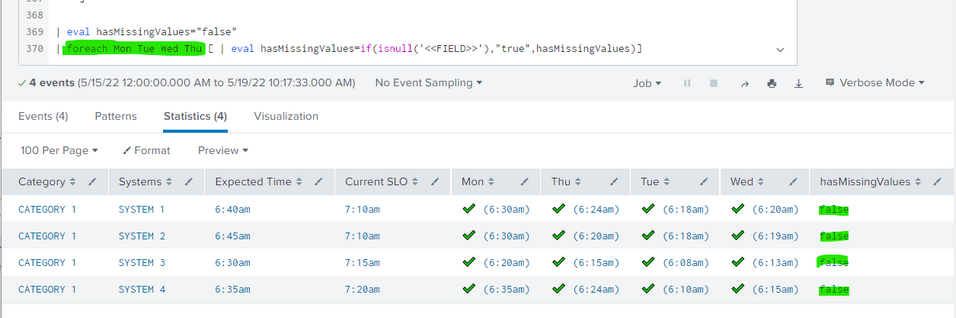
I'm realize if I remove Fri in the foreach (today is thursday) it works!
Now I'm thinking in a way to do the same dynamically, for example if today is Tuesday the foreach must only eval Monday and Tuesday.
- Mark as New
- Bookmark Message
- Subscribe to Message
- Mute Message
- Subscribe to RSS Feed
- Permalink
- Report Inappropriate Content
I forgot about days which have not come yet. So try this version (no hard coded week days)
inindex=myIndex sourcetype=mySource Systems IN ("SYSTEM 1" , "SYSTEM 2" , "SYSTEM 3" , "SYSTEM 4")
| eval weekday="Wday-".strftime(_time,"%A")
| eval EndHour=substr(time, 50, 1)
	| eval EndMin=substr(time, 52, 2)
	| eval time = EndHour.":".EndMin
	| eval Time = " (" .EndHour. ":" .EndMin. "am)"
	| eval category="CATEGORY 1"
| chart values(Time) over Systems by weekday
	| eval ExpectedTime = case(
				   System="SYSTEM 1", "6:30am",
				   System="SYSTEM 2", "6:35am",
				   System="SYSTEM 3", "6:45am",
				   System="SYSTEM 4", "6:40am"
			           )
	| eval CurrentSLO= case(
				   System="SYSTEM 1", "7:15am",
				   System="SYSTEM 2", "7:20am",
				   System="SYSTEM 3", "7:10am",
				   System="SYSTEM 4", "7:10am"
			        )
| eval category="CATEGORY 1"
	| table category Systems ExpectedTime CurrentSLO Wday-*
	| rename ExpectedTime as "Expected Time"
	| rename CurrentSLO as "Current SLO"
	| rename category as "Category"
| eval hasMissingValues="false"
| foreach Wday-* [ | eval hasMissingValues=if(isnull('<<FIELD>>'),"true",hasMissingValues)]
| where hasMissingValues="true"
| rename Wday-* as *- Mark as New
- Bookmark Message
- Subscribe to Message
- Mute Message
- Subscribe to RSS Feed
- Permalink
- Report Inappropriate Content
Thanks @somesoni2 but I don't understand your search, I mean, there is a
| eval weekday="Wday-".strftime(_time,"%A")
But then you are using the string "Wday-" to filter, but Wday is not a field in the search.
In my main search have Mon Tue Wed Thu Fri, those are calculated fields and indicate if there is data or not.
| table category Systems ExpectedTime CurrentSLO Mon Tue Wed Thu Fri
I understand your idea to filter, I'm trying to do that with every day (calculated fields)


Join the Splunk Community Slack to learn, troubleshoot, and make connections with fellow Splunk practitioners in real time!
Join Splunk User Groups to connect and learn in-person by region or remotely by topic or industry.
Thanks for the Memories: .conf26 Took Learning to New Heights
Best Practices: Splunk auto adjust pipeline queue
Splunk Auto Ingestion Parallel Pipeline Scaling
