
Join the Conversation
- Find Answers
- :
- Using Splunk
- :
- Splunk Search
- :
- How to get fields extracted by two fields?
- Subscribe to RSS Feed
- Mark Topic as New
- Mark Topic as Read
- Float this Topic for Current User
- Bookmark Topic
- Subscribe to Topic
- Mute Topic
- Printer Friendly Page
- Mark as New
- Bookmark Message
- Subscribe to Message
- Mute Message
- Subscribe to RSS Feed
- Permalink
- Report Inappropriate Content

i need the fields extracted by two fields
1) Detail message = before the comma ( I need the full description)
2) Count = after the comma ( I need the digit count)
RAW Log starts from below :
DETAIL MESSAGE, COUNT

Index 0 out of bounds for length 0, 61

No Recipienet found in MDM based on the input parameters, 120

No record found with this document Id, 86

No Records Found with given search Criteria in DB, 52

query did not return a unique result: 2; nested exception is javax.persistence.NonUniqueResultException: query did not return a unique result: 2, 106
You do not currently manage any user roles in PERLSS there is no task data to display at this time, 96
- Mark as New
- Bookmark Message
- Subscribe to Message
- Mute Message
- Subscribe to RSS Feed
- Permalink
- Report Inappropriate Content


It was not clear from the OP that the sample data was a single event rather than multiple events. That means the regular expression matches multiple strings, but the rex command defaults to returning only the first. Use the max_match option to override that.
| rex max_match=0 "(?<detailMessage>[^,]+), (?<count>\d+)"
This will produce multi-value fields. You'll then need to use mv commands/functions to work with the fields.
Let us know what results you want and we can try to be more specific.
If this reply helps you, Karma would be appreciated.
- Mark as New
- Bookmark Message
- Subscribe to Message
- Mute Message
- Subscribe to RSS Feed
- Permalink
- Report Inappropriate Content
This should get you started
| rex "(?<detailMessage>[^,]+), (?<count>\d+)"If this reply helps you, Karma would be appreciated.
- Mark as New
- Bookmark Message
- Subscribe to Message
- Mute Message
- Subscribe to RSS Feed
- Permalink
- Report Inappropriate Content
Thanks, @richgalloway. But here I am only getting the first line for the fields extracted in the log

- Mark as New
- Bookmark Message
- Subscribe to Message
- Mute Message
- Subscribe to RSS Feed
- Permalink
- Report Inappropriate Content
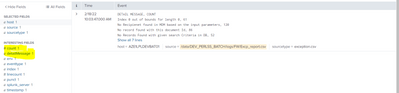
You say you only get one line, but the screenshot shows 7 lines.
Please provide more information, including the query used and the props.conf settings for the sourcetype.
If this reply helps you, Karma would be appreciated.
- Mark as New
- Bookmark Message
- Subscribe to Message
- Mute Message
- Subscribe to RSS Feed
- Permalink
- Report Inappropriate Content
Hi @richgalloway I don't have much details of the props but the below screenshot shows the rex is working only for the first line.
- Mark as New
- Bookmark Message
- Subscribe to Message
- Mute Message
- Subscribe to RSS Feed
- Permalink
- Report Inappropriate Content
It was not clear from the OP that the sample data was a single event rather than multiple events. That means the regular expression matches multiple strings, but the rex command defaults to returning only the first. Use the max_match option to override that.
| rex max_match=0 "(?<detailMessage>[^,]+), (?<count>\d+)"
This will produce multi-value fields. You'll then need to use mv commands/functions to work with the fields.
Let us know what results you want and we can try to be more specific.
If this reply helps you, Karma would be appreciated.
- Mark as New
- Bookmark Message
- Subscribe to Message
- Mute Message
- Subscribe to RSS Feed
- Permalink
- Report Inappropriate Content
Much appreciated mate for your help!. It worked for me.


Join the Splunk Community Slack to learn, troubleshoot, and make connections with fellow Splunk practitioners in real time!
Join Splunk User Groups to connect and learn in-person by region or remotely by topic or industry.
A Four-Part Event Series: Full Stack Observability For the AI Era
SOC4Kafka - New Kafka Connector Powered by OpenTelemetry
Event Series: Level up your SOC: Advancing with Splunk Enterprise Security
