
Join the Conversation
- Find Answers
- :
- Using Splunk
- :
- Splunk Search
- :
- How to drop extra fields while maintaining groupby...
- Subscribe to RSS Feed
- Mark Topic as New
- Mark Topic as Read
- Float this Topic for Current User
- Bookmark Topic
- Subscribe to Topic
- Mute Topic
- Printer Friendly Page
- Mark as New
- Bookmark Message
- Subscribe to Message
- Mute Message
- Subscribe to RSS Feed
- Permalink
- Report Inappropriate Content


To groupby? Or not to groupby? That is the question. (Not really. The question arises because trellis splitby seems to depend on an invisible groupby register.)
Take the following example:
| makeresults count=10
| eval value = "value" . random() % 3
| stats count by value
| eventstats sum(count) as total
| eval ratio = count / total
If I want to visualize ratio as single value in trellis, I can add `| fields - total count` in the end.
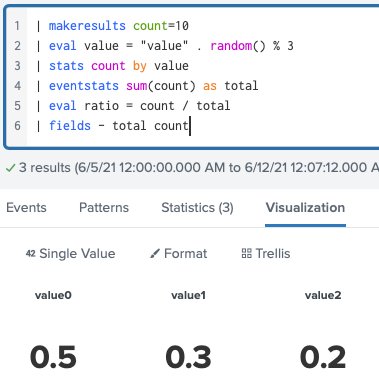
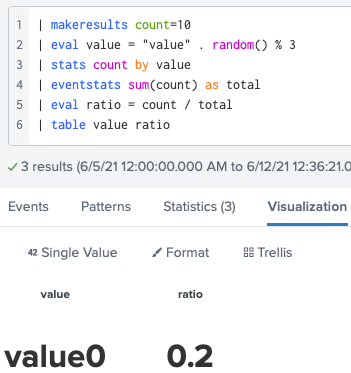
But if there are many intermediate variables, it gets tedious to list them for dropping. I thought `table value ratio` would be simpler, as statistics table is exactly the same, but SPL's invisible hand prevents splitby from seeing the original groupby field, so I get weird output like
I can avoid tedious `fields -` listing by doing another stats with groupby, e.g., `stats values(ratio) as ratio by value`.
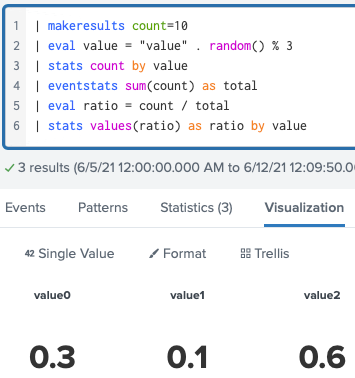
But I feel silly to do a useless calculation. Is there a simpler way to preserve groupby register without the tedious listing?
- Mark as New
- Bookmark Message
- Subscribe to Message
- Mute Message
- Subscribe to RSS Feed
- Permalink
- Report Inappropriate Content
is there any SPL answer to the original question?
The answer, it turns out, is yes. Instead of listing intermediate field names for exclusion, name all intermediate fields to be "hidden", i.e., start with underscore _. The above search can be written as
| makeresults count=10
| eval value = "value" . random() % 3
| stats count as _count by value
| eventstats sum(_count) as _total
| eval ratio = _count / _total
Splunk visualization will conveniently ignore hidden fields.

This writing has more elaborate use cases of this technique: Up Your Textual Viz with Splunk.
- Mark as New
- Bookmark Message
- Subscribe to Message
- Mute Message
- Subscribe to RSS Feed
- Permalink
- Report Inappropriate Content
I just realize that I can carefully name intermediate variables so I can drop them with wildcard. But is there any SPL answer to the original question?
- Mark as New
- Bookmark Message
- Subscribe to Message
- Mute Message
- Subscribe to RSS Feed
- Permalink
- Report Inappropriate Content
is there any SPL answer to the original question?
The answer, it turns out, is yes. Instead of listing intermediate field names for exclusion, name all intermediate fields to be "hidden", i.e., start with underscore _. The above search can be written as
| makeresults count=10
| eval value = "value" . random() % 3
| stats count as _count by value
| eventstats sum(_count) as _total
| eval ratio = _count / _total
Splunk visualization will conveniently ignore hidden fields.
This writing has more elaborate use cases of this technique: Up Your Textual Viz with Splunk.

Join the Splunk Community Slack to learn, troubleshoot, and make connections with fellow Splunk practitioners in real time!
Join Splunk User Groups to connect and learn in-person by region or remotely by topic or industry.
Meet the .conf26 AI Agent Buildathon Winners
Trusted Autonomy in the SOC: A Maturity Journey
Supercharging Windows Security Detection Performance: Introducing Hybrid Field ...
