
Join the Conversation
- Find Answers
- :
- Using Splunk
- :
- Splunk Search
- :
- Re: How to compare values on the same columns and...
- Subscribe to RSS Feed
- Mark Topic as New
- Mark Topic as Read
- Float this Topic for Current User
- Bookmark Topic
- Subscribe to Topic
- Mute Topic
- Printer Friendly Page
- Mark as New
- Bookmark Message
- Subscribe to Message
- Mute Message
- Subscribe to RSS Feed
- Permalink
- Report Inappropriate Content

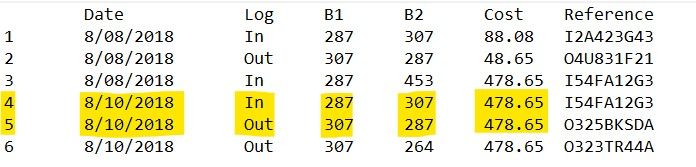
I have this table, and i just want to remove the rows that has the same cost on that date if the B1 of that row is on the B2 of another row. So basically, I just want to remove rows 4 and 5. Is there any way to do this? Thanks.

- Mark as New
- Bookmark Message
- Subscribe to Message
- Mute Message
- Subscribe to RSS Feed
- Permalink
- Report Inappropriate Content

Hi iancorrea,
I have a crazy search that works how you want it to, but you have to have the Line number field in there.
... [your search] ...

| sort Line

| streamstats current=f window=1 last(B2) as lastb2 last(B1) as lastb1 last(Cost) as lastcost last(Line) as lastline

| eval match = if(Cost == lastcost AND B1 == lastb2, 1, 0)

| eval removeline = case(match == 1, split(lastline . "," . Line, ","))

| eventstats values(removeline) as removeline

| where Line!=removeline

| table Line Date Log B1 B2 Cost Reference
Basically, it uses streamstats to compare to the previous event's values and then uses eventstats to provide a list of line numbers to remove using the where statement.
- Mark as New
- Bookmark Message
- Subscribe to Message
- Mute Message
- Subscribe to RSS Feed
- Permalink
- Report Inappropriate Content
Hi iancorrea,
I have a crazy search that works how you want it to, but you have to have the Line number field in there.
... [your search] ...

| sort Line

| streamstats current=f window=1 last(B2) as lastb2 last(B1) as lastb1 last(Cost) as lastcost last(Line) as lastline

| eval match = if(Cost == lastcost AND B1 == lastb2, 1, 0)

| eval removeline = case(match == 1, split(lastline . "," . Line, ","))

| eventstats values(removeline) as removeline

| where Line!=removeline

| table Line Date Log B1 B2 Cost Reference
Basically, it uses streamstats to compare to the previous event's values and then uses eventstats to provide a list of line numbers to remove using the where statement.
- Mark as New
- Bookmark Message
- Subscribe to Message
- Mute Message
- Subscribe to RSS Feed
- Permalink
- Report Inappropriate Content
Thanks for researching for a solution sir, I appreciate your effort 🙂 But i came up to another solution which I think the same concept as your answer. I made another field named "Comparison" and used eventstats to compare. This is what I've done,
1. ... [my search] ...
2. | eval Comparison=if(Log=="In", Date+"|"+B1+"|"+B2+"|"+Cost,Date+"|"+B2+"|"+B1+"|"+Cost)
3. | eventstats count as Status by Comparison
4. | eval Status=if(Status=="1","Failed","Passed")
5. | where Status="Failed"
- Mark as New
- Bookmark Message
- Subscribe to Message
- Mute Message
- Subscribe to RSS Feed
- Permalink
- Report Inappropriate Content

In that case, why is row 6 the one that stays? Is it because it's the latest one? How would we know that other than the ID?

Join the Splunk Community Slack to learn, troubleshoot, and make connections with fellow Splunk practitioners in real time!
Join Splunk User Groups to connect and learn in-person by region or remotely by topic or industry.
Announcing Modern Navigation: A New Era of Splunk User Experience
Modernize your Splunk Apps – Introducing Python 3.13 in Splunk
Step into “Hunt the Insider: An Splunk ES Premier Mystery” to catch a cybercriminal ...
