
Join the Conversation
- Find Answers
- :
- Using Splunk
- :
- Splunk Search
- :
- Re: Splunk Dashboard Text FIlter
- Subscribe to RSS Feed
- Mark Topic as New
- Mark Topic as Read
- Float this Topic for Current User
- Bookmark Topic
- Subscribe to Topic
- Mute Topic
- Printer Friendly Page
- Mark as New
- Bookmark Message
- Subscribe to Message
- Mute Message
- Subscribe to RSS Feed
- Permalink
- Report Inappropriate Content

I have a splunk dashboard that looks like below,
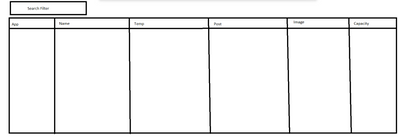
And i have added the text filter. But when i try to search of the text filter it works. But it only works when i search by one App. But i want it to search so that if i search,
Max, Pan, Ian
It will give me the details for the 3 rows. I have 4000 unique apps so i want it so that if i search Max, Pan, Ian it will give me 3 row details.
If someone can help me on this, it would be greatly appreciated.
- Mark as New
- Bookmark Message
- Subscribe to Message
- Mute Message
- Subscribe to RSS Feed
- Permalink
- Report Inappropriate Content


In that case, you should set up a change handler for the input to parse the text field and create a token with the values in quotes e.g. "Max", "Pan", "Ian", then you can use the token to filter with the IN clause
... app IN ($applist$)
- Mark as New
- Bookmark Message
- Subscribe to Message
- Mute Message
- Subscribe to RSS Feed
- Permalink
- Report Inappropriate Content
I presume you have an text input and are using the token in the search for the table.
Are you working with Classic / SimpleXML dashboard or Dashboard Studio?
- Mark as New
- Bookmark Message
- Subscribe to Message
- Mute Message
- Subscribe to RSS Feed
- Permalink
- Report Inappropriate Content
Yes that's correct,
And its a classic dashboard
- Mark as New
- Bookmark Message
- Subscribe to Message
- Mute Message
- Subscribe to RSS Feed
- Permalink
- Report Inappropriate Content
In that case, you should set up a change handler for the input to parse the text field and create a token with the values in quotes e.g. "Max", "Pan", "Ian", then you can use the token to filter with the IN clause
... app IN ($applist$)
- Mark as New
- Bookmark Message
- Subscribe to Message
- Mute Message
- Subscribe to RSS Feed
- Permalink
- Report Inappropriate Content
This Alone worked, Thanks.
- Mark as New
- Bookmark Message
- Subscribe to Message
- Mute Message
- Subscribe to RSS Feed
- Permalink
- Report Inappropriate Content
Could you please explain further how to set up a change handler, and how to do it. Thanks.
- Mark as New
- Bookmark Message
- Subscribe to Message
- Mute Message
- Subscribe to RSS Feed
- Permalink
- Report Inappropriate Content
I thought by your handle you were a Maestro? 😀
Depending on how sophisticated you want to be in preprocessing the text input (here I have just removed embedded spaces), you could try something like this
<form version="1.1">
  <label>Text parsing</label>
  <fieldset submitButton="false">
    <input type="text" token="apps">
      <label>Application filter</label>
      <change>
        <eval token="app_filter">"\"".mvjoin(split(replace($apps$," ",""),","),"\",\"")."\""</eval>
      </change>
    </input>
  </fieldset>
  <row>
    <panel>
      <html>... app IN ($app_filter$)</html>
    </panel>
  </row>
</form>
Join the Splunk Community Slack to learn, troubleshoot, and make connections with fellow Splunk practitioners in real time!
Join Splunk User Groups to connect and learn in-person by region or remotely by topic or industry.
Announcing Modern Navigation: A New Era of Splunk User Experience
Modernize your Splunk Apps – Introducing Python 3.13 in Splunk
Step into “Hunt the Insider: An Splunk ES Premier Mystery” to catch a cybercriminal ...
