
Turn on suggestions
Auto-suggest helps you quickly narrow down your search results by suggesting possible matches as you type.
Splunk Search
×
Join the Conversation
Without signing in, you're just watching from the sidelines. Sign in or Register to connect, share, and be part of the Splunk Community.
Turn on suggestions
Auto-suggest helps you quickly narrow down your search results by suggesting possible matches as you type.
- Find Answers
- :
- Using Splunk
- :
- Splunk Search
- :
- Re: How do you stop displaying a timechart line wh...
Options
- Subscribe to RSS Feed
- Mark Topic as New
- Mark Topic as Read
- Float this Topic for Current User
- Bookmark Topic
- Subscribe to Topic
- Mute Topic
- Printer Friendly Page
- Mark as New
- Bookmark Message
- Subscribe to Message
- Mute Message
- Subscribe to RSS Feed
- Permalink
- Report Inappropriate Content
How do you stop displaying a timechart line when value is 0?

dfofie
New Member
10-01-2018
07:06 AM
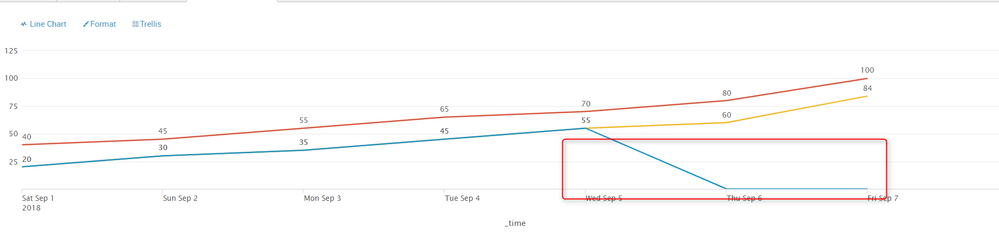
I'm trying to display a timechart based on count by a type.
But, for a certain type, the value will always be 0 for a certain time.
is it possible to tell Splunk to simply stop displaying the line from a certain datetime ? or when the count is 0 ?
The screenshot below shows the different lines and the part I marked is supposed to be hidden.

- Mark as New
- Bookmark Message
- Subscribe to Message
- Mute Message
- Subscribe to RSS Feed
- Permalink
- Report Inappropriate Content

Vijeta
Influencer
10-01-2018
08:39 AM
How about adding , where count>0 in your query
- Mark as New
- Bookmark Message
- Subscribe to Message
- Mute Message
- Subscribe to RSS Feed
- Permalink
- Report Inappropriate Content
dfofie
New Member
10-01-2018
11:40 PM
that doesn't work for me. When I enter where count>0 nothing appends. Not sure if this where clause is being taken in account.

Get Updates on the Splunk Community!
Congratulations to the 2025-2026 SplunkTrust!
Hello, Splunk Community! We are beyond thrilled to announce our newest group of SplunkTrust members!
The ...
[Puzzles] Solve, Learn, Repeat: Nested loops in Event Conversion
This challenge was first posted on Slack #puzzles channelFor a previous puzzle, I needed a set of fixed-length ...
Your Guide to Splunk Digital Experience Monitoring
A flawless digital experience isn't just an advantage, it's key to customer loyalty and business success. But ...
