
Join the Conversation
- Find Answers
- :
- Using Splunk
- :
- Splunk Search
- :
- Finding Timings Between Multiple Events
- Subscribe to RSS Feed
- Mark Topic as New
- Mark Topic as Read
- Float this Topic for Current User
- Bookmark Topic
- Subscribe to Topic
- Mute Topic
- Printer Friendly Page
- Mark as New
- Bookmark Message
- Subscribe to Message
- Mute Message
- Subscribe to RSS Feed
- Permalink
- Report Inappropriate Content

Hello,
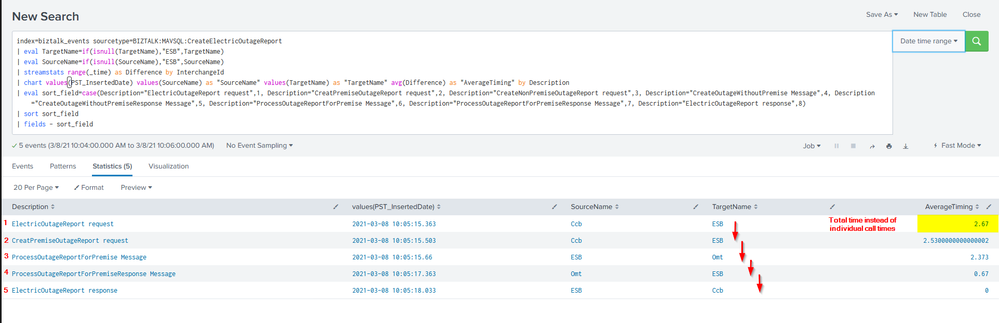
I am trying to find the timings between multiple calls under the same extracted field of InterchangeId. When using streamstats range(_time), I get the timing between the calls, however the first call in order of time has the total time and the last call has a 0 value. I am trying to determine how long it takes between each call in the correct order without it aggregating one of the calls to the total timing value.
Below is a screenshot of the results as well as the search. I appreciate any help with this!
- Mark as New
- Bookmark Message
- Subscribe to Message
- Mute Message
- Subscribe to RSS Feed
- Permalink
- Report Inappropriate Content


Use the window option of streamstats to limit the range calculation to the current row and the previous row.
| streamstats window=1 range(_time) as Difference by InterchangeID
If this reply helps you, Karma would be appreciated.
- Mark as New
- Bookmark Message
- Subscribe to Message
- Mute Message
- Subscribe to RSS Feed
- Permalink
- Report Inappropriate Content
Use the window option of streamstats to limit the range calculation to the current row and the previous row.
| streamstats window=1 range(_time) as Difference by InterchangeID
If this reply helps you, Karma would be appreciated.
- Mark as New
- Bookmark Message
- Subscribe to Message
- Mute Message
- Subscribe to RSS Feed
- Permalink
- Report Inappropriate Content
@richgalloway Thank you! I was able to add window=2 to the search and verified that the timings look accurate after finding the total time and checking against each individual row's timing. For some reason window=1 resulted in all 0 results, but 2 worked as expected. Thanks again!

Join the Splunk Community Slack to learn, troubleshoot, and make connections with fellow Splunk practitioners in real time!
Join Splunk User Groups to connect and learn in-person by region or remotely by topic or industry.
Meet the .conf26 AI Agent Buildathon Winners
Trusted Autonomy in the SOC: A Maturity Journey
Supercharging Windows Security Detection Performance: Introducing Hybrid Field ...
