
Join the Conversation
- Find Answers
- :
- Using Splunk
- :
- Splunk Search
- :
- Re: Expand XML created variable to search
- Subscribe to RSS Feed
- Mark Topic as New
- Mark Topic as Read
- Float this Topic for Current User
- Bookmark Topic
- Subscribe to Topic
- Mute Topic
- Printer Friendly Page
- Mark as New
- Bookmark Message
- Subscribe to Message
- Mute Message
- Subscribe to RSS Feed
- Permalink
- Report Inappropriate Content

Hi Splunkers,
Hopefully I am posting on the correct place, apologies if not!
I have the following code/SPL from inside the XML form. It looks inside a lookup, and then gives information about a specific field (field name taken from variable "FieldName") which matches the value of SearchString (value taken from variable "SearchString").
| inputlookup $lookup_name$
| search $FieldName$=$SearchString$
Those experienced you will see that it doesn't work this way. I am assuming that to make this XML code to work and give me the search result I expect I need to expand the variables?
If so, any idea how to do that?
Regards,
vagnet
- Mark as New
- Bookmark Message
- Subscribe to Message
- Mute Message
- Subscribe to RSS Feed
- Permalink
- Report Inappropriate Content


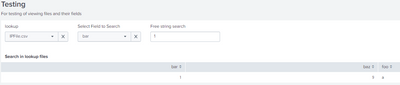
Once I created a dummy IPFile.csv lookup and corrected a typo in the form, it worked for me.
<form script="MyScript.js">
  <label>Testing</label>
  <description>For testing of viewing files and their fields</description>
  <fieldset submitButton="false"></fieldset>
 <row>
    <panel>
      <input type="dropdown" token="lookupFile" searchWhenChanged="true">
        <label>lookup</label>
        <fieldForLabel>lookups</fieldForLabel>
        <fieldForValue>lookups</fieldForValue>
        <search>
          <query>| makeresults
| eval lookups="IPFile.csv,MACFile.csv"
| makemv delim="," lookups
| mvexpand lookups
| table lookups</query>
          <earliest>-24h@h</earliest>
          <latest>now</latest>
        </search>
      </input>
      <input type="dropdown" token="fieldName">
        <label>Select Field to Search</label>
        <fieldForLabel>field</fieldForLabel>
        <fieldForValue>field</fieldForValue>
        <search>
          <query>| inputlookup $lookupFile$
| fieldsummary
| table field</query>
          <earliest>-24h@h</earliest>
          <latest>now</latest>
        </search>
        <default></default>
        <prefix>| search "</prefix>
        <suffix>"</suffix>
        <choice value="">--</choice>
      </input>
      <input type="text" token="searchString" searchWhenChanged="true">
        <label>Free string search</label>
        <default></default>
      </input>
      <table>
        <title>Search in lookup files</title>
        <search>
          <query>| inputlookup $lookupFile$ | search $fieldName$ = "*$searchString$*"</query>
          <earliest>-24h@h</earliest>
          <latest>now</latest>
        </search>
        <option name="drilldown">none</option>
        <option name="refresh.display">progressbar</option>
      </table>
    </panel>
  </row>
</form>
The fix was to change search FieldName$ = "*$searchString$*" to search $fieldName$ = "*$searchString$*".
If this reply helps you, Karma would be appreciated.
- Mark as New
- Bookmark Message
- Subscribe to Message
- Mute Message
- Subscribe to RSS Feed
- Permalink
- Report Inappropriate Content
Input tokens (assuming that's what you mean by "variable") are expanded automatically.
Please describe the problem you are trying to solve.
Please also share the code for the form.
If this reply helps you, Karma would be appreciated.
- Mark as New
- Bookmark Message
- Subscribe to Message
- Mute Message
- Subscribe to RSS Feed
- Permalink
- Report Inappropriate Content
Thanks for the reply @richgalloway .
Your input was very helpful! However, I still cannot run the search described as described above: "| inputlookup $lookupFile$ | search $fieldName$ = $searchString$ "
The whole code is found below:
 <form script="MyScript.js">
  <label>Testing</label>
  <description>For testing of viewing files and their fields</description>
  <fieldset submitButton="false"></fieldset>
 <row>
    <panel>
      <input type="dropdown" token="lookupFile" searchWhenChanged="true">
        <label>lookup</label>
        <fieldForLabel>lookups</fieldForLabel>
        <fieldForValue>lookups</fieldForValue>
        <search>
          <query>| makeresults
| eval lookups="IPFile.csv,MACFile.csv"
| makemv delim="," lookups
| mvexpand lookups
| table lookups</query>
          <earliest>-24h@h</earliest>
          <latest>now</latest>
        </search>
      </input>
      <input type="dropdown" token="fieldName">
        <label>Select Field to Search</label>
        <fieldForLabel>field</fieldForLabel>
        <fieldForValue>field</fieldForValue>
        <search>
          <query>| inputlookup $lookupFile$
| fieldsummary
| table field</query>
          <earliest>-24h@h</earliest>
          <latest>now</latest>
        </search>
        <default></default>
        <prefix>| search "</prefix>
        <suffix>"</suffix>
        <choice value="">--</choice>
      </input>
      <input type="text" token="searchString" searchWhenChanged="true">
        <label>Free string search</label>
        <default></default>
      </input>
      <table>
        <title>Search in lookup files</title>
        <search>
          <query>| inputlookup $lookupFile$ | search FieldName$ = "*$searchString$*"</query>
          <earliest>-24h@h</earliest>
          <latest>now</latest>
        </search>
        <option name="drilldown">none</option>
        <option name="refresh.display">progressbar</option>
      </table>
    </panel>
  </row>
  </form>
Regards,
vagnet
- Mark as New
- Bookmark Message
- Subscribe to Message
- Mute Message
- Subscribe to RSS Feed
- Permalink
- Report Inappropriate Content
Once I created a dummy IPFile.csv lookup and corrected a typo in the form, it worked for me.
<form script="MyScript.js">
  <label>Testing</label>
  <description>For testing of viewing files and their fields</description>
  <fieldset submitButton="false"></fieldset>
 <row>
    <panel>
      <input type="dropdown" token="lookupFile" searchWhenChanged="true">
        <label>lookup</label>
        <fieldForLabel>lookups</fieldForLabel>
        <fieldForValue>lookups</fieldForValue>
        <search>
          <query>| makeresults
| eval lookups="IPFile.csv,MACFile.csv"
| makemv delim="," lookups
| mvexpand lookups
| table lookups</query>
          <earliest>-24h@h</earliest>
          <latest>now</latest>
        </search>
      </input>
      <input type="dropdown" token="fieldName">
        <label>Select Field to Search</label>
        <fieldForLabel>field</fieldForLabel>
        <fieldForValue>field</fieldForValue>
        <search>
          <query>| inputlookup $lookupFile$
| fieldsummary
| table field</query>
          <earliest>-24h@h</earliest>
          <latest>now</latest>
        </search>
        <default></default>
        <prefix>| search "</prefix>
        <suffix>"</suffix>
        <choice value="">--</choice>
      </input>
      <input type="text" token="searchString" searchWhenChanged="true">
        <label>Free string search</label>
        <default></default>
      </input>
      <table>
        <title>Search in lookup files</title>
        <search>
          <query>| inputlookup $lookupFile$ | search $fieldName$ = "*$searchString$*"</query>
          <earliest>-24h@h</earliest>
          <latest>now</latest>
        </search>
        <option name="drilldown">none</option>
        <option name="refresh.display">progressbar</option>
      </table>
    </panel>
  </row>
</form>
The fix was to change search FieldName$ = "*$searchString$*" to search $fieldName$ = "*$searchString$*".
If this reply helps you, Karma would be appreciated.


Join the Splunk Community Slack to learn, troubleshoot, and make connections with fellow Splunk practitioners in real time!
Join Splunk User Groups to connect and learn in-person by region or remotely by topic or industry.
Meet Splunk Observability Studio: AI-Assisted OpenTelemetry Instrumentation Without ...
Federated Search for Cisco Security and Analytics Logging (SAL) is now GA on Splunk ...
Your Path to AgenticOps: AI Experiences for Every Splunk Practitioner
