
Join the Conversation
- Find Answers
- :
- Using Splunk
- :
- Splunk Search
- :
- Re: Dynamic time range in Splunk query
- Subscribe to RSS Feed
- Mark Topic as New
- Mark Topic as Read
- Float this Topic for Current User
- Bookmark Topic
- Subscribe to Topic
- Mute Topic
- Printer Friendly Page
- Mark as New
- Bookmark Message
- Subscribe to Message
- Mute Message
- Subscribe to RSS Feed
- Permalink
- Report Inappropriate Content

Hi
I write the Splunk query below to monitor server log
index="abc" sourcetype="abc" login "response.status"=200 source="abc.log"
| timechart span=2m count
| timewrap d series=short
| addtotals s*
| eval daysAvg=round(Total/14.0,0)
| eval yesterday_time=strftime(_time,"%H:%M")
| table _time, yesterday_time, s0, daysAvg,s6 | outputlookup openapi_login_last_days_lam.csv
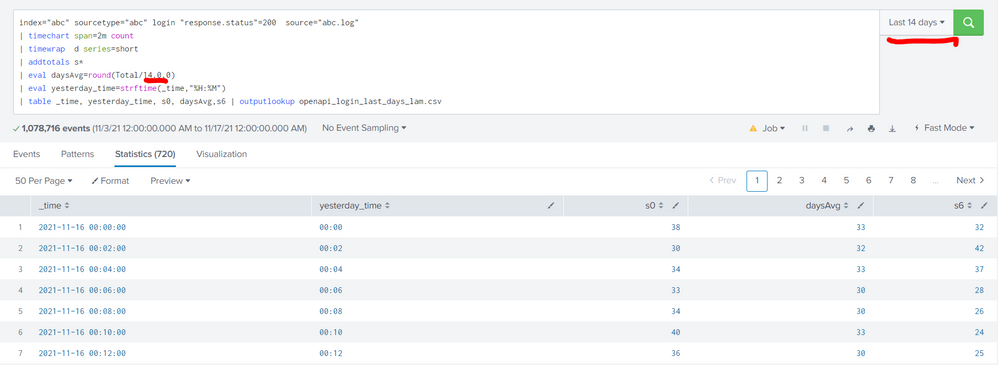
However, my query is rely on time range to count daysAvg value, for example in this case time range is 14 day so eval daysAvg=round(Total/14.0,0).
I want to calculate daysAvg dynamic. That means I don't need to change time range value when I apply other range.
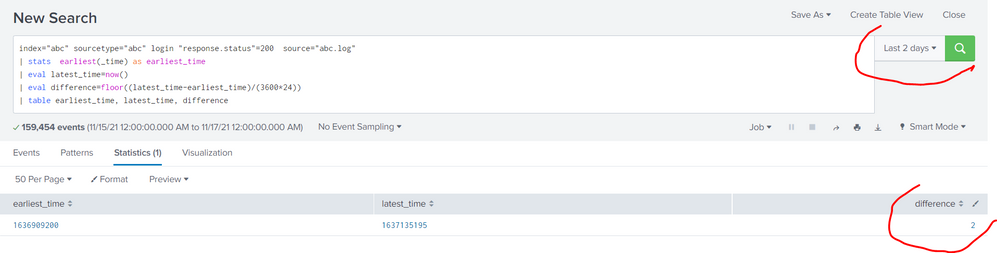
To achieve that, I wrote code to calculate time range like this
index="abc" sourcetype="abc" login "response.status"=200 source="abc.log"
| stats earliest(_time) as earliest_time
| eval latest_time=now()
| eval difference=floor((latest_time-earliest_time)/(3600*24))
| table earliest_time, latest_time, difference
index="abc" sourcetype="abc" login
"response.status"=200 source="abc.log"
| timechart span=2m count
| timewrap d series=short
| addtotals s*
| append
[ search index="abc" sourcetype="abc" login "response.status"=200 source="abc.log"
| stats earliest(_time) as earliest_time
| eval earliest=earliest_time
]
| eval latest_time=now()
| eval daysAvg=round(Total/14.0,0)
| eval yesterday_time=strftime(_time,"%H:%M")
| table _time, yesterday_time, s0, daysAvg, s6, latest_time, earliest
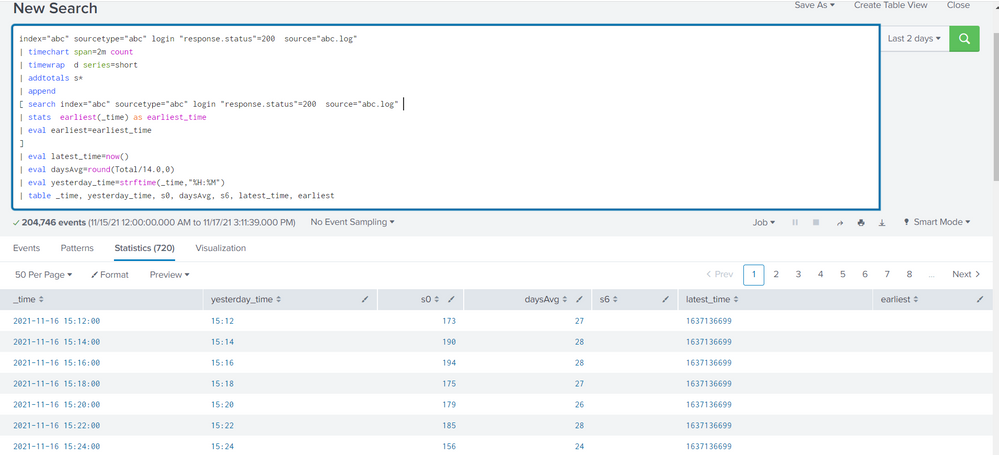
But earliest from subsearch did not pass to outer search.
Please help me.
Thank you
- Mark as New
- Bookmark Message
- Subscribe to Message
- Mute Message
- Subscribe to RSS Feed
- Permalink
- Report Inappropriate Content


To get the earliest and latest time used in the search, try addinfo
| addinfo
| eval timespan=info_max_time-info_min_time
| eval partialdays=floor((timespan-1)/86400)+1- Mark as New
- Bookmark Message
- Subscribe to Message
- Mute Message
- Subscribe to RSS Feed
- Permalink
- Report Inappropriate Content
To get the earliest and latest time used in the search, try addinfo
| addinfo
| eval timespan=info_max_time-info_min_time
| eval partialdays=floor((timespan-1)/86400)+1
Join the Splunk Community Slack to learn, troubleshoot, and make connections with fellow Splunk practitioners in real time!
Join Splunk User Groups to connect and learn in-person by region or remotely by topic or industry.
[Puzzles] Solve, Learn, Repeat: Classic British Rock Bands
New to the Community? Join Us for an Exclusive Post .conf26 Welcome Session (Plus a ...
Accelerate Splunk App Development with AI
