
Join the Conversation
- Find Answers
- :
- Using Splunk
- :
- Splunk Search
- :
- Display all values at time when hoovering over tim...
- Subscribe to RSS Feed
- Mark Topic as New
- Mark Topic as Read
- Float this Topic for Current User
- Bookmark Topic
- Subscribe to Topic
- Mute Topic
- Printer Friendly Page
- Mark as New
- Bookmark Message
- Subscribe to Message
- Mute Message
- Subscribe to RSS Feed
- Permalink
- Report Inappropriate Content
Display all values at time when hoovering over timechart

I have a timechart with multiple values/graphs.
When hoovering my mouse over the timechart I can only see one value at the time in the tooltip. (see pictures)
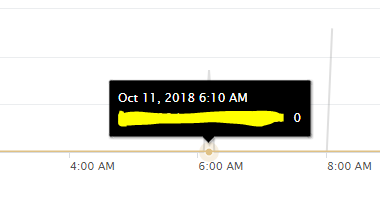
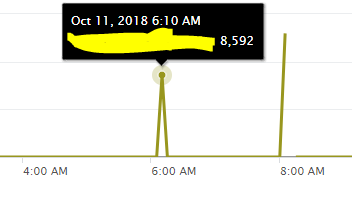
Is it possible to display all values at a certain time when hoovering over?
eks: at 6.10 AM I have two datapoints (8,592 and 0), so when the mouse is positioned at 6.10 AM I want both those values displayed.


- Mark as New
- Bookmark Message
- Subscribe to Message
- Mute Message
- Subscribe to RSS Feed
- Permalink
- Report Inappropriate Content
Please check this previous link on similar issue, see if this helps :
https://answers.splunk.com/answers/637224/how-to-display-multiple-data-points-when-hovering-1.html
- Mark as New
- Bookmark Message
- Subscribe to Message
- Mute Message
- Subscribe to RSS Feed
- Permalink
- Report Inappropriate Content
unfortunately the answer in that link does not solve the issue I am asking, it does provide an optional solution, but that doesent show multiple data datapoints at the same time.
- Mark as New
- Bookmark Message
- Subscribe to Message
- Mute Message
- Subscribe to RSS Feed
- Permalink
- Report Inappropriate Content
with the optional solution of using column charts, you can use the stacked chart with scale set to use "log " instead of linear..
- Mark as New
- Bookmark Message
- Subscribe to Message
- Mute Message
- Subscribe to RSS Feed
- Permalink
- Report Inappropriate Content
I have looked in to that, but it can be as much as 15 different values and that wont look good. Also this is a request from an client so this is not the way I want to solve it. Do you know if my initial question is even possible?

Upcoming Webinar: Unmasking Insider Threats with Slunk Enterprise Security’s UEBA
.conf25 technical session recap of Observability for Gen AI: Monitoring LLM ...
A Season of Skills: New Splunk Courses to Light Up Your Learning Journey
