
Join the Conversation
- Find Answers
- :
- Premium Solutions
- :
- Splunk Enterprise Security
- :
- Adding key indicator search to custom dashboard in...
- Subscribe to RSS Feed
- Mark Topic as New
- Mark Topic as Read
- Float this Topic for Current User
- Bookmark Topic
- Subscribe to Topic
- Mute Topic
- Printer Friendly Page
- Mark as New
- Bookmark Message
- Subscribe to Message
- Mute Message
- Subscribe to RSS Feed
- Permalink
- Report Inappropriate Content
Adding key indicator search to custom dashboard in Splunk Enterprise Security

Hello,
I'm trying to add new/existing key indicator searches to my dashboard in ES, but the edit toolbar does not have the "Add Key Indicator" button.
My custom dashboard:

Default dashboard with Key Indicators:
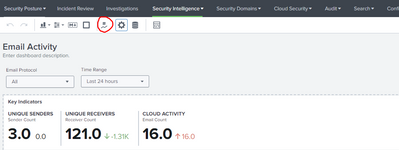
I also tried to clone the default "Email Activity" dashboard (which has existing key indicators in it), but the clone dashboard cannot be loaded.

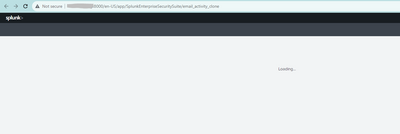
What should I do?
If this is a bug, which log files do I need to check?
Thank you.
- Mark as New
- Bookmark Message
- Subscribe to Message
- Mute Message
- Subscribe to RSS Feed
- Permalink
- Report Inappropriate Content
This is a little late, but I was interested in doing the same thing as OP. Looking at ES dashabord source it looks like key indicators visualization is custom. Make me question using it in my own dashboard. Is that a good idea?

- Mark as New
- Bookmark Message
- Subscribe to Message
- Mute Message
- Subscribe to RSS Feed
- Permalink
- Report Inappropriate Content


Hello @ThuLe,
There should be input available in the dropdown menu -
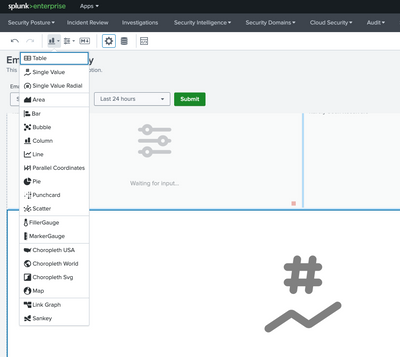
Can you please confirm if this is something you are looking for? Please accept the solution and hit Karma, if this helps!
- Mark as New
- Bookmark Message
- Subscribe to Message
- Mute Message
- Subscribe to RSS Feed
- Permalink
- Report Inappropriate Content
Hello, Just checking through if the issue was resolved or you have any further questions?

Upcoming Webinar: Unmasking Insider Threats with Slunk Enterprise Security’s UEBA
.conf25 technical session recap of Observability for Gen AI: Monitoring LLM ...
A Season of Skills: New Splunk Courses to Light Up Your Learning Journey
