
Join the Conversation
- Find Answers
- :
- Apps & Add-ons
- :
- Splunk Development
- :
- Splunk Dev
- :
- How to implement a logic when the page is loaded?
- Subscribe to RSS Feed
- Mark Topic as New
- Mark Topic as Read
- Float this Topic for Current User
- Bookmark Topic
- Subscribe to Topic
- Mute Topic
- Printer Friendly Page
- Mark as New
- Bookmark Message
- Subscribe to Message
- Mute Message
- Subscribe to RSS Feed
- Permalink
- Report Inappropriate Content

How to implement a logic when the page is loaded
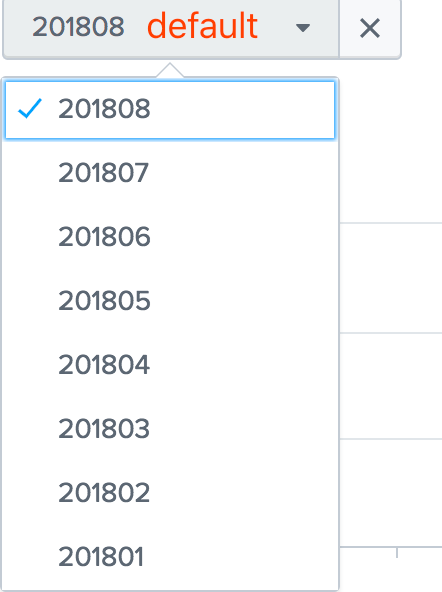
When the page is loaded, the drop-down box displays the last month of the month by default.
Now, if it's August, the drop-down box will display 201807 by default.
Now, if it's September, the drop-down box will display 201808 by default, and so on.
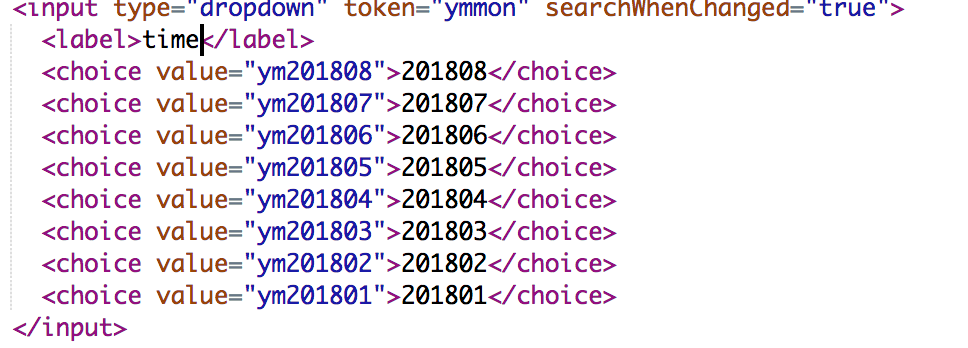
code xml
- Mark as New
- Bookmark Message
- Subscribe to Message
- Mute Message
- Subscribe to RSS Feed
- Permalink
- Report Inappropriate Content

@flzhang132,
Just add a page load token using init and set default and initialValue to that
<form>
  <init>
    <eval token="prev_month">strftime(relative_time(now(),"-1mon"),"%Y%m")</eval>
  </init>
  <fieldset submitButton="false">
    <input type="dropdown" token="ymmon">
      <label>Date</label>
      <choice value="ym201801">201801</choice>
      <choice value="ym201802">201802</choice>
      <choice value="ym201803">201803</choice>
      <choice value="ym201804">201804</choice>
      <choice value="ym201805">201805</choice>
      <choice value="ym201806">201806</choice>
      <choice value="ym201807">201807</choice>
      <choice value="ym201808">201808</choice>
      <choice value="ym201809">201809</choice>
      <choice value="ym201810">201810</choice>
      <default>$prev_month$</default>
      <initialValue>$prev_month$</initialValue>
    </input>
  </fieldset>
</form>
What goes around comes around. If it helps, hit it with Karma 🙂
- Mark as New
- Bookmark Message
- Subscribe to Message
- Mute Message
- Subscribe to RSS Feed
- Permalink
- Report Inappropriate Content

@flzhang132 <init> section is available post Splunk Enterprise 6.5 which works only with Simple XML Dashboards, so documenting a workaround of using independent search with search event handler. (PS: prior to Splunk Enterprise 6.5 they were <preview> and <finalized> instead of <progress> and <done> from 6.5 onward).
  <search>
    <query>| makeresults
| eval prev_month=strftime(relative_time(now(),"-1mon@mon"),"%Y%m")
    </query>
    <done>
      <set token="prev_month">$result.prev_month$</set>
    </done>
  </search>
Please refer to using <eval> to set token using relative_time() will use Client Time Zone: http://docs.splunk.com/Documentation/Splunk/latest/Viz/tokens#Define_token_filtering_and_formatting
1) With independent <search> you should be able to perform complicated searches to fetch result to set required token.
2) You should also add depends attribute with the default value token to the <input> to ensure that it is displayed only when the default value is set.
Following is a run anywhere example:
<form>
  <label>Initialize form variables on load</label>
  <search>
    <query>| makeresults
| eval prev_month=strftime(relative_time(now(),"-1mon@mon"),"%Y%m")
    </query>
    <done>
      <set token="prev_month">$result.prev_month$</set>
    </done>
  </search>
   <fieldset submitButton="false">
     <input type="dropdown" token="ymmon" depends="$prev_month$">
       <label>Date</label>
       <choice value="ym201801">201801</choice>
       <choice value="ym201802">201802</choice>
       <choice value="ym201803">201803</choice>
       <choice value="ym201804">201804</choice>
       <choice value="ym201805">201805</choice>
       <choice value="ym201806">201806</choice>
       <choice value="ym201807">201807</choice>
       <choice value="ym201808">201808</choice>
       <choice value="ym201809">201809</choice>
       <choice value="ym201810">201810</choice>
       <default>$prev_month$</default>
       <initialValue>$prev_month$</initialValue>
     </input>
   </fieldset>
   <row>
     <panel>
       <html>
         <div>prev_month: $prev_month$</div>
       </html>
     </panel>
   </row>
 </form>
| makeresults | eval message= "Happy Splunking!!!"
- Mark as New
- Bookmark Message
- Subscribe to Message
- Mute Message
- Subscribe to RSS Feed
- Permalink
- Report Inappropriate Content
@flzhang132,
Just add a page load token using init and set default and initialValue to that
<form>
  <init>
    <eval token="prev_month">strftime(relative_time(now(),"-1mon"),"%Y%m")</eval>
  </init>
  <fieldset submitButton="false">
    <input type="dropdown" token="ymmon">
      <label>Date</label>
      <choice value="ym201801">201801</choice>
      <choice value="ym201802">201802</choice>
      <choice value="ym201803">201803</choice>
      <choice value="ym201804">201804</choice>
      <choice value="ym201805">201805</choice>
      <choice value="ym201806">201806</choice>
      <choice value="ym201807">201807</choice>
      <choice value="ym201808">201808</choice>
      <choice value="ym201809">201809</choice>
      <choice value="ym201810">201810</choice>
      <default>$prev_month$</default>
      <initialValue>$prev_month$</initialValue>
    </input>
  </fieldset>
</form>
What goes around comes around. If it helps, hit it with Karma 🙂




Join the Splunk Community Slack to learn, troubleshoot, and make connections with fellow Splunk practitioners in real time!
Join Splunk User Groups to connect and learn in-person by region or remotely by topic or industry.
Developer Spotlight with Eduard Lekanne
From Data Landing to Insight
Mastering Threat Intelligence in ES 8.5, Splunk AI Assistant v2, and More from Splunk ...
