
Join the Conversation
- Find Answers
- :
- Splunk Administration
- :
- Admin Other
- :
- Installation
- :
- Installing Splunk - Troubleshooting error "Waiting...
- Subscribe to RSS Feed
- Mark Topic as New
- Mark Topic as Read
- Float this Topic for Current User
- Bookmark Topic
- Subscribe to Topic
- Mute Topic
- Printer Friendly Page
- Mark as New
- Bookmark Message
- Subscribe to Message
- Mute Message
- Subscribe to RSS Feed
- Permalink
- Report Inappropriate Content

I'm trying to install Splunk Enterprise on CentOS7 operating system. CentOS is installed on Virtual Box. However when i run ./splunk start -accept-license i get the message "waiting for web server at http://127.0.0.1:8000 to be available.
This is my first installation so the solution maybe pretty simple.
I have logged in as root to open ports by typing the following commands
firewall-cmd --zone=public --add-port=8000/tcp –permanent
firewall-cmd --zone=public --add-port=8080/tcp --permanent
firewall-cmd --zone=public --add-port=8088/tcp –permanent
firewall-cmd --zone=public --add-port=8089/tcp –permanent
firewall-cmd --zone=public --add-port=9997/tcp –permanent
firewall-cmd --zone=public --add-port=514/tcp –permanent
firewall-cmd --zone=public --add-port=514/udp –permanent
I reloaded the firewall rules by firewall-cmd -reload and when i run firewall-cmd --list-all i can see the ports that i have opened.
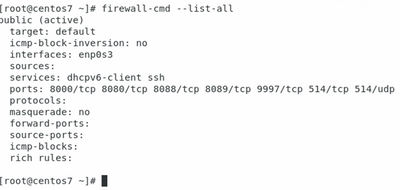
i created a splunk user and group and associated it to each other.
i uncompressed the tar file and moved to /opt/splunk
i changed the ownership of the uncompressed files to splunk
Then logged into CentOS as splunk ran ./splunk start -accept-license and all the prelimary checks passed. Then after a few minutes, the error appeared and believe the installation stopped.
I ran the command /opt/splunk/bin/splunk status and splunkd is not running
i did netstat -an | grep 8000 and its not listening on port 8000.
- Mark as New
- Bookmark Message
- Subscribe to Message
- Mute Message
- Subscribe to RSS Feed
- Permalink
- Report Inappropriate Content
Just to give an update, i did the following:
i set the current mode to passive from enforcing by typing setenforce permissive > Enter
I disabled the firewall by typing systemctl stop firewalld > Enter
I updated centOS by typing yum update > Enter. (As i only downloaded the install file a few days ago i didnt do this as i thought it would already be the latest. Turns out it wasnt the case)
I then ran ./splunk start > Enter and then after a few minutes it completed.
However, now when i go to the web browser it says secure connection failed. Error code: SSL_ERROR_RX_RECORD_TOO_LONG
- Mark as New
- Bookmark Message
- Subscribe to Message
- Mute Message
- Subscribe to RSS Feed
- Permalink
- Report Inappropriate Content
Just to give an update, i did the following:
i set the current mode to passive from enforcing by typing setenforce permissive > Enter
I disabled the firewall by typing systemctl stop firewalld > Enter
I updated centOS by typing yum update > Enter. (As i only downloaded the install file a few days ago i didnt do this as i thought it would already be the latest. Turns out it wasnt the case)
I then ran ./splunk start > Enter and then after a few minutes it completed.
However, now when i go to the web browser it says secure connection failed. Error code: SSL_ERROR_RX_RECORD_TOO_LONG


Join the Splunk Community Slack to learn, troubleshoot, and make connections with fellow Splunk practitioners in real time!
Join Splunk User Groups to connect and learn in-person by region or remotely by topic or industry.
Data Management Digest – September 2026
Federated Search for CloudWatch Unified Data Store Is Generally Available
Announcing Modern Navigation: A New Era of Splunk User Experience
