
Join the Conversation
- Find Answers
- :
- Splunk Administration
- :
- Getting Data In
- :
- Re: how to index a json file ?
- Subscribe to RSS Feed
- Mark Topic as New
- Mark Topic as Read
- Float this Topic for Current User
- Bookmark Topic
- Subscribe to Topic
- Mute Topic
- Printer Friendly Page
- Mark as New
- Bookmark Message
- Subscribe to Message
- Mute Message
- Subscribe to RSS Feed
- Permalink
- Report Inappropriate Content
how to index a json file ?

HI,
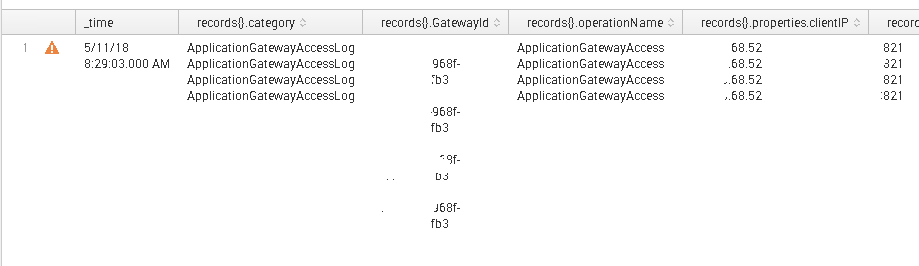
i am trying to index a local json file, but when going trough the sourcetype the predefined json source type is not reading the file properly..splunk put everything in one line...no detecting time format or something (see attached file)
this is an exemple inside the file
{
    "records":
    [

        {
            "time": "2018-05-11T13:29:03Z",
             "GatewayId": "4r566-5678-4753-968f-34568",
             "Region": "unknown",
              "operationName": "ApplicationGatewayAccess",
              "category": "ApplicationGatewayAccessLog",
            }
        ,
{
            "time": "2018-05-11T13:29:05Z",
             "GatewayId": "4r566-ae57-dfg543-968f-xxx45t67",
             "Region": "unknown",
             "operationName": "ApplicationGatewayAccess",
             "category": "ApplicationGatewayAccessLog",
            }
can someone help me to figure this out ?
thanks for your support
- Mark as New
- Bookmark Message
- Subscribe to Message
- Mute Message
- Subscribe to RSS Feed
- Permalink
- Report Inappropriate Content

Hello. The pb is i the json file. Please remove the last comma of each record, and try again. For instance, based on your example :
{
    "records": [

        {
            "time": "2018-05-11T13:29:03Z",
            "GatewayId": "4r566-5678-4753-968f-34568",
            "Region": "unknown",
            "operationName": "ApplicationGatewayAccess",
            "category": "ApplicationGatewayAccessLog"
        },
        {
            "time": "2018-05-11T13:29:05Z",
            "GatewayId": "4r566-ae57-dfg543-968f-xxx45t67",
            "Region": "unknown",
            "operationName": "ApplicationGatewayAccess",
            "category": "ApplicationGatewayAccessLog"
        }
- Mark as New
- Bookmark Message
- Subscribe to Message
- Mute Message
- Subscribe to RSS Feed
- Permalink
- Report Inappropriate Content

If the JSON response is from REST API call then I can help you with rest_ta response handler script.
- Mark as New
- Bookmark Message
- Subscribe to Message
- Mute Message
- Subscribe to RSS Feed
- Permalink
- Report Inappropriate Content
the jason file is stored locally in splunk server to index once
- Mark as New
- Bookmark Message
- Subscribe to Message
- Mute Message
- Subscribe to RSS Feed
- Permalink
- Report Inappropriate Content


If Splunk does not pick up the JSON event straight away, it is most likely not pure JSON.
Put your JSON events into any JSON validator to see if it is pure JSON.
cheers, MuS
- Mark as New
- Bookmark Message
- Subscribe to Message
- Mute Message
- Subscribe to RSS Feed
- Permalink
- Report Inappropriate Content
i verified, the validator says json is valid, splunk is showing all records in one line with only one timestamp...i am expecting 4 lines
is this a time format error ?
- Mark as New
- Bookmark Message
- Subscribe to Message
- Mute Message
- Subscribe to RSS Feed
- Permalink
- Report Inappropriate Content
i found that splunk is not indexing separate events because the json file starts with { and ends with } if i removed those character splunk will give me a line per event.
now the question is: how can i remove the { at the beginning and the } at the end with splunk before indexing?
thanks
- Mark as New
- Bookmark Message
- Subscribe to Message
- Mute Message
- Subscribe to RSS Feed
- Permalink
- Report Inappropriate Content
But, looking at the screenshot this looks not too bad. What or where do you think it breaks or behaves badly?
- Mark as New
- Bookmark Message
- Subscribe to Message
- Mute Message
- Subscribe to RSS Feed
- Permalink
- Report Inappropriate Content

I guess he/she wants it to be separate events, but the whole JSON is indexed as a single event. Right?
- Mark as New
- Bookmark Message
- Subscribe to Message
- Mute Message
- Subscribe to RSS Feed
- Permalink
- Report Inappropriate Content
yes, you are correct...i want separate events since they are at different times
- Mark as New
- Bookmark Message
- Subscribe to Message
- Mute Message
- Subscribe to RSS Feed
- Permalink
- Report Inappropriate Content
Hi Have you found the answers to it. Even I am facing the same problem.



Join the Splunk Community Slack to learn, troubleshoot, and make connections with fellow Splunk practitioners in real time!
Join Splunk User Groups to connect and learn in-person by region or remotely by topic or industry.
Data Management Digest – September 2026
Federated Search for CloudWatch Unified Data Store Is Generally Available
Announcing Modern Navigation: A New Era of Splunk User Experience
