
Join the Conversation
- Find Answers
- :
- Splunk Administration
- :
- Getting Data In
- :
- Props.conf, transforms.conf and Index Time field e...
- Subscribe to RSS Feed
- Mark Topic as New
- Mark Topic as Read
- Float this Topic for Current User
- Bookmark Topic
- Subscribe to Topic
- Mute Topic
- Printer Friendly Page
- Mark as New
- Bookmark Message
- Subscribe to Message
- Mute Message
- Subscribe to RSS Feed
- Permalink
- Report Inappropriate Content
Props.conf, transforms.conf and Index Time field extractions not working in production environment

We are logging one application deployed in Kubernetes and ingesting its tomcat localhost access logs in Splunk via HEC (HF).
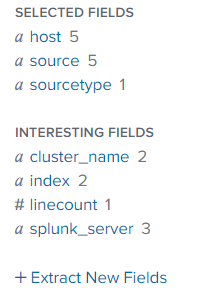
I've pushed the props.conf and transforms.conf on HF as well as on indexers through Indexer Master but the problem is that extractions as well as transforms are not working et all.
Sample log:
10.1.0.225 - - [12/Mar/2021:13:39:51 +0000] "PUT /outlookaddin/v1/edap/sessions HTTP/1.1" 200 25
===============================
props.conf
[tomcat:localhost]
NO_BINARY_CHECK = true
category = Custom
disabled = false
pulldown_type = true
ANNOTATE_PUNCT = false
SHOULD_LINEMERGE = false
TIME_PREFIX=\[
TIME_FORMAT = %d/%b/%Y:%H:%M:%S %z
LINE_BREAKER = ([\r\n]+)\d+\.\d+.\d+\.\d+
TRUNCATE = 0
EXTRACT-access =^(?P<ip>[^\s]+)\s(?P<indent>(-|\w+))\s(?P<user>(-|\w+))\s\[(?<req_time>[^\]]+)\]\s\"(?P<method>\w+)\s(?P<request_uri>[\S]+)\s(?P<protocol>[^\"]+)\"\s(?P<status>\d{3})\s(?P<bytes_sent>(?:\d+|-))
FIELDALIAS-bytes_in = bytes_sent AS bytes_in
FIELDALIAS-http_method = method AS http_method
FIELDALIAS-uri_query = request_uri AS uri_query
FIELDALIAS-ip = ip AS src
EVAL-bytes_in = if(bytes_in=="-", 0, bytes_in)
EVAL-bytes_sent = if(bytes_sent=="-", 0, bytes_sent)
EVAL-vendor_product = "Apache Tomcat"
EVAL-product_family = "Apache Foundation Software"
EVAL-bytes = coalesce(bytes_in, 0)+coalesce(bytes_out, 0)
FIELDALIAS-response_code = status AS response_code
TRANSFORMS-anonymize=token-anonymizer
==========================================
transforms.conf
[token-anonymizer]
REGEX = (?m)^(.*accessToken\=).+(tokenType.*refreshToken=).+(expiresInSeconds.*username\=)\w+(.+ParamKey-dimensions-ParamKey\-).*(ParamKey.+)
FORMAT = $1######&$2######&$3######&$4#######$5
DEST_KEY = _raw
- Mark as New
- Bookmark Message
- Subscribe to Message
- Mute Message
- Subscribe to RSS Feed
- Permalink
- Report Inappropriate Content


Did the extractions work in the Dev environment? Are you searching in Verbose Mode? Did you restart the indexers and HFs? The props.conf file must also be installed on the search head because there are search-time fields in it.
If this reply helps you, Karma would be appreciated.


Join the Splunk Community Slack to learn, troubleshoot, and make connections with fellow Splunk practitioners in real time!
Join Splunk User Groups to connect and learn in-person by region or remotely by topic or industry.
Data Management Digest – September 2026
Federated Search for CloudWatch Unified Data Store Is Generally Available
Announcing Modern Navigation: A New Era of Splunk User Experience
