
Join the Conversation
- Find Answers
- :
- Splunk Administration
- :
- Getting Data In
- :
- Need help parsing and extracting MongoDB JSON log ...
- Subscribe to RSS Feed
- Mark Topic as New
- Mark Topic as Read
- Float this Topic for Current User
- Bookmark Topic
- Subscribe to Topic
- Mute Topic
- Printer Friendly Page
- Mark as New
- Bookmark Message
- Subscribe to Message
- Mute Message
- Subscribe to RSS Feed
- Permalink
- Report Inappropriate Content
Need help parsing and extracting MongoDB JSON log in Splunk

Hi,
I need some help.
We have been using Splunk for MongoDB alert for a while, now the new MongoDB version we are upgrading to is changing the log format from text to JSON.
I need to alter the alert in Splunk so that it will continue to work with the new JSON log format.
Here is an example of a search query in one of the alert we have now:
index=googlecloud*
source="projects/dir1/dir2/mongodblogs"
data.logName="projects/dir3/logs/mongodb"
data.textPayload="* REPL *"
NOT "catchup takeover"
| rex field=data.textPayload "(?<sourceTimestamp>\d{4}-\d*-\d*T\d*:\d*:\d*.\d*)-\d*\s*(?<severity>\w*)\s*(?<component>\w*)\s*(?<context>\S*)\s*(?<message>.*)"
| search component="REPL"
message!="*took *ms"
message!="warning: log line attempted * over max size*"
NOT (severity="I" AND message="applied op: CRUD*" AND message!="*took *ms")
| rename data.labels.compute.googleapis.com/resource_name as server
| regex server="^preprod0[12]-.+-mongodb-server8*\d$"
| sort sourceTimestamp data.insertId
| table sourceTimestamp server severity component context message
The content of the MongoDB log is under data.TextPayload, currently is being formatted using regex and split into 5 groups with labels and then we search from each group for the string or message that we want to be alerted on.
The new JSON format log looks like this:
{"t":{"$date":"2022-04-19T07:50:31.005-04:00"},"s":"I", "c":"REPL", "id":21340, "ctx":"RstlKillOpThread","msg":"State transition ops metrics","attr":{"metrics":{"lastStateTransition":"stepDown","userOpsKilled":0,"userOpsRunning":4}}}
I need to split them into 7 groups, using comma as delimiter and then search from each group using the same search criteria.
I have been trying and testing for 2 days, I'm new to Splunk and not very good in regex.
Any help would be appreciated.
Thanks !
Sally
- Mark as New
- Bookmark Message
- Subscribe to Message
- Mute Message
- Subscribe to RSS Feed
- Permalink
- Report Inappropriate Content
I got this one working now with below:
sourcetype=json
| spath input="data.textPayload" output="Timestamp" path=t
| spath input="data.textPayload" output="Severity" path=s
| spath input="data.textPayload" output="Component" path=c
| spath input="data.textPayload" output="Context" path=ctx
| spath input="data.textPayload" output="Message" path=msg
| spath input="data.textPayload" output="Attr" path=attr
| search < Search criteria by field here>
| table Timestamp Server Severity Component Context Message Attr
Thanks !
- Mark as New
- Bookmark Message
- Subscribe to Message
- Mute Message
- Subscribe to RSS Feed
- Permalink
- Report Inappropriate Content

Hi @ychoo
I think you'll need to update the sourcetype for the log from text to json to correctly parse the logs looking at a good long term solution.
If not you can proceed with using spath or regex for field extractions.
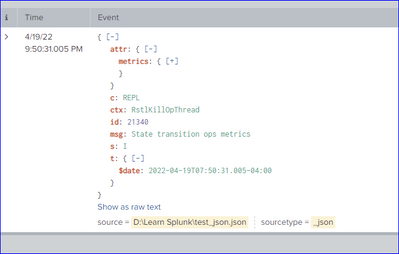
source="D:\\Learn Splunk\\test.txt"  sourcetype="text"
| rex field=_raw "date\"\:\"(?P<SourceTimestamp>[\d\-\:\.T]+)\"\},\"s\"\:\"(?P<Severity>[\w]+)\",\s\"c\"\:\"(?P<Component>[\w]+)"
| rex field=_raw "ctx\"\:\"(?P<Context>[\w]+)\",\"msg\"\:\"(?P<Message>[\w\s]+)"
| table _time SourceTimestamp Severity Component Context Message



Join the Splunk Community Slack to learn, troubleshoot, and make connections with fellow Splunk practitioners in real time!
Join Splunk User Groups to connect and learn in-person by region or remotely by topic or industry.
Your Feedback. Our Roadmap. Visit the PX Feedback Booth at .conf26
Agentic SOC Triage: Investigating Splunk ES Notables with MCP Server and a Local LLM
Painting a Clearer Picture: Creating Cross-Domain Visibility with AI Canvas
