
Join the Conversation
- Find Answers
- :
- Splunk Administration
- :
- Getting Data In
- :
- Re: Is there an error in the documentation? My te...
- Subscribe to RSS Feed
- Mark Topic as New
- Mark Topic as Read
- Float this Topic for Current User
- Bookmark Topic
- Subscribe to Topic
- Mute Topic
- Printer Friendly Page
- Mark as New
- Bookmark Message
- Subscribe to Message
- Mute Message
- Subscribe to RSS Feed
- Permalink
- Report Inappropriate Content
Is there an error in the documentation? My tests indicate the document is not correct when using curl.

According to my tests the Authorization header should not have a space between the colon and splunk keyword. It should be "Authorization:Splunk ###-####..." and not "Authorization: Splunk ###-####..."
https://docs.splunk.com/Documentation/Splunk/9.0.1/Data/FormateventsforHTTPEventCollector
In other words this works:
curl -k https://prd-p.splunkcloud.com:8088/services/collector -H "Authorization:Splunk ###-######" -d "{\"sourcetype\":\"_json\",\"index\": \"job1\",\"event\": {\"a\": \"value1\", \"b\": [\"value1\", \"value1\"]}}"Whereas this does not work:
curl -k https://prd-p.splunkcloud.com:8088/services/collector -H "Authorization: Splunk ###-######-b680-72c7bd33f9bb" -d "{\"sourcetype\":\"_json\",\"index\": \"job1\",\"event\": {\"a\": \"value1\", \"b\": [\"value1\", \"value1\"]}}"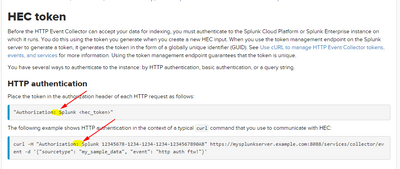
- Mark as New
- Bookmark Message
- Subscribe to Message
- Mute Message
- Subscribe to RSS Feed
- Permalink
- Report Inappropriate Content


Hi
this
-H "Authorization: Splunk eae66351-aaaa-1111-2222-2787781f501f"works as documentation said. Actually you can use it with or without that space between : and Splunk.
What I have earlier seen, is that in some OS (like windows) and/or some shell configurations will generate some confusion with sending event with curl to HEC. Especially when you are surrounding event with " instead of '. In this first case you must do some escape for " on json field names and values and there are situation when this can leads to unwanted situation.
r. Ismo
- Mark as New
- Bookmark Message
- Subscribe to Message
- Mute Message
- Subscribe to RSS Feed
- Permalink
- Report Inappropriate Content

Submit this message as feedback on the relevant Docs page.
If this reply helps you, Karma would be appreciated.
- Mark as New
- Bookmark Message
- Subscribe to Message
- Mute Message
- Subscribe to RSS Feed
- Permalink
- Report Inappropriate Content
Done.


Join the Splunk Community Slack to learn, troubleshoot, and make connections with fellow Splunk practitioners in real time!
Join Splunk User Groups to connect and learn in-person by region or remotely by topic or industry.
SOC4Kafka - New Kafka Connector Powered by OpenTelemetry
Event Series: Level up your SOC: Advancing with Splunk Enterprise Security
Announcing Modern Navigation: A New Era of Splunk User Experience
