
Join the Conversation
- Find Answers
- :
- Splunk Administration
- :
- Getting Data In
- :
- How to parse out a single line following a static ...
- Subscribe to RSS Feed
- Mark Topic as New
- Mark Topic as Read
- Float this Topic for Current User
- Bookmark Topic
- Subscribe to Topic
- Mute Topic
- Printer Friendly Page
- Mark as New
- Bookmark Message
- Subscribe to Message
- Mute Message
- Subscribe to RSS Feed
- Permalink
- Report Inappropriate Content

Hello,
I am new to Splunk and attempting to parse and display a single line of text from a java stack trace captured in a single event.
Here is a sample of the stack trace:
com.sun.proxy.$Proxy90.executeOpCodeForXml(Unknown Source)
ca.shaw.billing.integration.core.BrmGateway.buildConnection(BrmGateway.java:61)
ca.shaw.billing.integration.core.BrmGateway.executeOpCodeForXml(BrmGateway.java:39)
ca.shaw.billing.tasks.account.overview.AccountOverviewTask.getAgingBucketsResponseFlist(AccountOverviewTask.java:93)
ca.shaw.billing.tasks.account.overview.AccountOverviewTask.getAccountOverviewInfo(AccountOverviewTask.java:64)
I have built a "top" display for all the events which find this stack trace over a given period of time using the following query:
index=brm source=/opt/brm/weblogic/Oracle/Middleware/user_projects/domains/billing_service_domain/servers/* "[STUCK] ExecuteThread" "socketRead0" | rex field=_raw "X_SHAW_TRANSACTION_ID:(?.*)"
| eval myTime=strftime(_time,"%Y-%m-%dT%H:%M:%S.%Q")
| dedup theTransaction
|  top 0 myTime,theTransaction
What I am having trouble with is parsing out the line that follows a static line which is in all stack traces:
ca.shaw.billing.integration.core.BrmGateway.executeOpCodeForXml(BrmGateway.java:39)
...then add this result to the display as well.
From above, the line I would want is:
ca.shaw.billing.tasks.account.overview.AccountOverviewTask.getAgingBucketsResponseFlist(AccountOverviewTask.java:93)
Any help would be appreciated!
- Mark as New
- Bookmark Message
- Subscribe to Message
- Mute Message
- Subscribe to RSS Feed
- Permalink
- Report Inappropriate Content

Hello enkidu999,
If you want to parse out the line following a line in an event, here is how you would do it. Let's take your sample data:
com.sun.proxy.$Proxy90.executeOpCodeForXml(Unknown Source)

ca.shaw.billing.integration.core.BrmGateway.buildConnection(BrmGateway.java:61)

ca.shaw.billing.integration.core.BrmGateway.executeOpCodeForXml(BrmGateway.java:39)

ca.shaw.billing.tasks.account.overview.AccountOverviewTask.getAgingBucketsResponseFlist(AccountOverviewTask.java:93)

ca.shaw.billing.tasks.account.overview.AccountOverviewTask.getAccountOverviewInfo(AccountOverviewTask.java:64)
To get the line following ca.shaw.billing.integration.core.BrmGateway.executeOpCodeForXml(BrmGateway.java:39) you would do something like this:
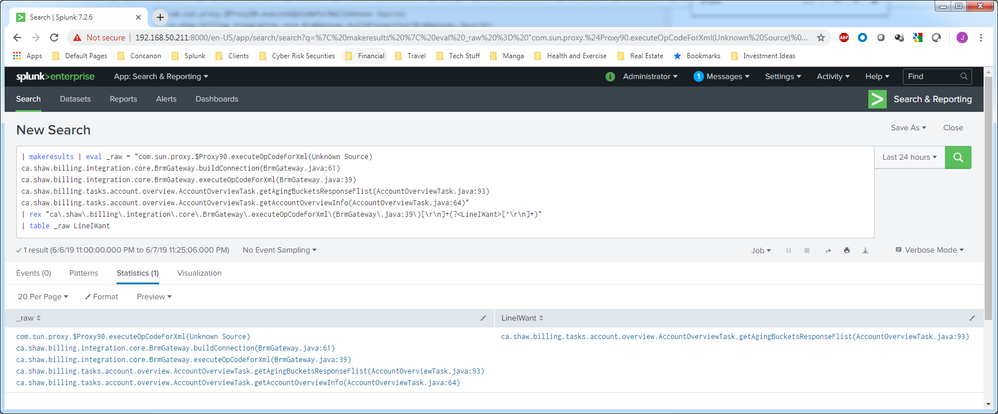
| rex "ca\.shaw\.billing\.integration\.core\.BrmGateway\.executeOpCodeForXml\(BrmGateway\.java:39\)[\r\n]+(?<LineIWant>[^\r\n]+)"(When using rex you have to escape special characters in regex, like the period . or parenthesis () with a backslash character \ as seen above)
How does this look?
In the following image I create a "dummy" event using your 5 lines of data. Then I apply the | rex command after the dummy event is created. Next I print a table with the _raw field and the captured field (LineIWant in this case, but you can change that to whatever you want it to be in the rex command)
Screen Capture:

- Mark as New
- Bookmark Message
- Subscribe to Message
- Mute Message
- Subscribe to RSS Feed
- Permalink
- Report Inappropriate Content


@enkidu999,
Try | rex field=_raw "ca\.shaw\.billing\.integration\.core\.BrmGateway\.executeOpCodeForXml\(BrmGateway\.java:39\)(?<stack_trace_line>[^)]+\))" command to extract that line. This will extract the line you want in field stack_trace_line.
Hope this helps!!!
- Mark as New
- Bookmark Message
- Subscribe to Message
- Mute Message
- Subscribe to RSS Feed
- Permalink
- Report Inappropriate Content
Hello VatsalJagani,
Your rex worked great!
Thanks!
- Mark as New
- Bookmark Message
- Subscribe to Message
- Mute Message
- Subscribe to RSS Feed
- Permalink
- Report Inappropriate Content
Hello enkidu999,
If you want to parse out the line following a line in an event, here is how you would do it. Let's take your sample data:
com.sun.proxy.$Proxy90.executeOpCodeForXml(Unknown Source)

ca.shaw.billing.integration.core.BrmGateway.buildConnection(BrmGateway.java:61)

ca.shaw.billing.integration.core.BrmGateway.executeOpCodeForXml(BrmGateway.java:39)

ca.shaw.billing.tasks.account.overview.AccountOverviewTask.getAgingBucketsResponseFlist(AccountOverviewTask.java:93)

ca.shaw.billing.tasks.account.overview.AccountOverviewTask.getAccountOverviewInfo(AccountOverviewTask.java:64)
To get the line following ca.shaw.billing.integration.core.BrmGateway.executeOpCodeForXml(BrmGateway.java:39) you would do something like this:
| rex "ca\.shaw\.billing\.integration\.core\.BrmGateway\.executeOpCodeForXml\(BrmGateway\.java:39\)[\r\n]+(?<LineIWant>[^\r\n]+)"(When using rex you have to escape special characters in regex, like the period . or parenthesis () with a backslash character \ as seen above)
How does this look?
In the following image I create a "dummy" event using your 5 lines of data. Then I apply the | rex command after the dummy event is created. Next I print a table with the _raw field and the captured field (LineIWant in this case, but you can change that to whatever you want it to be in the rex command)
Screen Capture:
- Mark as New
- Bookmark Message
- Subscribe to Message
- Mute Message
- Subscribe to RSS Feed
- Permalink
- Report Inappropriate Content
Hello jnudell_2,
Thanks for showing me a sample of how you would set it up, you saved me hours of searching forums and trial+error, being new to Splunk.
Thanks!

Join the Splunk Community Slack to learn, troubleshoot, and make connections with fellow Splunk practitioners in real time!
Join Splunk User Groups to connect and learn in-person by region or remotely by topic or industry.
Make Your Machine Data AI-Ready in Splunk
Splunk Asynchronous Forwarding Explained
How to Monitor AI Agents with Splunk Agent Observability
