
Join the Conversation
- Find Answers
- :
- Splunk Administration
- :
- Getting Data In
- :
- Re: How to have my JSON output data in separate ro...
- Subscribe to RSS Feed
- Mark Topic as New
- Mark Topic as Read
- Float this Topic for Current User
- Bookmark Topic
- Subscribe to Topic
- Mute Topic
- Printer Friendly Page
- Mark as New
- Bookmark Message
- Subscribe to Message
- Mute Message
- Subscribe to RSS Feed
- Permalink
- Report Inappropriate Content

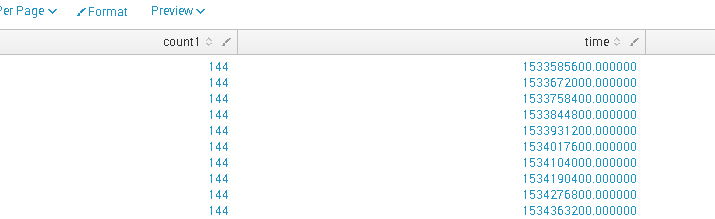
This is the output of my JSON data. I would want to see it in separate rows and not in a single row.
When I do mvexpand for each time it's taking all the count1 values.
My output should be separate rows with time and count1 value.

- Mark as New
- Bookmark Message
- Subscribe to Message
- Mute Message
- Subscribe to RSS Feed
- Permalink
- Report Inappropriate Content

@Nadhiyaa as explained in my previous answer fields count1 and time need to be zipped together using mvzip() evaluation function. Try the following search based on your data:
  <yourCurrentSearch>
 | table count1 time
 | eval data=mvzip(count1, time)
 | mvexpand data
 | makemv data delim=","
 | eval count1=mvindex(data,0),time=mvindex(data,1)
 | fields - data
| makeresults | eval message= "Happy Splunking!!!"
- Mark as New
- Bookmark Message
- Subscribe to Message
- Mute Message
- Subscribe to RSS Feed
- Permalink
- Report Inappropriate Content
@Nadhiyaa as explained in my previous answer fields count1 and time need to be zipped together using mvzip() evaluation function. Try the following search based on your data:
  <yourCurrentSearch>
 | table count1 time
 | eval data=mvzip(count1, time)
 | mvexpand data
 | makemv data delim=","
 | eval count1=mvindex(data,0),time=mvindex(data,1)
 | fields - data
| makeresults | eval message= "Happy Splunking!!!"
- Mark as New
- Bookmark Message
- Subscribe to Message
- Mute Message
- Subscribe to RSS Feed
- Permalink
- Report Inappropriate Content
Yes it worked .
Now i am trying add a trend in a single value format.
- Mark as New
- Bookmark Message
- Subscribe to Message
- Mute Message
- Subscribe to RSS Feed
- Permalink
- Report Inappropriate Content


Hey @nadhiyaa,
Did @niketnilay help solve your problem? If so, would you approve his answer so that other users know it's legit. Also, could you toss him an upvote? MMM... upvotes.
- Mark as New
- Bookmark Message
- Subscribe to Message
- Mute Message
- Subscribe to RSS Feed
- Permalink
- Report Inappropriate Content
@Nadhiyaa you can call your time field as _time which should take care of showing data over time.
   <yourCurrentSearch>
  | table count1 time
  | eval data=mvzip(count1, time)
  | mvexpand data
  | makemv data delim=","
  | eval count1=mvindex(data,0),_time=mvindex(data,1)
  | table _time count1
If you want you can also add timechart command with required aggregating function like
| timechart sum(count1) as Total
| makeresults | eval message= "Happy Splunking!!!"

Join the Splunk Community Slack to learn, troubleshoot, and make connections with fellow Splunk practitioners in real time!
Join Splunk User Groups to connect and learn in-person by region or remotely by topic or industry.
Meet the .conf26 AI Agent Buildathon Winners
Trusted Autonomy in the SOC: A Maturity Journey
Supercharging Windows Security Detection Performance: Introducing Hybrid Field ...
