
Join the Conversation
- Find Answers
- :
- Splunk Administration
- :
- Getting Data In
- :
- How do I resolve this error: [SPLUNKD] Not Found?
- Subscribe to RSS Feed
- Mark Topic as New
- Mark Topic as Read
- Float this Topic for Current User
- Bookmark Topic
- Subscribe to Topic
- Mute Topic
- Printer Friendly Page
- Mark as New
- Bookmark Message
- Subscribe to Message
- Mute Message
- Subscribe to RSS Feed
- Permalink
- Report Inappropriate Content
How do I resolve this error: [SPLUNKD] Not Found?

Hi,
I am using the Splunk version 8.2.8
when I am trying to open the setup page of Splunk Add-on : ServiceNow Security Operations Integration
Then i am getting below error on console
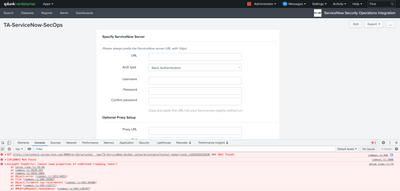
Can anyone please help on this?
Above error is not coming in Splunk version 9.0.2. Add-on working fine with this version.
- Mark as New
- Bookmark Message
- Subscribe to Message
- Mute Message
- Subscribe to RSS Feed
- Permalink
- Report Inappropriate Content


The developer appears to be using the wrong REST URL
It should be
splunkd/__raw/services/TA-ServiceNow-SecOps_Setup
I would report this to [email protected]
- Mark as New
- Bookmark Message
- Subscribe to Message
- Mute Message
- Subscribe to RSS Feed
- Permalink
- Report Inappropriate Content

I don't typically start with the browser tools when working on issues with Splunk. At least not at first.
What is the actual issue in the Splunk UI? What is not functionally working the way you expect? How can someone reproduce this issue? Which app does this correspond to, including the link to that app on Splunkbase, so others can reproduce this? (There is no app on Splunkbase called "Splunk Add-on : ServiceNow Security Operations Integration"). Please be as specific as possible so others can help reproduce the questioned behavior.
I see there are 10 messages (upper right). What are they? What errors did you see in the _internal logs that were related to the issue you are experiencing.
- Mark as New
- Bookmark Message
- Subscribe to Message
- Mute Message
- Subscribe to RSS Feed
- Permalink
- Report Inappropriate Content
Hi @sloshburch
Please see the below mention steps to reproduce the issue.
Step1 : download the Add-on - https://splunkbase.splunk.com/app/3921
Step2 : Install This Add-on in Splunk version 8.2.8
Step3 : Once installation succeed. Click on setup page link (see below screenshot)
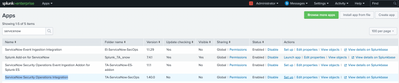
Step4 : Once clicked. open Developer tool and check the error in Console (see below screenshot)
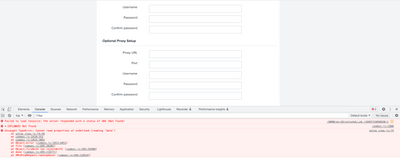
Actual Problem is related to call API
when we click on setup page one API is getting call from backend and its saying that not able to find that API thats why 404 error is coming.
Even though if you install same Add-on https://splunkbase.splunk.com/app/3921 in Splunk version 9.0.1, Its working fine. able to hit API and fetching the response.
Way how we are calling API From Javascript file
var endpoint = new splunkjs.Service.Endpoint(splunk_js_sdk_service, "/TA-ServiceNow-SecOps_setup/myinstance");
This above endpoint is properly configured in "restmap.conf" file and working fine in splunk version 9.0.1 as mentioned above
- Mark as New
- Bookmark Message
- Subscribe to Message
- Mute Message
- Subscribe to RSS Feed
- Permalink
- Report Inappropriate Content
I tested this on a Docker instance running Splunk 8.2.8 and by default the app loads fine with no error.
However, if I remove the web.conf from the app, then I get the exact error you are seeing.
Is it possible the web.conf file is missing or something with permissions is preventing Splunk from seeing the app's web.conf file on your 8.2.8 instance?

Join the Splunk Community Slack to learn, troubleshoot, and make connections with fellow Splunk practitioners in real time!
Join Splunk User Groups to connect and learn in-person by region or remotely by topic or industry.
[Puzzles] Solve, Learn, Reuse: Word-play
Tuning Edge Processor in Hybrid Mode: What Limits Each Data Path
Best Practices: Splunk auto adjust pipeline queue
