
Join the Conversation
- Find Answers
- :
- Splunk Administration
- :
- Getting Data In
- :
- Disk space was full need to delete the data ?
- Subscribe to RSS Feed
- Mark Topic as New
- Mark Topic as Read
- Float this Topic for Current User
- Bookmark Topic
- Subscribe to Topic
- Mute Topic
- Printer Friendly Page
- Mark as New
- Bookmark Message
- Subscribe to Message
- Mute Message
- Subscribe to RSS Feed
- Permalink
- Report Inappropriate Content
Disk space was full need to delete the data ?

Hello,
I am facing disk space issue in my Splunk so decided to delete the unwanted data as it is test environment, while running the following command index=malware | delete i am getting the following error.
Search not executed: The minimum free disk space (5000MB) reached for /opt/splunk/var/run/splunk/dispatch. user=admin., concurrency_category="historical", concurrency_context="user_instance-wide", current_concurrency=0, concurrency_limit=5000
and also I can see so many errors on my Splunk as follows
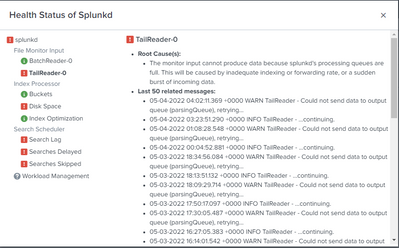
Please help me on this to solve the issues.
- Mark as New
- Bookmark Message
- Subscribe to Message
- Mute Message
- Subscribe to RSS Feed
- Permalink
- Report Inappropriate Content


Hi @naveenyadav99,
at first, the delete command perform a logical deletion (events are marked as deleted but remain in the index), so you don't have new space in your storage.
Then the delete command requires that the user has a "can_delete" role.
Anyway, the problem is that you haven't sufficient space in your disk, so every search is blocked, and you cannot perform a search for deleting events.
To restart your searches, you can modify the minimun disk space from 5 MB to 2 MB [Settings -- Server Settings -- General Settings], but, as I said, this doesn't resolve your problem, it's only a momentary solution.
You can physically delete the oldest buckets, modifying the retention of some large index (e.g. _internal), you can do this, modifying indexes.conf on $SPLUNK_HOME/etc/system/local/indexes.conf, adding
FrozenTimePeriodInSecs = 864000and restarting Splunk.
If you haven't indexes.conf in local folder, as you well know, you have to create it in this folder, don't modify the one in default because at the first upgrade you loose this change.
This should give you much space on your disk but you'll have Splunk internal data only for 10 days.
Obviously you loose some information as the license consuption after 10 days.
Ciao.
Giuseppe


Join the Splunk Community Slack to learn, troubleshoot, and make connections with fellow Splunk practitioners in real time!
Join Splunk User Groups to connect and learn in-person by region or remotely by topic or industry.
Agentic Operations Start with Context: Build the Right Data Foundation
Assisted, Augmented or Agentic? Choose Your Splunk Starting Point
Session 2 | Beyond the Thread: Operationalizing AI with Confidence
